Most small businesses treat SEO like a lottery ticket—a random assortment of keywords and blog posts they hope will one day hit the jackpot. This is fundamentally wrong. An SEO solution for a small business is a system for improving your website’s visibility on search engines like Google to attract more qualified customers. It combines technical optimization, content creation, and local signals to generate organic traffic and leads without paying for every single click. It’s not about tricks; it’s about building a predictable engine for growth.
What Exactly is Small Business SEO?
Search Engine Optimization (SEO) is the practice of increasing the quantity and quality of traffic to your website through organic search engine results. For small businesses, this practice is hyper-focused. It isn’t about ranking for broad, global terms. It’s about being the top answer for a customer searching for “best pizza delivery near me” or “emergency plumber in [Your Town]”. To achieve this efficiently, many small businesses leverage specific small business seo tools.
Unlike enterprise SEO that might involve massive teams and multi-million dollar budgets, small business SEO is about precision and efficiency. It prioritizes actions that directly impact local visibility and purchase intent. This means a heavy emphasis on your Google Business Profile, local customer reviews, and content that answers the specific questions your community is asking. It’s less about abstract brand awareness and more about making the phone ring.
The Benefits of SEO for Small Businesses
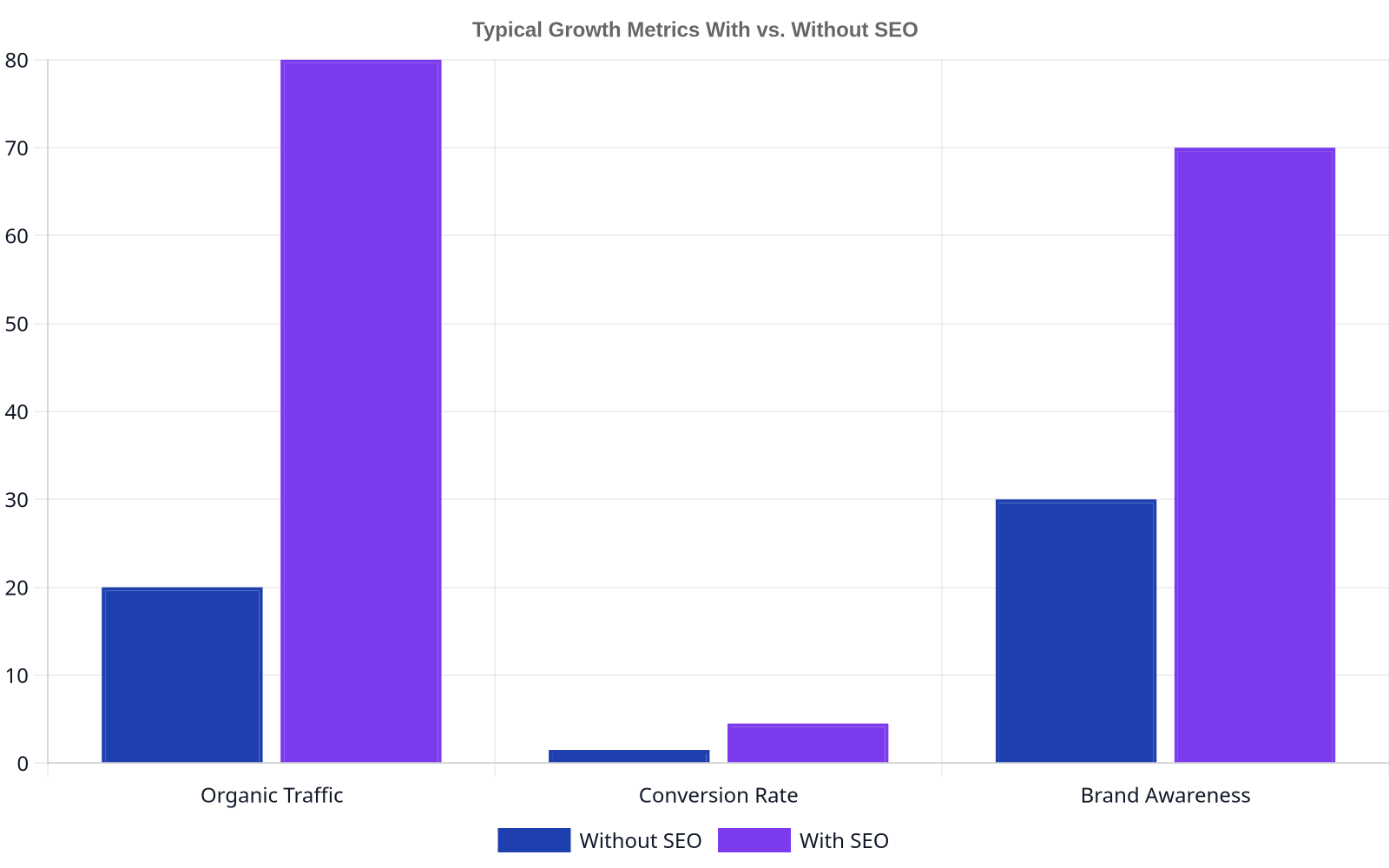
Impact of SEO on Small Business Growth
Investing in a coherent SEO strategy provides tangible returns that compound over time. Unlike paid advertising, where the traffic stops the moment you stop paying, SEO builds a lasting digital asset. According to a 2023 BrightLocal study, 98% of consumers used the internet to find information about local businesses. If you’re not visible, you’re not an option.
Key benefits include:
High-Quality Traffic: You attract users actively searching for your products or services, leading to higher conversion rates.
Increased Credibility: Ranking high on Google builds trust. Users perceive top results as more authoritative and reliable.
Cost-Effectiveness: Over the long term, the cost-per-acquisition from organic search is significantly lower than from paid channels.
Competitive Advantage: Outranking your local competitors means you capture market share they are leaving on the table.
Key SEO Strategies for Small Businesses
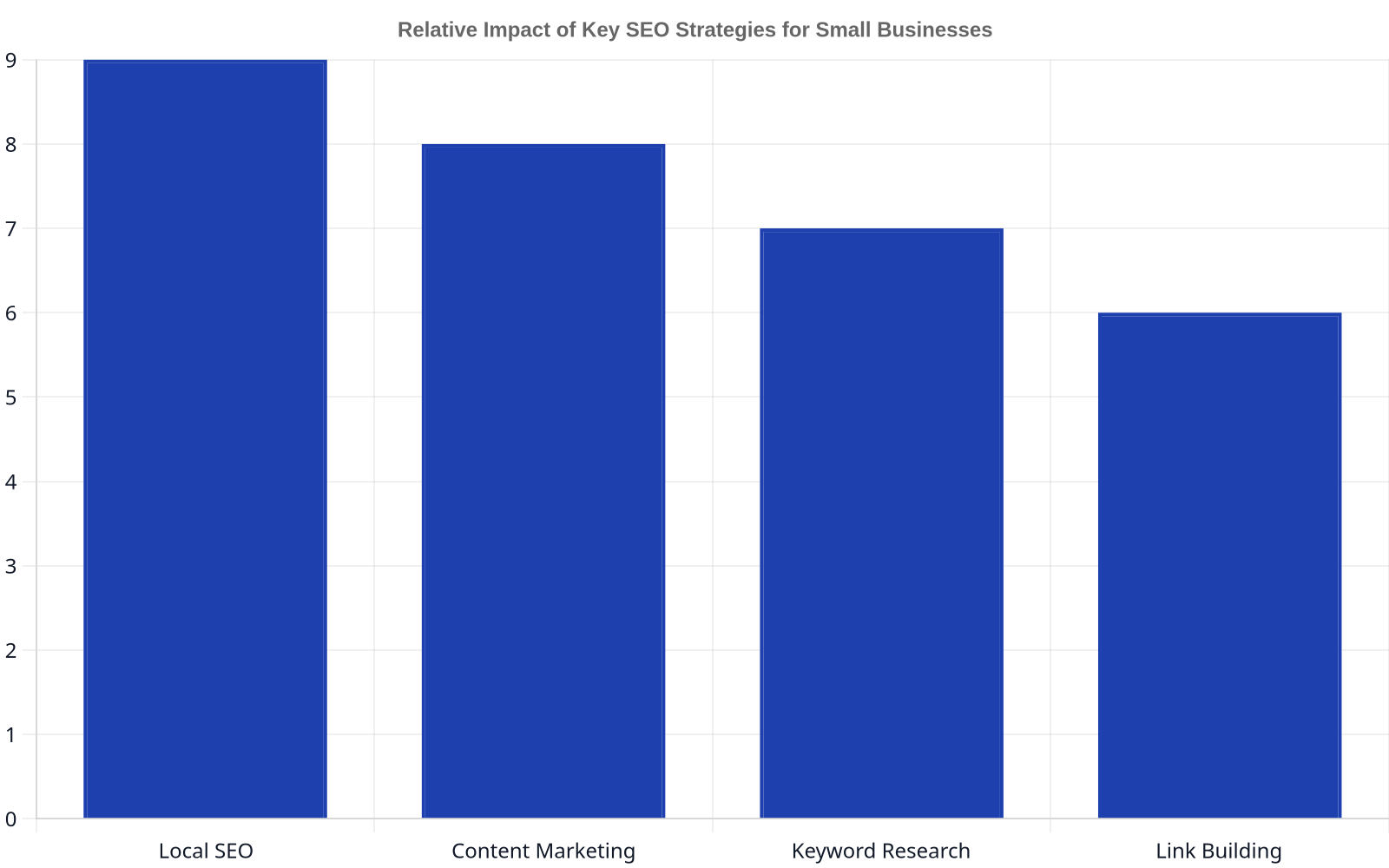
Impact of Key SEO Strategies
An effective SEO solution is built on four pillars. Neglecting any one of them is like trying to build a stool with three legs.
Technical SEO: This is the foundation. Your site must be fast, secure (HTTPS), and mobile-friendly. Search engines need to be able to crawl and index your site without hitting errors. Google’s emphasis on Core Web Vitals means user experience is a direct ranking factor. A slow, confusing website will not rank, no matter how great the content is.
Content Creation: Your website must be the single best answer to your customers’ questions. This goes beyond just service pages. It means creating helpful blog posts, guides, and FAQs. A platform that automates the creation of high-quality content, such as daily articles, can systematically cover the topics your customers care about, establishing your authority.
Local SEO: This is non-negotiable for any business with a physical location or service area. It starts with a fully optimized Google Business Profile and expands to managing online reviews, building local citations (mentions of your business name, address, and phone number), and creating location-specific pages on your website.
Authority Building (Link Building): Authority is measured by who links to you. Earning high-quality backlinks from other reputable local businesses, industry blogs, or news sites acts as a vote of confidence in your favor. This is often the most challenging part of SEO, but it’s critical for competitive niches.
SEO isn’t a cost center; it’s an asset you build. Every piece of content, every backlink, is digital real estate that appreciates over time.
Common SEO Challenges for Small Businesses
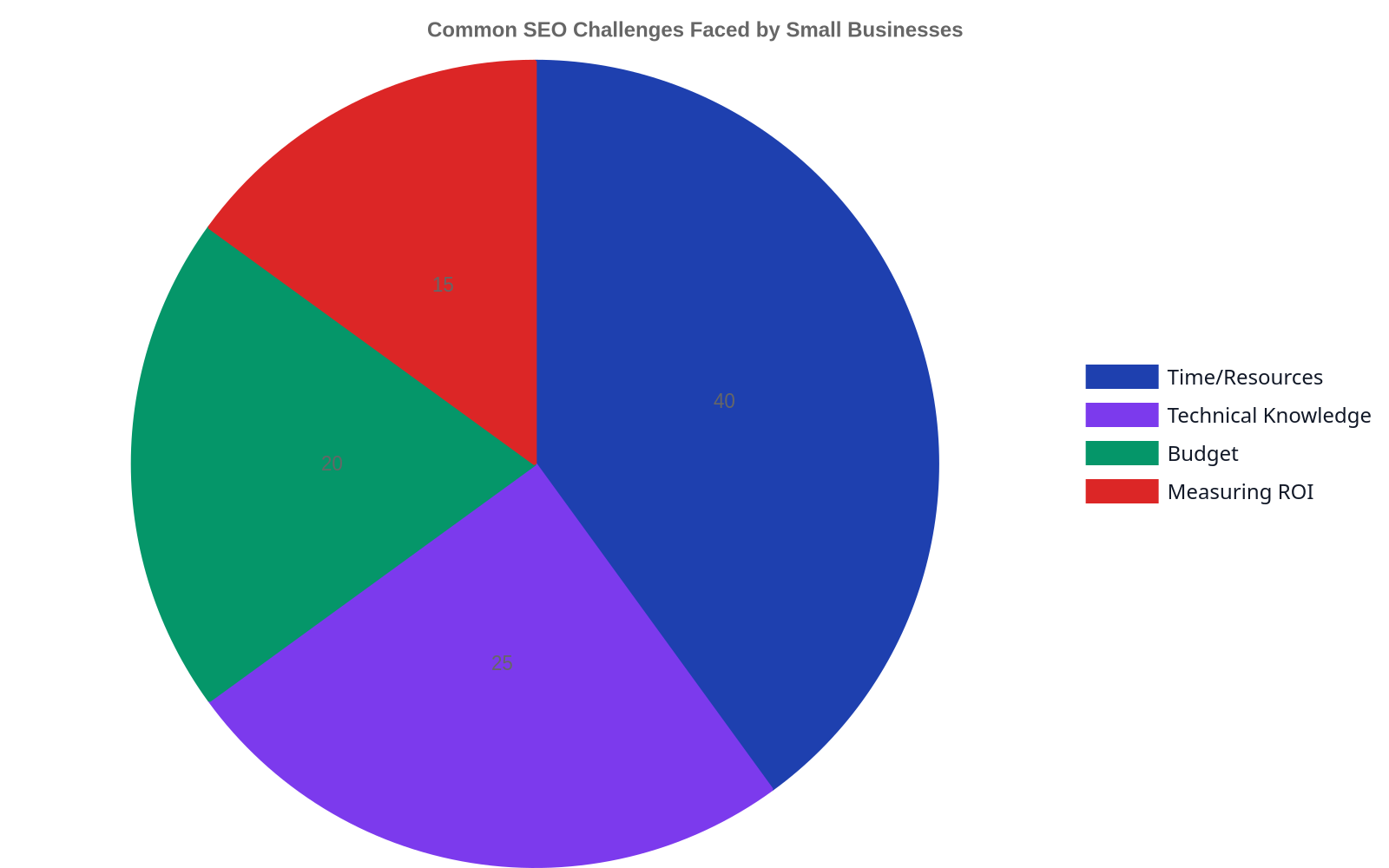
Top SEO Challenges for Small Businesses
While the principles are straightforward, execution is where many businesses struggle. The most common hurdles are a lack of time, limited budget, and insufficient technical expertise. Many small business owners are juggling marketing along with a dozen other responsibilities. They know SEO is important but can’t dedicate the consistent hours required for tasks like keyword research and content production.
This often leads them down the path of cheap SEO services that promise impossible results, ultimately wasting both time and money. The key is to find a solution—whether a tool, an agency, or a consultant—that aligns with your business goals and provides transparent reporting on what actually matters.
Debunking Common SEO Myths
Misinformation is rampant in the SEO industry. Let’s clear up a few dangerous myths.
Myth: SEO is a one-time project. Reality: SEO is a continuous process. Search engine algorithms change, competitors update their sites, and customer behavior evolves. It requires ongoing maintenance and improvement.
Myth: You have to be #1 for a major keyword. Reality: This is an outdated and expensive goal. It’s far more profitable to rank for multiple, specific long-tail keywords that show clear purchase intent. Chasing a vanity rank for a broad term is a waste of resources.
Myth: SEO is all about gaming the algorithm. Reality: The era of “tricks” is long over. Modern SEO is about creating a great user experience and providing valuable information. Trying to manipulate rankings with keyword stuffing or shady link schemes is the fastest way to get penalized by Google.
Chasing the #1 rank for a broad term is vanity. Driving three customers for a specific, high-intent phrase is sanity.
How to Measure SEO Success
To understand if your SEO efforts are working, you must track the right metrics. Forget fixating on a single keyword ranking. Success is measured by business impact.
Key Performance Indicators (KPIs) for small business SEO should include:
Organic Traffic: An increase in visitors coming from search engines.
Keyword Portfolio Growth: The total number of relevant keywords for which you rank, not just a handful of “money” terms.
Local Pack Visibility: How often you appear in the map-based results for local searches.
Organic Conversion Rate: The percentage of organic visitors who complete a desired action, like filling out a form, making a purchase, or calling your business. Tracking this is essential for proving ROI.
How to Choose SEO Services
When evaluating an SEO provider or platform, demand transparency and a focus on business goals. Be wary of anyone who makes guarantees; no one can promise a #1 ranking on Google. A credible partner will focus on their process and the KPIs they will track to demonstrate progress.
Ask for case studies or examples of their work. For instance, we were able to achieve significant organic growth for our client Wolverine Assemblies by focusing on a consistent content and authority-building strategy. A good provider should be able to share similar success stories. According to a 2023 industry report from Aira, the average cost for SEO services can vary wildly, so focus on the value and ROI, not just the lowest price.
For a new website or campaign, it typically takes 4-6 months to start seeing meaningful results. SEO is a long-term strategy, and initial efforts are focused on building a solid technical foundation and content base. Results build exponentially over time.
Can I do SEO myself?
Yes, but it requires a significant time commitment to learn and execute properly. Tools can help automate parts of the process, like creating content with Rank My Website, but it still requires strategic oversight. For most busy owners, a hybrid approach or a fully managed solution is more realistic.
How much does small business SEO cost?
Costs vary dramatically, from a few hundred dollars per month for basic tools or local citation management to several thousand for a comprehensive agency retainer. The right investment depends on your market, competition, and business goals. The key is to view it as an investment in a revenue-generating asset.
What is the most important part of SEO for a local business?
For a local business, a fully optimized and active Google Business Profile (GBP) is the most critical element. It is your digital storefront on Google and directly impacts your visibility in local search and on Google Maps. It’s the highest-impact starting point.
Is SEO better than paid ads?
They serve different purposes and work best together. Paid ads (PPC) deliver immediate results but stop when you stop paying. SEO delivers sustainable, long-term traffic that grows over time. A healthy marketing mix often includes both, using SEO for foundational growth and PPC for targeted campaigns.
The most significant of all SEO challenges for marketing agencies isn’t Google’s latest update, but their own labor-intensive, task-based service model. Agencies are stuck selling hours for manual processes like keyword research and link building, creating a treadmill of reporting that fails to prove scalable value. The only way to break this cycle is to shift from being a service provider to a technology partner, implementing automated content systems that deliver consistent outcomes, not just completed tasks.
The Top 3 SEO Challenges Agencies Face Today
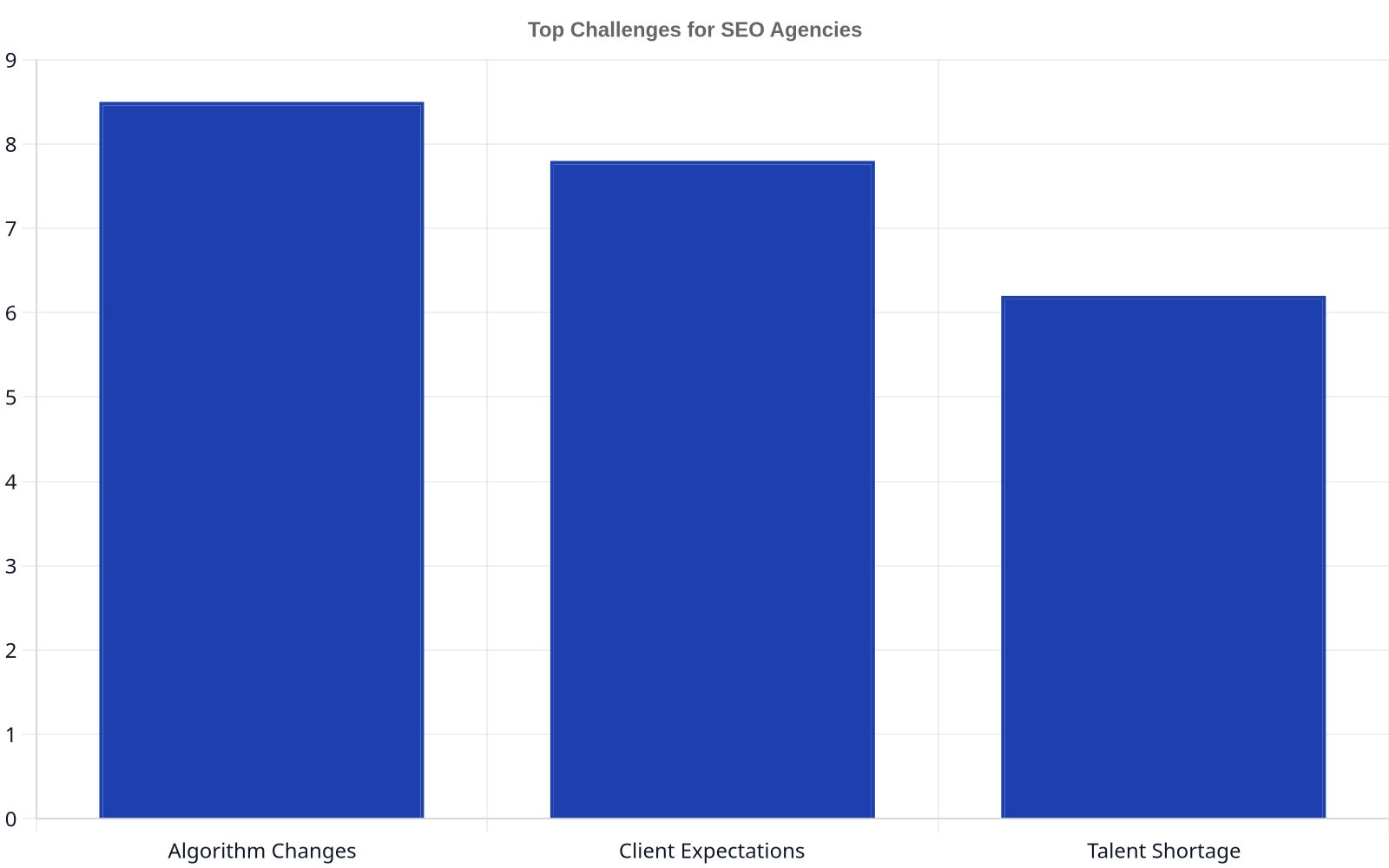
Top Challenges for SEO Agencies
For years, agencies have structured their SEO offerings around a checklist of manual actions. This model is fundamentally broken. It creates friction, drains margins, and keeps agencies in a permanently defensive position with their clients. According to a 2024 survey by Ahrefs, the top challenge for agencies is “attracting and retaining clients,” which is a direct consequence of a failure to demonstrate clear, scalable value.
Unsustainable Labor Costs: The core of the traditional agency model is billing for time. You charge for a strategist to perform keyword research, an analyst to build links, and a writer to produce a blog post. This model directly caps your profitability. You can only make more money by hiring more people or charging higher hourly rates, both of which make you less competitive. Your margins are perpetually squeezed between rising talent costs and client pressure on budgets.
The ROI Reporting Treadmill: How much of your team’s non-billable time is spent creating reports to justify your existence? Agencies are trapped in a cycle of trying to draw a straight line from “we acquired 3 backlinks this month” to “your revenue increased by 4%.” This is a losing game. 76% of CEOs want marketing to be 100% ROI-focused, yet the connection between discrete SEO tasks and financial outcomes remains notoriously difficult to prove.
Scalability vs. Customization: The third major hurdle is the false dichotomy between scalable services and bespoke strategy. To be profitable, you need to standardize your process. But clients pay you for a custom strategy tailored to their unique business. This tension means you either lose money creating hyper-customized plans for small accounts or you deliver a generic service that gets mediocre results, leading to client churn.
Stop selling hours. Start selling outcomes. The future of agency SEO is not about manually pulling levers; it’s about building the machine that pulls them automatically.
Why Traditional SEO Metrics Aren’t Enough Anymore
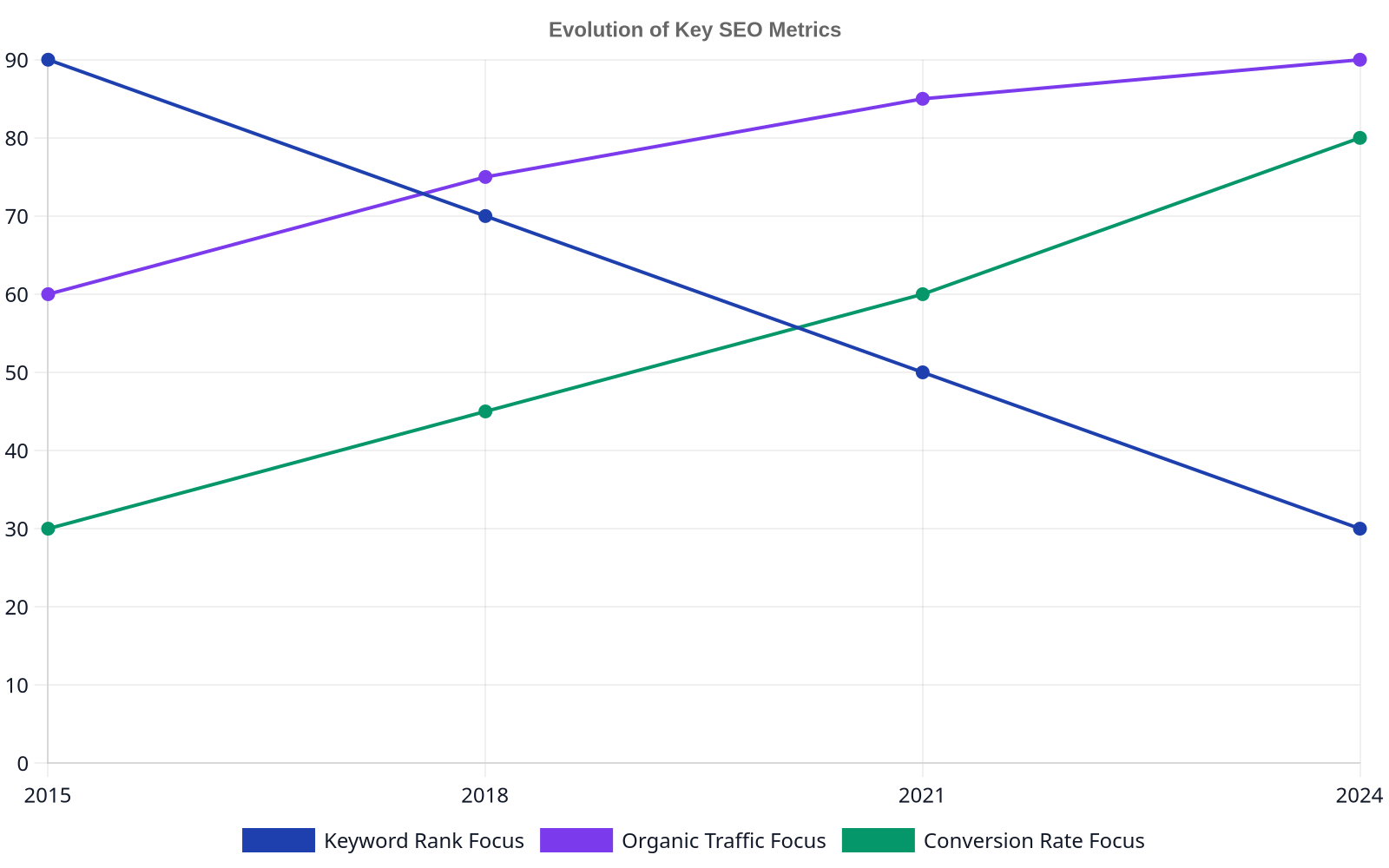
Evolution of Key SEO Metrics
The reporting treadmill is fueled by outdated metrics. For a decade, agencies have sent clients monthly reports showing keyword ranking improvements, domain authority scores, and the number of backlinks built. While not useless, these metrics are proxies for success, not success itself. They represent activities, not outcomes. Clients are becoming more sophisticated; they don’t care about a “position 3” ranking for a vanity keyword if it doesn’t drive qualified traffic and conversions.
This is a symptom of focusing on individual components rather than the health of the overall system. A high Domain Authority score from Moz is meaningless if your site architecture is a mess and users can’t find what they need. This reflects a broader shift in the core seo ranking factors for 2026, where signals related to user experience and topical authority are becoming just as important as the classic pillars of keywords and links.
Instead of reporting on isolated metrics, the conversation needs to shift to business impact:
Instead of “Rankings Increased”: Show “Growth in non-branded organic traffic to conversion-focused pages.”
Instead of “Backlinks Built”: Show “Increase in referral traffic from authoritative domains.”
Instead of “Articles Published”: Show “Expansion of topical authority, leading to a 15% increase in keyword footprint.”
This shift in focus requires a new operational model—one that isn’t built around completing a set number of tasks each month.
Beyond the Basics: Embracing AI for Agency Efficiency
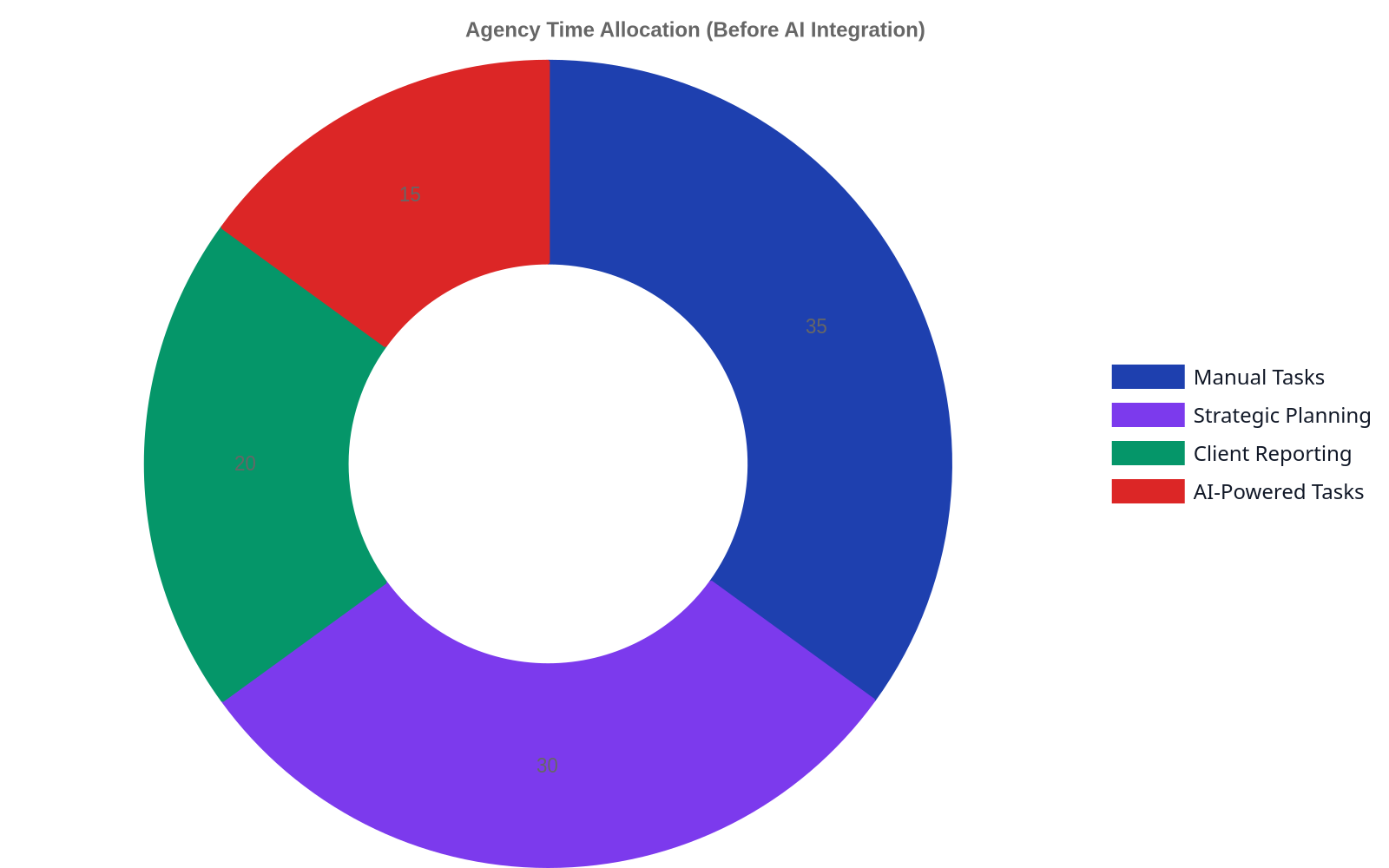
Agency Time Allocation (Before AI vs. With AI)
Most agencies view AI as a tool to do the same old tasks, just faster. They use it to generate a first draft of a blog post or to brainstorm a list of keywords. This is a failure of imagination. It’s like buying a Formula 1 car and only driving it to the grocery store. According to a 2024 Deloitte report, while 79% of marketing and creative industry professionals anticipate GenAI to transform their roles, many are still stuck at the task-automation level.
True transformation comes from using AI to build an automated content engine. At Rank My Website, we see this firsthand. Instead of just writing faster, we build systems that handle the entire content lifecycle on autopilot. This includes not just generating daily articles but also optimizing them, creating the internal linking structure, and publishing them directly to a client’s site. The human element shifts from manual labor to high-level strategy and quality control.
Your most valuable strategist shouldn’t be spending their day hunting for keyword variations. Their job is to interpret the results from a system that does the hunting for them.
This model resolves the core tensions of the agency model. It’s inherently scalable, as the system does the heavy lifting. It makes ROI self-evident through a constant stream of optimized content and resulting traffic growth, not a backward-looking report. And it allows your team to provide immense strategic value, advising clients on which topics to target and how to interpret the business results the system is generating. You finally get to sell the strategy that clients have always wanted.
The Real Solution: From Service Provider to Technology Partner
To solve the persistent SEO challenges for marketing agencies, you must change your identity. Stop being a “full-service SEO agency” and start being a technology partner that installs and manages a content generation system. Instead of selling a dozen discrete services, you sell one cohesive system that produces the outcome: organic traffic growth.
This isn’t a theoretical model. It’s how modern software-enabled companies operate. We’ve seen it work for clients like Wolverine Assemblies, who benefit from a consistent, automated content pipeline rather than a series of one-off projects. This approach turns SEO from a cost center based on manual labor into a predictable, scalable growth channel. Leading firms are already moving toward AI-powered, customer-obsessed SEO, which requires a systems-thinking approach.
Your agency can lead this transition. Propose a model where you build an automated content engine for your clients. Your team’s expertise is the secret sauce that configures and guides the system. You’re no longer selling hours; you’re selling a growth machine. This is how you escape the reporting treadmill, scale profitably, and finally align your work directly with the business outcomes your clients demand.
Ready to transform your agency’s SEO offering? At Rank My Website, we provide the platform that lets you become a technology partner for your clients. Generate SEO-optimized content from keywords, publish it to their sites, and use built-in on-page tools to drive consistent rankings. Grow your clients’ organic traffic on autopilot.
Frequently Asked Questions
What is the biggest SEO challenge for agencies in 2026?
The primary challenge is the outdated, labor-intensive business model. Agencies that sell hours for manual tasks face shrinking margins, scalability problems, and a constant struggle to prove ROI. The solution is shifting to a systems-based approach using automation.
How does an automated content system solve the ROI problem?
Instead of trying to connect discrete tasks (like building 5 backlinks) to revenue, a content system consistently publishes optimized articles, builds topical authority, and grows organic traffic. The value is demonstrated through sustained growth in traffic and leads, which are metrics CEOs understand, rather than activity reports. The connection to ROI becomes much clearer and more direct.
Will AI and automation replace the need for SEO strategists at agencies?
No, it changes their role for the better. Automation handles the repetitive, low-value tasks like keyword research, first drafts, and internal link placement. This frees up human strategists to focus on high-value work: overall content strategy, competitive analysis, interpreting results, and advising clients on how to turn traffic into revenue. Their role becomes more strategic and less tactical.
How can a small agency compete with larger ones on SEO?
Smaller agencies can compete by being more agile and adopting a technology-forward model faster than larger, more bureaucratic competitors. Instead of trying to match a large agency’s headcount, a small agency can use a platform like Rank My Website to deliver superior results through automation, offering a more efficient and scalable solution.
What is the first step to shifting my agency to this new model?
Start with one client as a pilot. Instead of their standard monthly retainer, propose a project to build an automated content engine. Use a platform that handles keyword research, content generation, and publishing. Focus the reporting on traffic growth and keyword footprint expansion. Use the success of this pilot to create a case study and transition other clients.
How is this different from just using an AI writer?
AI writers are tools that assist with a single task: writing. An automated content system is a comprehensive platform that manages the entire workflow. It includes keyword research, clustering, article generation, automated internal linking, and direct publishing to the CMS. It’s the difference between a power drill and a fully automated assembly line.
Your 2027 SEO Playbook Is Wrong: 7 Next Gen Strategies to Actually Implement
Forget everything you think you know about ranking. The old playbook of stuffing keywords and chasing backlinks is a ghost. The best next gen SEO strategies for 2027 focus on optimizing for AI-driven search experiences, mastering entity-based content modeling, and treating user experience as a primary ranking signal. This involves a shift from keyword repetition to building topical authority through structured data and varied content formats. Success in 2027 means adapting to generative AI answers, prioritizing technical performance metrics like Core Web Vitals, and creating content that serves user intent so well it becomes the cited source. To truly succeed, it’s time to stop chasing trends and focus on foundational strategies.
How We Ranked These Strategies
This isn’t a list of vague predictions. We analyzed the trajectory of SEO by focusing on three concrete sources of truth: patent filings from Google that reveal their technological direction, feature adoption rates across enterprise-level marketing platforms, and the bleeding-edge tactics discussed in private mastermind groups. We weighted each strategy based on its potential for disruptive impact and its alignment with where search engines are clearly investing their resources. What remains is a practical guide for what to do now to prepare for 2027.
1. Generative Experience Optimization (GEO)
For years, the goal was Position #1. Now, the goal is to be the authoritative source cited directly within a generative AI answer. Generative Experience Optimization, or GEO, is the practice of structuring your content to be the ideal raw material for models like Google’s Search Generative Experience (SGE). This means less focus on conversational fluff and more on dense, factual, and clearly delineated information. Your content needs to answer questions so definitively that the AI has no choice but to use it.
This requires a profound shift in how we write. Instead of writing an article about a topic, you write a definitive resource that can be programmatically parsed. Use clear headings, bulleted lists, and tables. Explicitly state definitions, specifications, and processes. A 2023 study by Authoritas on SGE’s early impact found that links within the AI-generated answers saw significant click-through, proving that being part of the generative experience is the new frontier for traffic.
Best for: Businesses in informational, data-heavy verticals (finance, health, technical B2B) where factual accuracy is paramount.
Watch out for: Over-optimizing for a single AI model. The principles of clear, structured data are universal, but the exact implementation may differ between Google, Perplexity, and others.
2. Entity-First Content Architecture
Google doesn’t think in keywords; it thinks in entities. An entity is a distinct and well-defined thing or concept: a person, a place, a product, a company. An entity-first strategy is about building your content around these concepts, not just the strings of text people type into a search bar. It’s the difference between writing an article about “best car insurance” and building a comprehensive topic cluster around the entity of “Automobile Insurance,” covering sub-entities like “Liability Coverage,” “Collision Coverage,” and specific providers.
Building an entity-first architecture involves using structured data (Schema.org is non-negotiable) to explicitly tell search engines what your content is about. You must also build deep, interconnected webs of content that demonstrate your authority on the entire topic, not just one keyword. This is the foundation of building real topical authority. The goal is for Google to see your site not as a collection of pages, but as a knowledge base. This is why a core SEO service must include building out these deep topic clusters.
Best for: Any business aiming for long-term authority and defensible rankings in a competitive niche.
Watch out for: Mistaking a list of related blog posts for a true topic cluster. A real entity architecture requires deliberate planning and structured internal linking to create a semantic map of your expertise.
Stop chasing keywords that will be obsolete tomorrow. Start building a knowledge graph about your domain that Google can understand and trust as an entity-based authority.
The Rise of AI in SEO
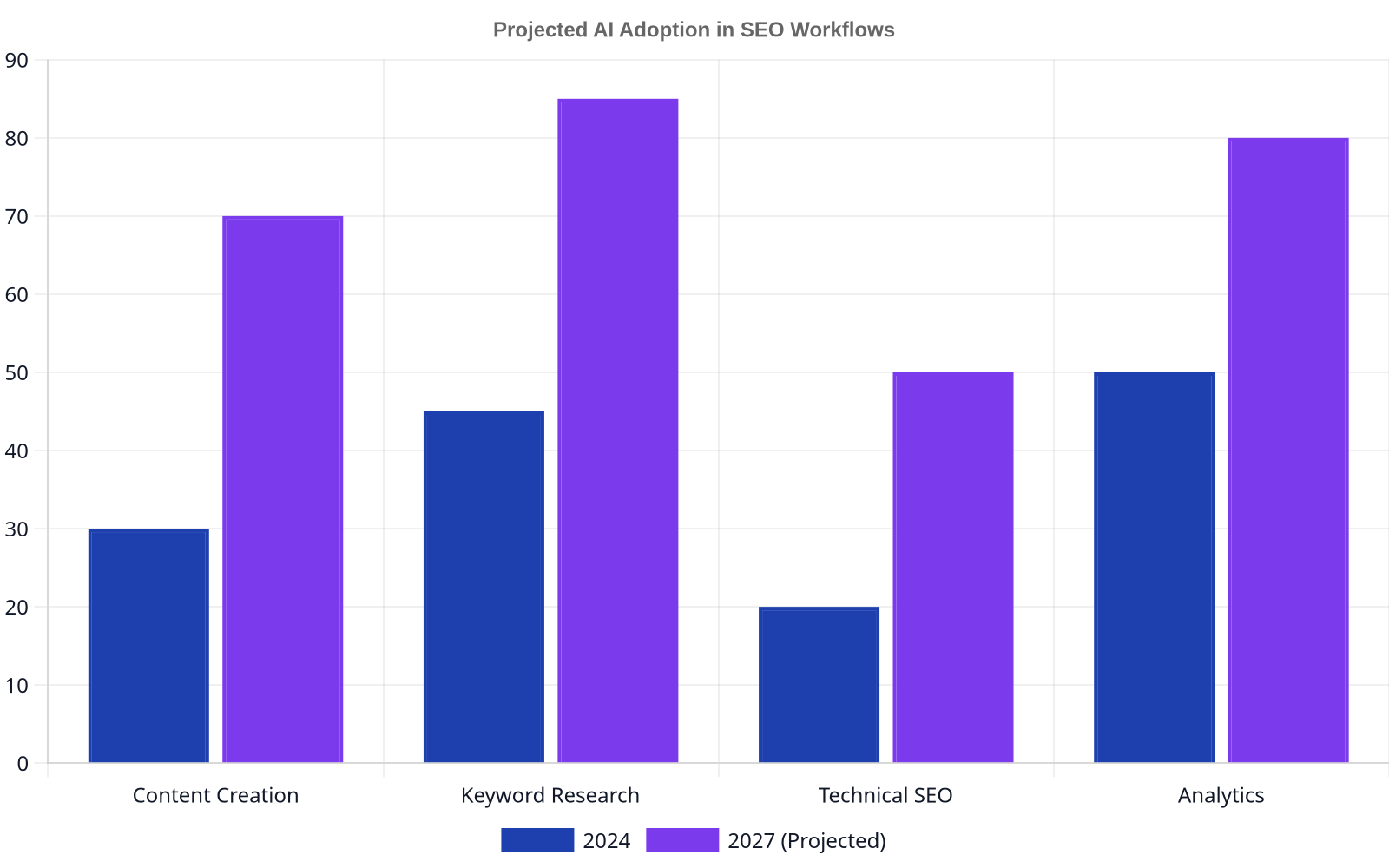
Projected AI Adoption in SEO Workflows
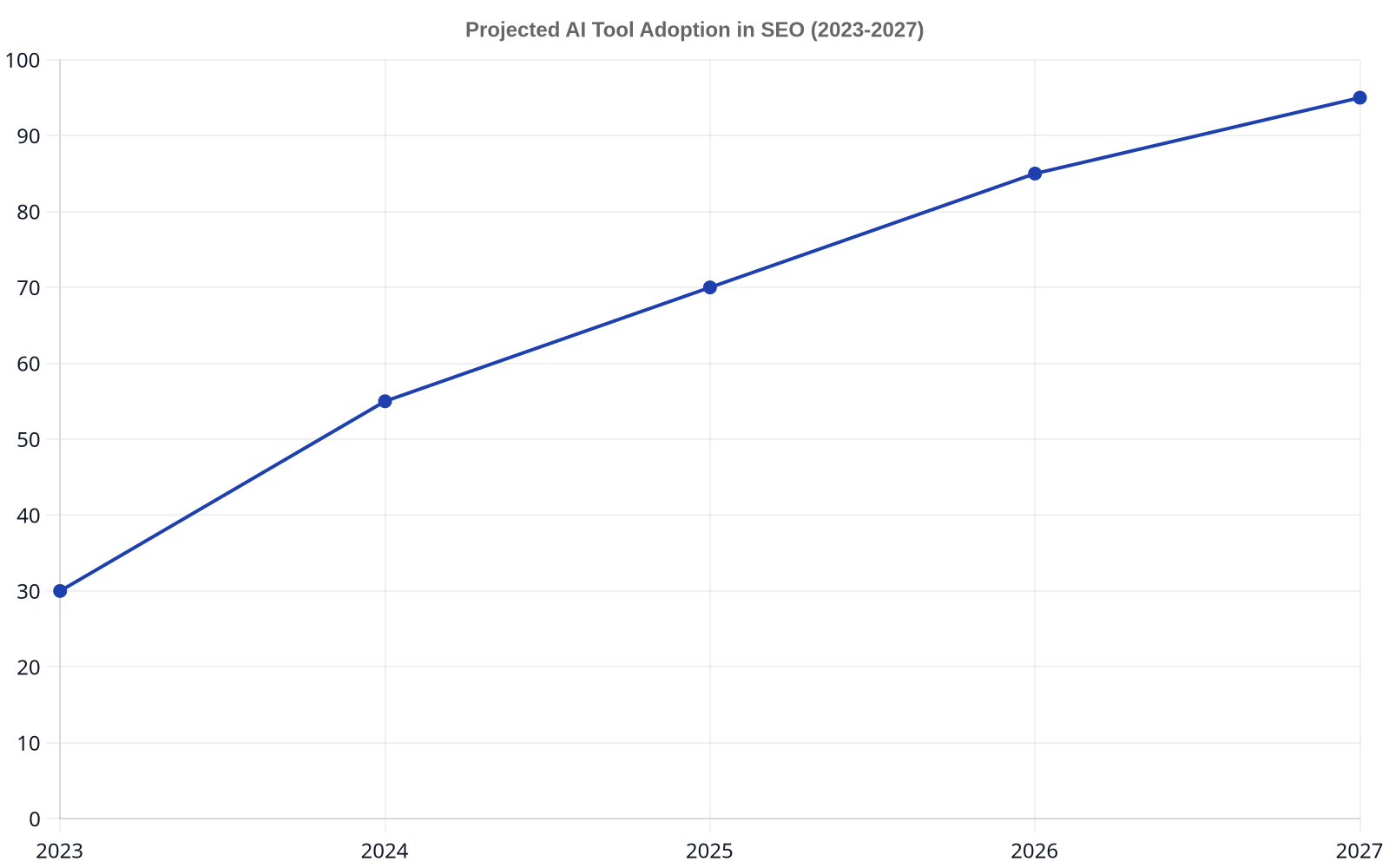
Artificial intelligence isn’t just for writing articles anymore. The next generation of SEO leans on AI for technical analysis, predictive forecasting, and workflow automation. Platforms can now perform automated keyword research, identifying opportunities based on competitive gaps and semantic relevance at a scale no human team can match. For example, some systems can generate hundreds of contextually relevant daily articles to build out topic clusters with shocking speed.
This isn’t about replacing the strategist; it’s about amplifying their impact. Imagine using AI to predict the ranking potential of a content piece before you even write it, or to automatically identify and fix toxic backlinks. A 2024 report from Gartner highlights that by 2026, over 50% of complex marketing tasks will be automated through AI. For SEOs, this means offloading the repetitive work to focus on high-level strategy, like building relationships for backlinks or analyzing the complex needs of customers like our client in the industrial assemblies space, wolverine-llc.com.
Best for: Agencies and in-house teams looking to scale their output and focus human expertise on high-value strategic tasks.
Watch out for: Relying on “black box” AI tools without understanding their methodology. Always demand transparency in how an AI tool arrives at its conclusions, whether for keyword suggestions or technical audits.
User Experience (UX) as a Ranking Factor
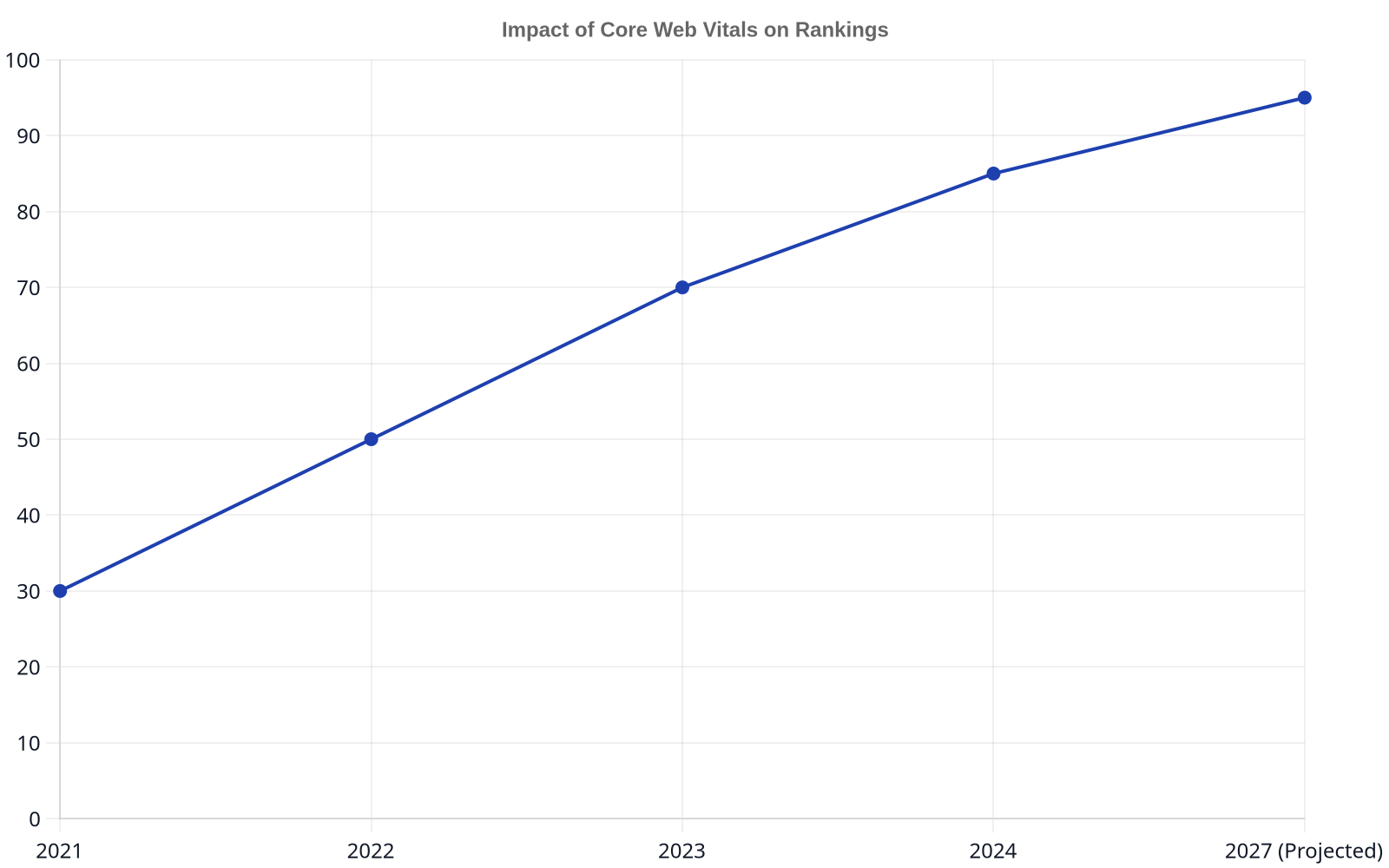
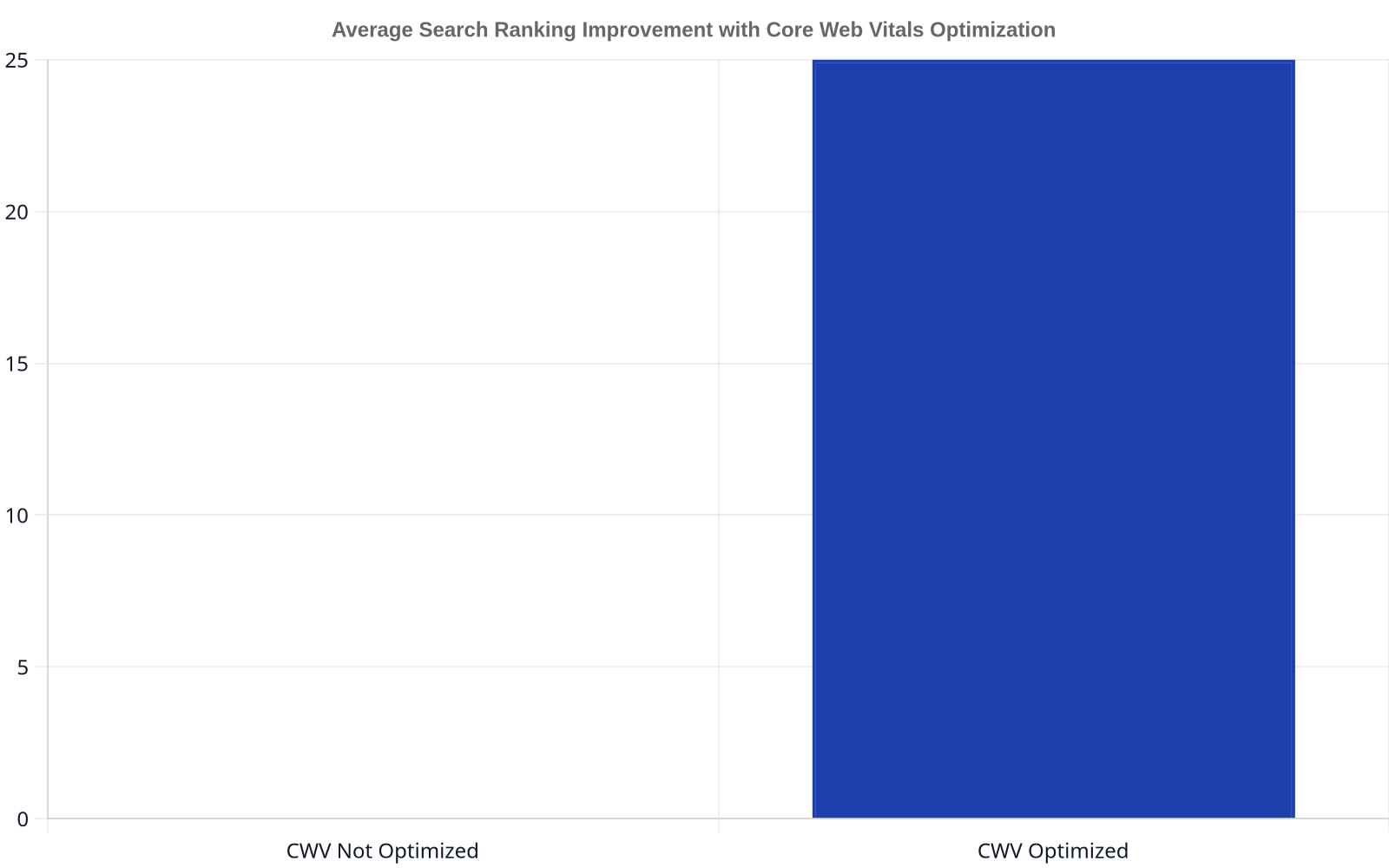
Impact of Core Web Vitals on Rankings
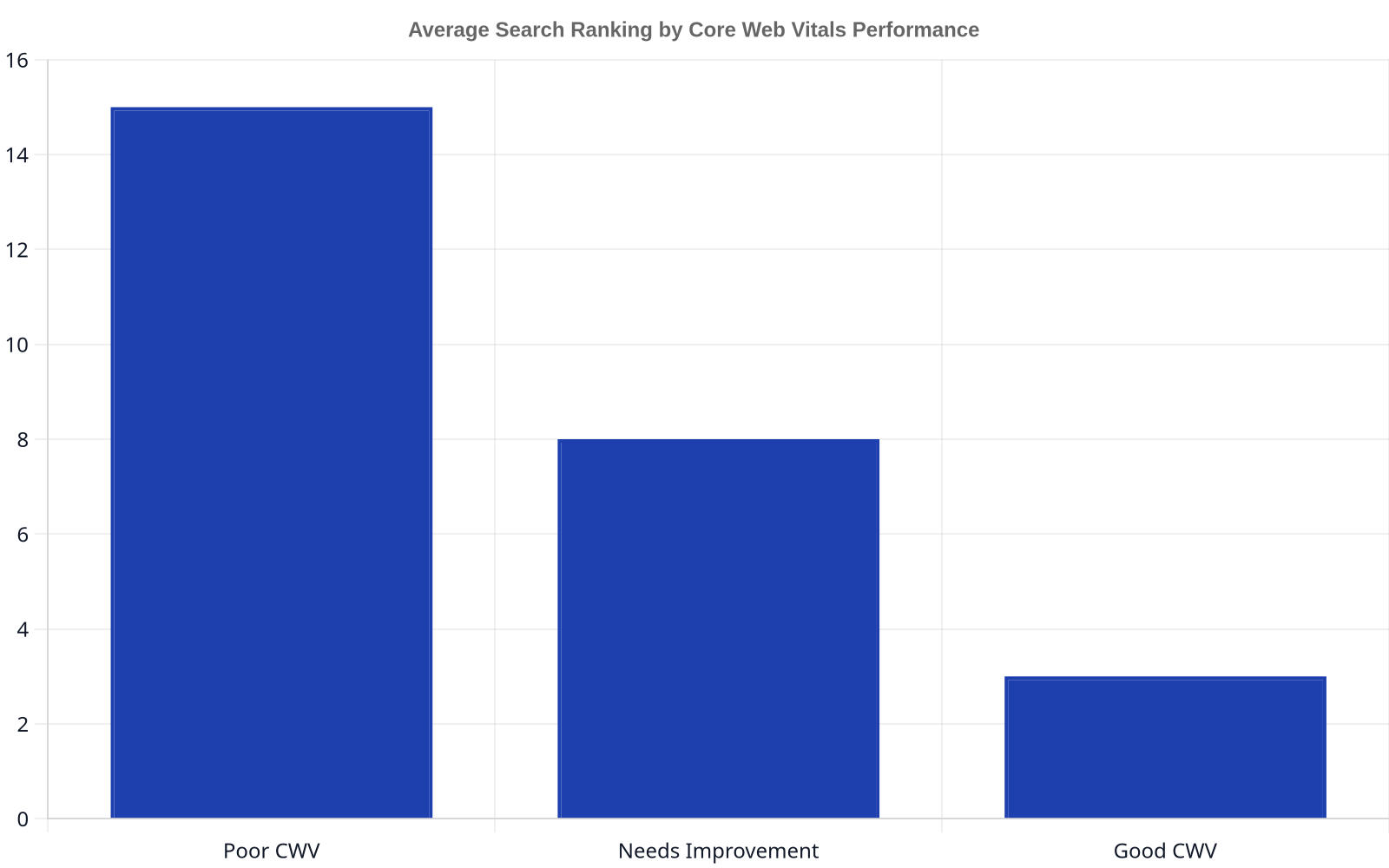
Google’s obsession with user experience is not new, but its ability to measure it is becoming terrifyingly precise. Core Web Vitals (CWV) were just the beginning. The rollout of Interaction to Next Paint (INP) as a replacement for First Input Delay (FID) in March 2024 signals a deeper focus on a page’s total responsiveness throughout the user’s visit, not just on the first interaction.
For 2027, this means UX is not a “nice to have”—it’s a foundational element of technical SEO. A slow, clunky page that is packed with amazing content will lose to a fast, intuitive page with merely good content. Google’s own data has shown that a site that meets the Core Web Vitals thresholds is 24% less likely to have users abandon the page. Your developers and your SEOs can no longer live in separate silos; they must work together to ensure the user’s journey is fluid and fast.
Best for: E-commerce, media sites, and any business where on-page engagement is a critical business metric.
Watch out for: Focusing only on the three Core Web Vitals. True UX optimization considers the entire user journey, from initial load to final conversion, including mobile usability and intuitive navigation.
5. Programmatic Internal Linking
For a site with thousands of pages, manual internal linking is an impossible task. You will miss opportunities and create an inconsistent site architecture. Programmatic internal linking uses rules and automation to build a powerful, contextually relevant web of links across your entire domain. This can be as simple as a script that automatically links a product name to its product page every time it’s mentioned in a blog post, or as complex as an AI-driven system that identifies semantic relationships between articles to suggest or create links.
This strategy ensures that link equity flows efficiently throughout your site, signals the relationship between content to search engines, and improves user navigation. For large-scale publishers or e-commerce sites, a well-executed programmatic linking strategy is one of the most powerful and scalable SEO levers you can pull. It turns your archive of content from a liability into a constantly compounding asset. This is a far cry from just hiring a junior employee to “add three internal links” to every new post.
Best for: Large e-commerce stores, publishers, and enterprise-level websites with thousands or millions of pages.
Watch out for: Creating spammy, unnatural linking patterns. The rules must be sophisticated, ensuring links are contextually relevant and genuinely useful to the reader, not just placed for bots.
An internal link isn’t just a blue line of text. It’s a vote of confidence from one page on your site to another. A messy internal linking structure is like having a team that doesn’t trust itself.
Shifting Content Formats and Consumption
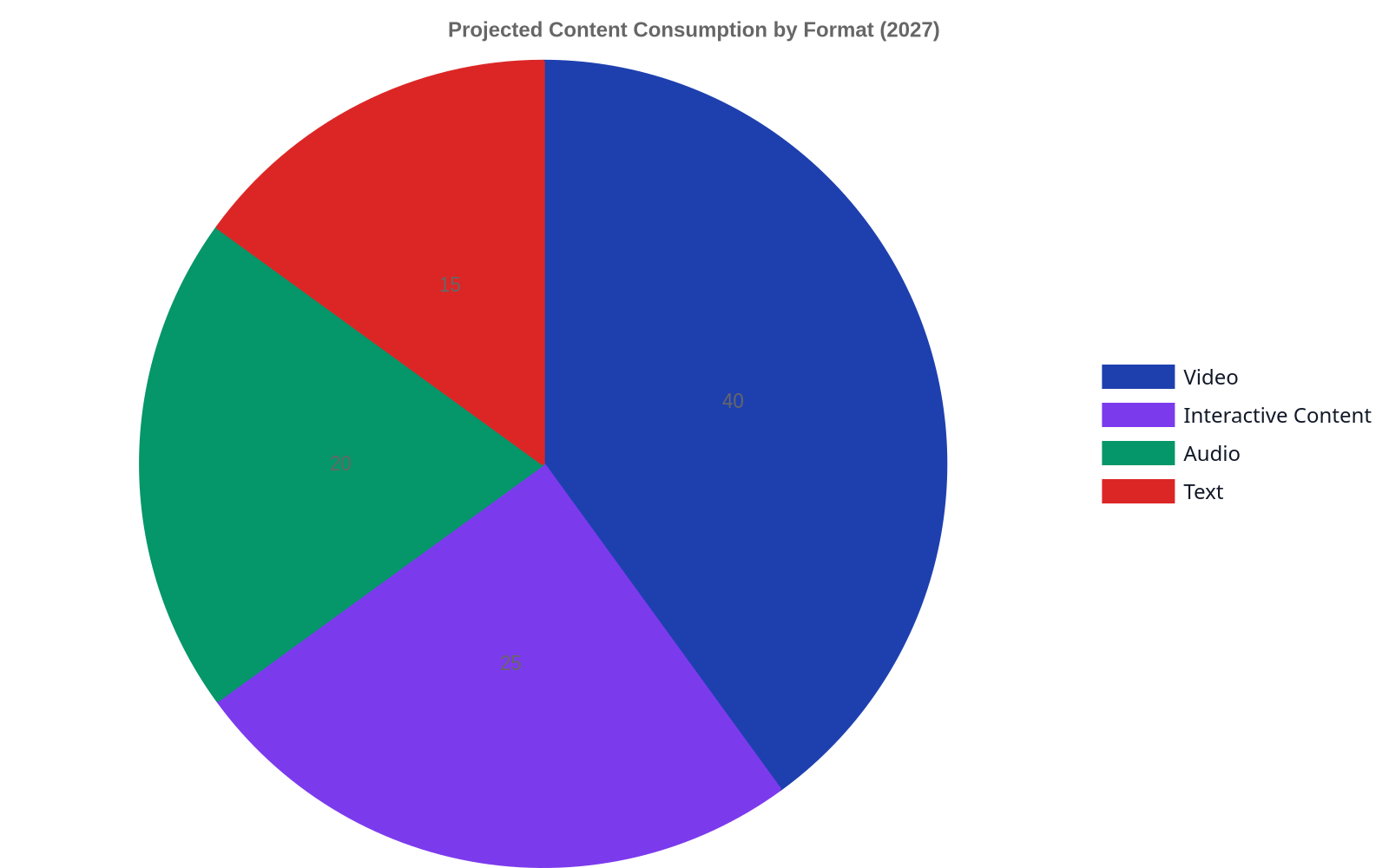
Projected Content Consumption by Format (2027)
The 2,000-word blog post is not dead, but it’s no longer the only game in town. Content consumption is fragmenting across video, audio, and interactive experiences. Optimizing for 2027 means creating content in the format your audience prefers and ensuring it’s discoverable via search. This includes producing short-form video for YouTube Shorts and TikTok, launching a podcast to capture the audio audience, and creating interactive tools like calculators or quizzes that answer a user’s need directly.
Voice search is a key part of this trend. While the dream of “one-in-four searches will be voice” hasn’t fully materialized, the use of voice assistants for specific, answer-seeking queries continues to grow. That the voice assistant market will reach $90 billion by 2028. Optimizing for this means structuring content in a natural language, Q&A format that aligns with how people actually speak, not just how they type. Think about how you can become the definitive answer for a spoken query in your niche.
Best for: Brands targeting younger demographics or those in niches where visual or audio content provides more value than text (e.g., cooking, fitness, music).
Watch out for: Spreading yourself too thin. It’s better to master one new format that aligns with your audience than to produce mediocre content across five different platforms.
7. Mastering the Zero-Click Search
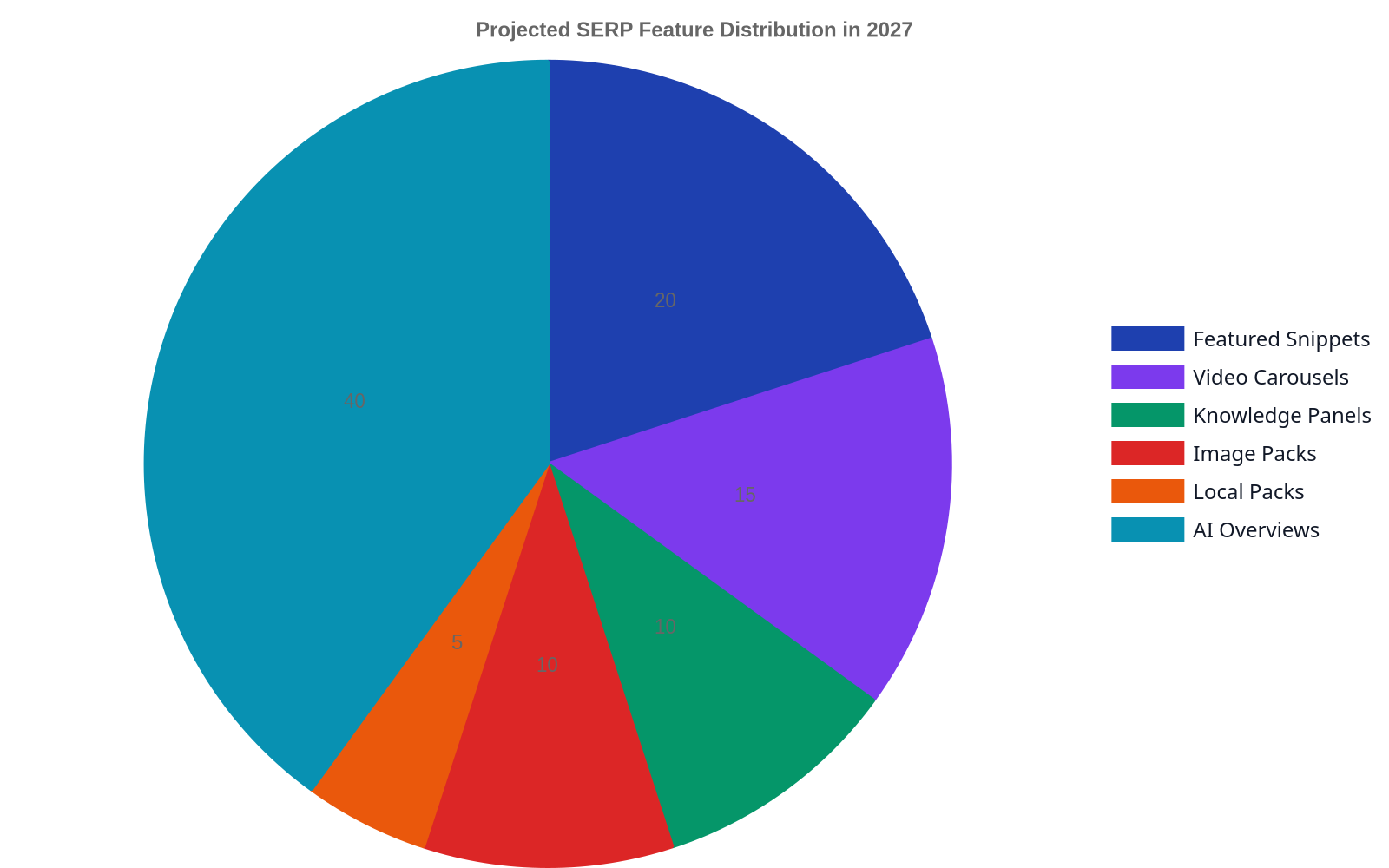
Over two-thirds of all Google searches now end without a click to a third-party website, according to analysis by SparkToro founder Rand Fishkin. The user gets their answer from a featured snippet, a knowledge panel, a “People Also Ask” box, or an AI-generated summary. Crying foul about this won’t bring the clicks back. The winning strategy for 2027 is to dominate these SERP features.
Winning in a zero-click world means structuring your content to be the source for these features. Use How-to and FAQPage schema to explicitly format instructions and questions. Provide concise, direct answers at the top of your articles before elaborating. The goal is brand visibility and authority, even without a click. When your brand name consistently appears as the source for answers, you build trust that pays dividends later, even if it doesn’t result in a session today. It’s a long-term play that separates a simple website from a genuine authority.
Best for: Any business that relies on answering common questions, from SaaS companies explaining features to local businesses listing hours of operation.
Watch out for: Sacrificing in-depth content for snippet-bait. You still need comprehensive, high-quality pages to serve as the foundation from which search engines can pull these snippets.
Summary of Next Gen SEO Strategies
Strategy
Primary Goal
Effort to Implement
Key Tooling
Generative Experience Optimization
Become the cited source in AI answers
High
Content structuring, factual density
Entity-First Content
Build topical authority around concepts
High
Schema.org, Topic cluster mapping
AI in SEO
Automate and scale technical tasks
Medium
AI-powered SEO platforms
UX as a Ranking Factor
Improve user engagement & speed
Medium
Performance monitoring, INP tracking
Programmatic Internal Linking
Scale site architecture & link equity
High (Technical)
Custom scripts, SEO automation tools
Shifting Content Formats
Reach audience on new platforms
Medium
Video/audio production, voice search tools
Zero-Click Search Mastery
Dominate SERP features for visibility
Medium
Schema markup, concise answer formatting
Ultimately, the future of organic search is about providing demonstrable, structured, and technically sound value. The era of shortcuts is over. The coming years will reward the organizations that invest in building genuine authority and a seamless user experience, using AI not as a crutch, but as an amplifier for smart, human-led strategy. Rank My Website is designed to automate the heavy lifting of this process, allowing you to focus on the strategy that matters.
FAQ
What is the difference between entity SEO and keyword SEO?
Keyword SEO focuses on optimizing a page for a specific search query or phrase. Entity SEO is a more advanced approach that focuses on building content around a well-defined topic or concept (the “entity”). It uses structured data and interconnected content to prove to search engines that you have deep authority on the entire subject, not just a single keyword. It’s a strategy for building a knowledge graph, not just a list of pages.
How do I optimize for Google’s SGE (Search Generative Experience)?
Optimization for SGE, or GEO, involves making your content easily digestible for AI models. This means writing with extreme clarity, using factual and data-rich sentences, and structuring your content with clear headings, lists, and tables. Answer questions directly and concisely. The goal is to make your page the most logical and authoritative source for the AI to cite in its generated answer.
Will AI replace SEO professionals?
No, AI will not replace skilled SEO professionals; it will amplify them. AI is incredibly powerful for automating repetitive and data-intensive tasks like technical audits, opportunity analysis, and even content production. However, it still requires human oversight for high-level strategy, creative problem-solving, and understanding nuanced user intent. The SEOs who thrive will be those who master AI tools to become more efficient and strategic.
Is it still worth investing in long-form blog content in 2027?
Yes, but its purpose has evolved. Long-form content is less about capturing a single keyword ranking and more about serving as the foundational pillar of your entity-based authority. A comprehensive, in-depth guide is the raw material from which search engines can extract featured snippets, populate “People Also Ask” boxes, and inform generative AI answers. It proves your expertise, even if many users never read the full article.
What’s more important: technical SEO or content?
This is a false choice; they are two sides of the same coin. The best content in the world will fail if it’s on a slow, broken, and insecure website that search engines can’t crawl. Conversely, a technically perfect website with thin, low-value content will never rank for competitive terms. In 2027, success requires a holistic approach where technical performance and content quality are given equal priority.
How can I measure the ROI of these advanced strategies?
Beyond traditional metrics like organic traffic and keyword rankings, the ROI of next-gen strategies can be measured by tracking “unclicked impressions” or brand mentions within SERP features like SGE and featured snippets. Look at the growth of your overall topical authority—are you ranking for a wider basket of related terms? Also, monitor user engagement metrics like time on site and conversion rates, which are often improved by a better UX and more relevant content.
The Only AI Content Generation Trend for 2027 That Actually Matters
Everyone is asking the wrong question about AI content. They ask how fast it will get, or how cheap it will become. They’re missing the point. The most significant of all AI content generation trends for 2027 isn’t about replacing human writers with cheap, voluminous output. It’s about AI becoming the invisible infrastructure for proving authenticity and delivering hyper-relevant experiences.
By 2027, the key trend in AI content generation will not be speed or volume, but the shift towards AI as infrastructure for verifying human expertise and creating hyper-personalized, trustworthy digital experiences. The focus will move from simple text generation to complex, auditable systems that blend human authorship with AI-driven distribution and personalization. This pivot is driven by declining trust in unvetted AI output and the demand from sophisticated audiences like Gen Z for authenticity and interactive content formats.
AI Is No Longer a Tool—It Is Infrastructure
For the past few years, marketers have treated AI as a tool—a sophisticated word processor or a clever intern. You open a platform like ChatGPT or Jasper, give it a command, and it spits out text. By 2027, this model will be obsolete. AI is moving from an application you run to the infrastructure on which your entire content ecosystem operates.
Think of it like electricity. You don’t think about “using electricity” to run your office; it’s the foundational utility that makes everything possible. Soon, AI will be the same for content. It will be baked into your CMS, your CRM, and your analytics platforms, creating a cohesive system that doesn’t just generate content but personalizes its delivery at a scale of one. This integration of content, search, and purchase into a single user journey is the real objective. The AI will know a user’s history, predict their needs, and assemble a content experience for them in real-time. This isn’t about writing a single blog post; it’s about dynamically building an entire information environment for each user.
The “Human-Made” Premium in a Deluge of AI
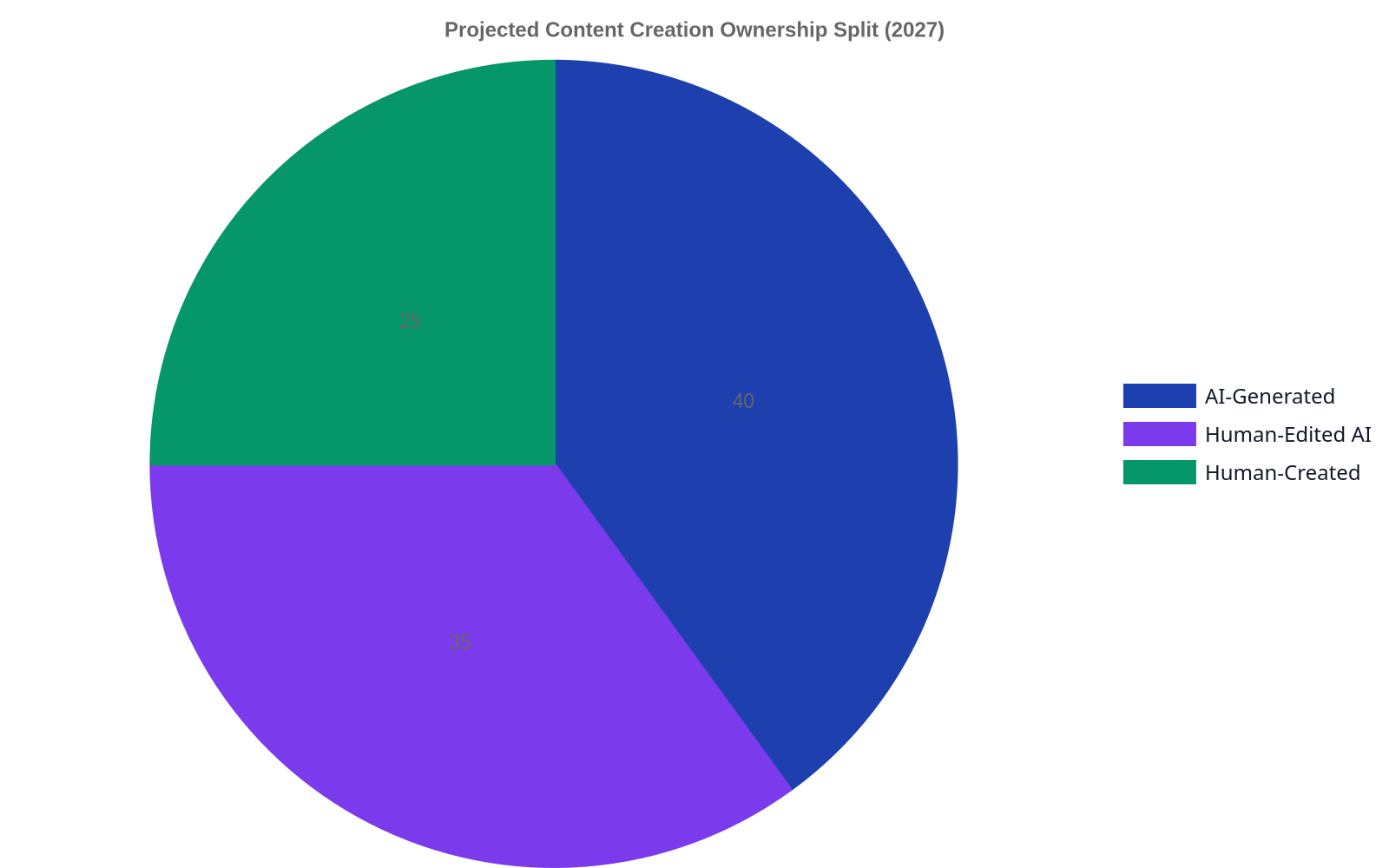
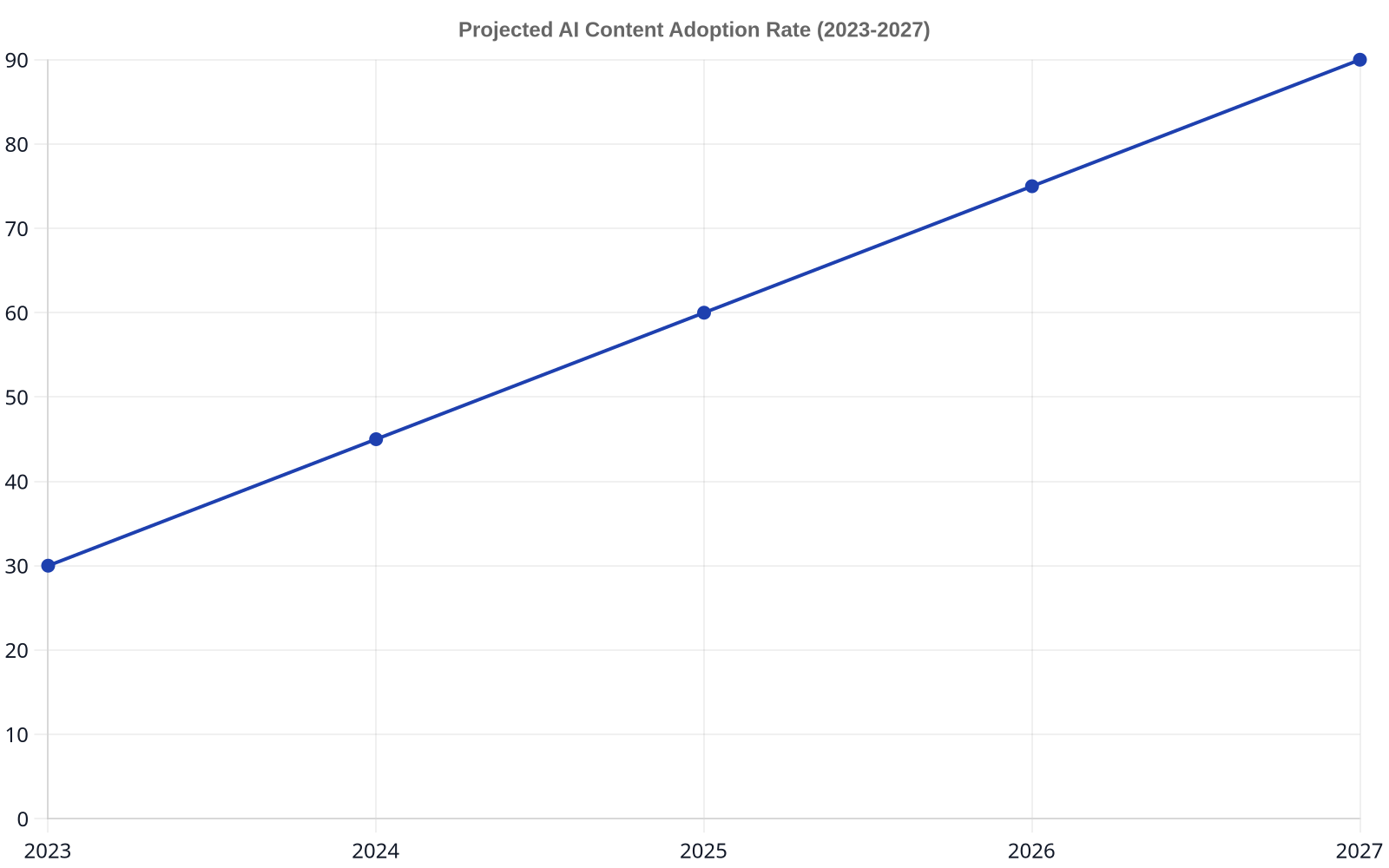
Content Creation Ownership SplitProjected AI Content Adoption Rate (2023-2027)
As the internet becomes flooded with mediocre, AI-generated noise, a paradoxical trend will solidify: the value of verifiably human-created content will skyrocket. Audiences, particularly younger demographics like Gen Z and Gen Alpha, are already adept at sniffing out inauthenticity. They crave connection, not just information. A study based on 200 international surveys highlights the rising demand for real-life experiences and the power of fandom-led marketing, where audiences co-create brand narratives.
The future of content isn’t human-versus-machine. It’s human-plus-machine, where AI handles the scale and the plumbing, leaving humans to provide the one thing the machine can’t: lived experience and a credible point of view.
This is where trust and reputation become your most valuable assets. Closed communities, whether on Discord, Slack, or private forums, will become even more critical centers of influence. Brands won’t be able to just barge in with AI-generated platitudes. They will need to earn trust through genuine participation and by showcasing real expertise. Provably human insights will act as the ultimate differentiator, commanding higher engagement and loyalty.
Enter Synthetic Media and the Phygital Experience
Text and static images are just the beginning. The next frontier is synthetic media—AI-generated video, audio, and interactive experiences. By 2027, we can expect to see AI-powered avatars hosting product demos, personalized video messages sent to millions of customers, and interactive narratives that change based on user input. These aren’t just novelties; they are powerful tools for creating engaging, memorable content.
This trend also fuels the rise of “phygital” experiences, which merge the physical and digital worlds. Imagine a retail store where you can scan a QR code to interact with an AI stylist that knows your past purchases, or a trade show booth that offers a personalized virtual reality experience based on your LinkedIn profile. The growth of synthetic media is not just about creating deepfakes; it’s about building entirely new ways for audiences to interact with brands and information.
The New Gatekeepers: Auditing, Ethics, and Accuracy
This AI-driven future is not without its perils. The potential for misinformation, bias, and a complete erosion of public trust is enormous. Acknowledging this is not pessimism; it’s a prerequisite for responsible strategy. As AI becomes infrastructure, a new set of roles and responsibilities will emerge. The focus will shift from creation to curation and verification.
In an information economy, trust is the only currency that matters. An AI can generate a million words a minute, but it can’t build a decade of reputation.
This is where the real work will be. We will need AI Content Auditors to ensure factual accuracy and mitigate bias. We need to develop robust strategies for watermarking AI content and maintaining transparency. At Rank My Website, our process isn’t just about producing daily articles for clients. Our initial keyword research is an investigative process to understand user intent and validate the information needed, a crucial step for industrial clients like wolverine-llc.com where accuracy is non-negotiable. The regulatory landscape for AI is already taking shape, and companies that ignore the ethical implications do so at their own peril.
How AI Infrastructure Reshapes SEO
So, what does this mean for search? By 2027, search engine algorithms will have evolved to aggressively reward authenticity and penalize undifferentiated AI content. The simple act of stuffing keywords into AI-generated articles will be the fastest way to get de-indexed. Instead, Google and other engines will double down on signals that are difficult to fake.
This is where understanding the move towards entity-based strategy is critical. Search engines will look for evidence of real-world expertise: consistent and verifiable author information, unique data sets, and content that demonstrates deep, specialized knowledge. They will analyze how content is being discussed in trusted online communities and how it connects to a larger knowledge graph. Simply publishing content won’t be enough; you’ll need to prove its authority and the credibility of its source. This means that a well-defined and executed content strategy, much like some of the core SEO trends for 2027, will become more important than ever.
Ultimately, the AI content generation trends for 2027 are less about the tech itself and more about how we choose to use it. The smart play isn’t to build a content factory that churns out endless articles. It’s to build a system of trust, using AI as the infrastructure to amplify credible human voices and deliver genuinely valuable experiences. The machines won’t win; the strategists who understand this will.
Frequently Asked Questions
What does “AI as infrastructure” mean for content?
It means AI will no longer be a standalone tool for writing but the underlying system that powers all content operations. It will be deeply integrated into your CMS, CRM, and analytics, enabling real-time personalization, automated distribution, and dynamic content assembly for individual users rather than broad segments.
Will AI make human content creators obsolete by 2027?
No, but it will fundamentally change their role. The demand for low-level content generation will decrease, but the value of high-level human expertise, critical thinking, and unique perspective will increase significantly. Creators will shift from writing every word to acting as editors, strategists, and subject matter experts who guide AI systems and provide the authentic insights that machines cannot.
How will AI content generation affect SEO in 2027?
It will make SEO more challenging and more focused on rewarding true authority. Search engines will become better at detecting generic AI content and will prioritize signals that are hard to fake, such as author credibility, unique data, and engagement within trusted communities. According to a Goldman Sachs report, while AI will boost productivity, its impact on specific job tasks will vary, pushing SEO professionals towards more strategic, less automatable work.
What are the biggest ethical concerns with AI content?
The primary concerns are the spread of misinformation, the potential for baked-in algorithmic bias, lack of transparency, and intellectual property issues. Without strong ethical guidelines and auditing processes, AI can be used to create convincing but false narratives at an unprecedented scale, eroding public trust. Establishing clear standards for transparency and accountability is crucial.
How can a business prepare for these future AI trends?
Start by focusing on building authority and trust, not just content volume. Invest in your human experts and highlight their credibility. Begin treating your content as part of a larger, integrated system, not as a series of one-off campaigns. Finally, develop an internal policy on the ethical use of AI, focusing on transparency, accuracy, and adding genuine value rather than just cutting costs.
Most executives think AI content is about firing their writers and replacing them with a cheap subscription. They are fundamentally wrong. Adopting AI isn’t like swapping a human assembly line for a robotic arm; it’s like giving your best engineers a supercomputer. The goal isn’t replacement, it’s leverage. In 2026, AI in content creation is no longer a novelty but a fundamental layer of the marketing stack, automating repetitive tasks and generating initial drafts. Its primary function is to augment human strategists by providing data-driven insights, scaling production, and handling programmatic content, allowing experts to focus on high-level strategy, originality, and brand voice. Success hinges not on the AI itself, but on the human oversight guiding it.
The Strategic Shift: From Content Mills to Content Intelligence
For years, the SEO world was dominated by a brute-force approach: more content, more keywords, more pages. This led to the rise of low-cost content mills that churned out thousands of generic, 500-word articles. AI, ironically, is the final nail in that coffin. By making mediocre content virtually free and instantaneous to produce, it has rendered it worthless. The new competitive frontier is content intelligence—using AI to inform a more strategic, targeted, and effective content plan.
Redefining the Role of the Content Creator
The job title “content writer” is becoming obsolete. In 2026, the most valuable players are “content strategists,” “AI editors,” and “prompt engineers.” These roles require a hybrid skillset. You still need to be a strong writer, but you also need to understand data, SEO, and the specific capabilities and limitations of various AI models. The creator’s job is no longer to fill a blank page. It’s to craft a detailed strategic brief, guide the AI to produce a functional first draft, and then provide the critical 20% of work—the nuance, storytelling, brand voice, and original insights—that creates 80% of the value.
AI as a Co-pilot for Keyword Research and Topic Clustering
Manual keyword research is a thing of the past. Modern AI tools can analyze thousands of SERPs in minutes, identify semantic keyword groups, and map out entire topic clusters that align with user intent. At Rank My Website, our own process for clients starts with sophisticated keyword research, but the real work is in structuring that data. AI can suggest pillar page ideas and spoke articles, ensuring comprehensive coverage that builds topical authority. Instead of guessing which long-tail keywords to target, a strategist can now use AI to identify proven question-based queries and generate a content plan to answer them systematically.
The End of “Writing for Word Count”
For too long, word count has been used as a lazy proxy for quality and comprehensiveness. AI destroys this notion. An LLM can generate a 5,000-word article on any topic in under a minute. This forces a much-needed shift in how we measure content value. The new metrics are about impact: Does the content rank? Does it drive qualified traffic? Does it convert? Does it provide a genuinely useful answer that satisfies the user? The focus moves from the cost of production to the return on investment.
The Current Landscape: AI Adoption in Content Creation
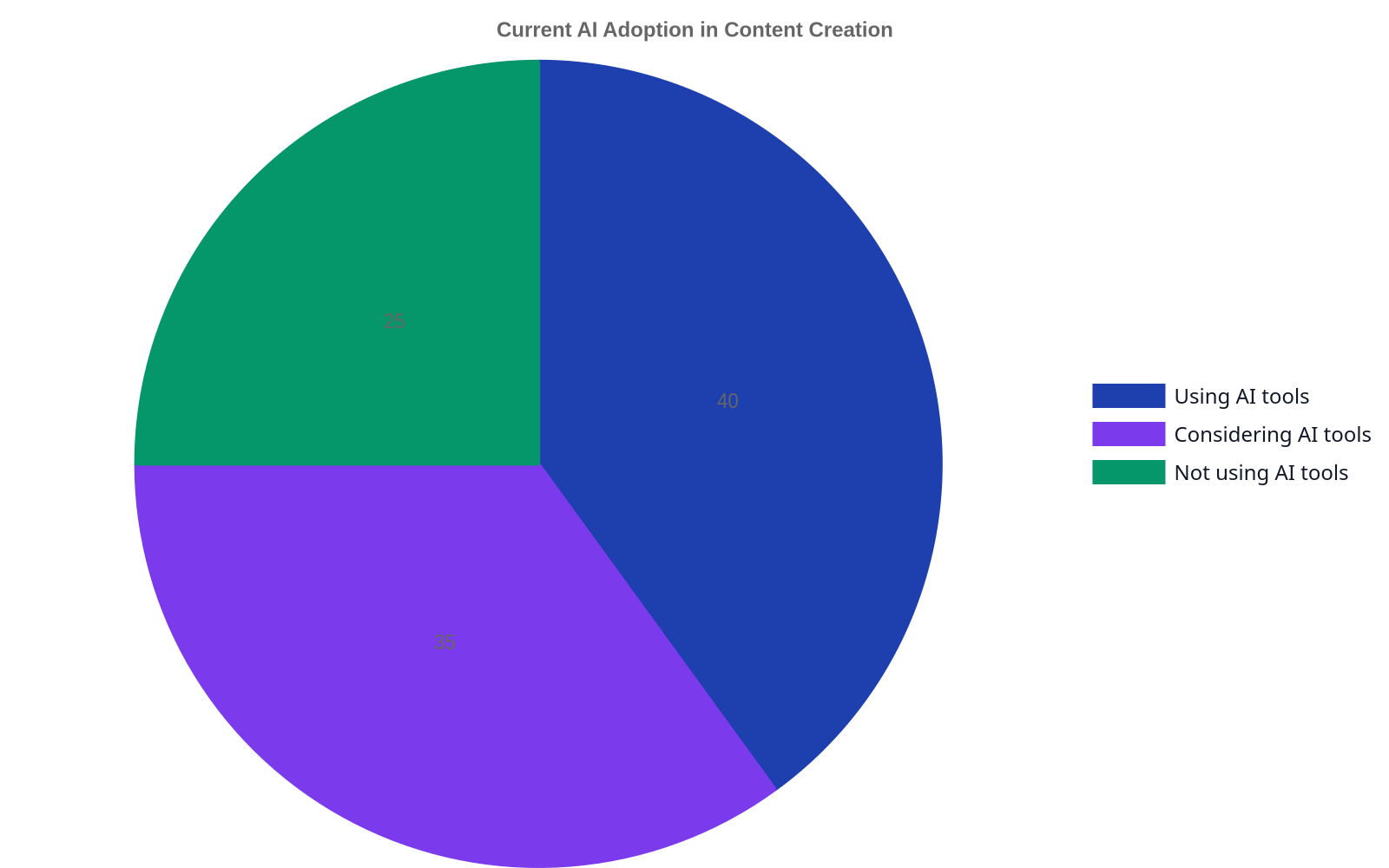
Current AI Adoption in Content Creation
AI adoption is no longer a question of if, but how. Early adopters have moved beyond simple text generation and are integrating AI into their core workflows. According to a 2025 Gartner report, over 70% of enterprise marketing teams now use some form of generative AI in their content pipeline, a figure that was under 10% in 2023.
Which Industries Are Leading the Charge?
Unsurprisingly, tech, e-commerce, and digital media were the first to go all-in. They have the technical expertise and the high-volume content needs to see immediate benefits. However, we’re now seeing rapid adoption in more traditional sectors. For instance, an industrial assemblies manufacturer like our client wolverine-llc.com might use AI to generate technical spec sheets, installation guides, and localized product descriptions for a global market—tasks that were once prohibitively time-consuming. The legal, financial, and healthcare industries are more cautious due to compliance and accuracy concerns, but even they are using AI for internal knowledge bases and initial research.
The Generative AI Toolbox: Beyond ChatGPT
While ChatGPT remains the most recognized name, the 2026 toolkit is far more diverse. Content teams now use a portfolio of models, often accessed via API or specialized platforms like Rank My Website. Anthropic’s Claude 3 family is favored for tasks requiring brand voice consistency and nuanced, long-form writing. Google’s Gemini is unparalleled for its real-time integration with search data, making it ideal for creating timely, fact-based content. For visual content, Midjourney and Canva AI have become standard for generating ad creatives, blog headers, and social media assets in seconds.
Measuring the Initial ROI: Speed vs. Quality
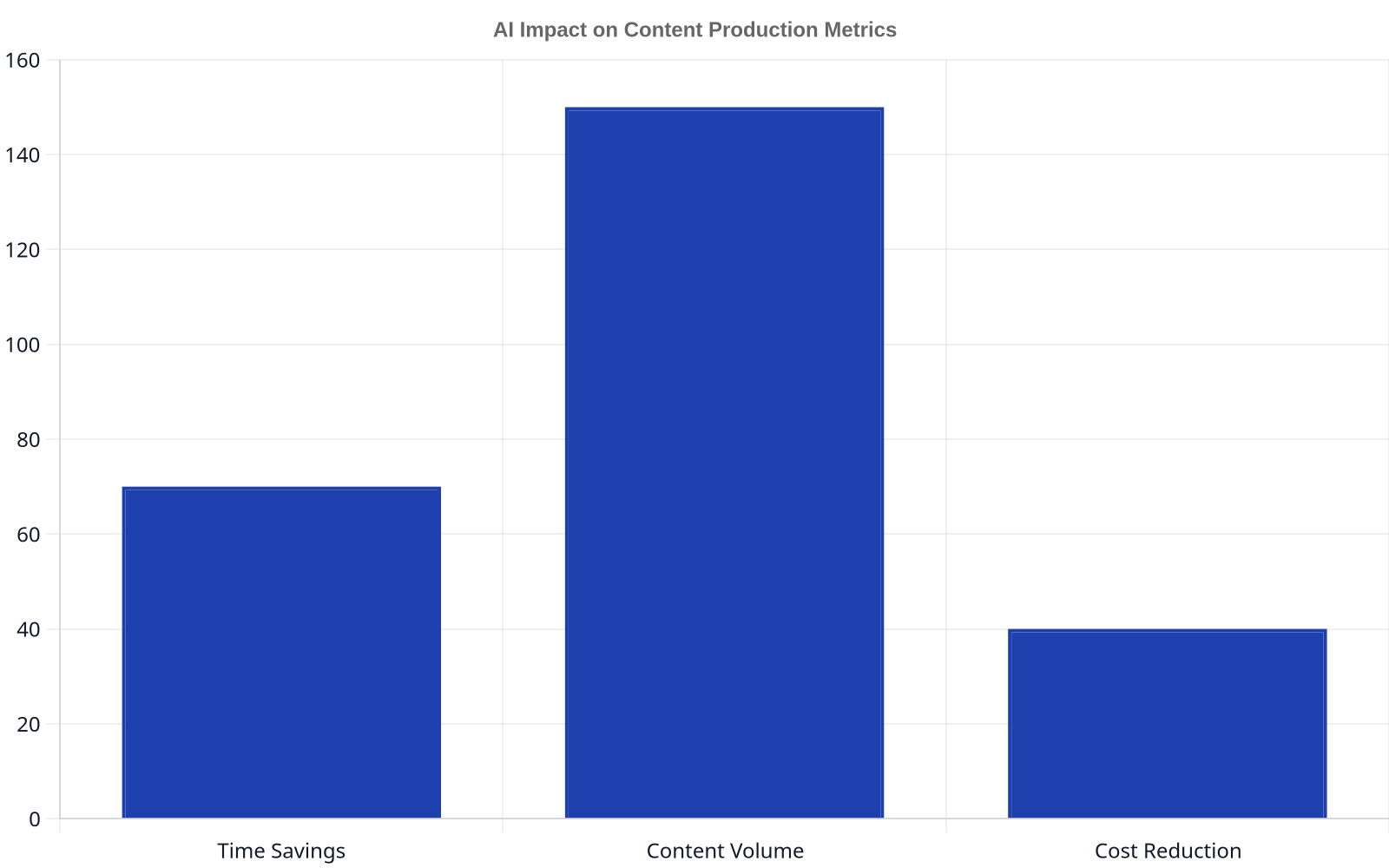
The most immediate return on investment is a dramatic reduction in production time. What once took a writer 8 hours can now be accomplished in 2. This doesn’t mean the cost of content goes down by 75%. Instead, that saved time is reallocated to higher-value activities: strategy, editing, fact-checking, and promotion. As one Forbes analysis on AI ROI points out, the true measure of success isn’t just producing content faster; it’s producing better content faster, leading to higher rankings and more organic traffic.
By 2026, if your ‘content strategy’ is just feeding keywords into a text generator and hitting publish, you’re not practicing SEO. You’re just making the internet a more crowded, mediocre place.
Impact on Content Production: Efficiency and Scale
AI Impact on Content Production Metrics
Leveraging AI is about creating systems that can operate at a scale previously unimaginable for most businesses. It’s about moving from an artisanal “one-off” content model to a programmatic, scalable engine that continuously captures organic traffic.
Automating First Drafts for Blogs and Scripts
The single biggest efficiency gain is the elimination of the “blank page problem.” A human strategist, armed with a deep understanding of the audience and keyword goals, creates a detailed outline or creative brief. This brief is then fed to an AI model to generate a comprehensive first draft. This draft is never publish-ready. But it provides the raw material—the structure, the basic research, the key talking points—allowing the human expert to focus immediately on refinement, adding original thought, and injecting brand personality.
Programmatic SEO and AI-Generated Landing Pages
Programmatic SEO involves creating pages at scale to target thousands of specific, long-tail search queries. Think of a real estate site with a unique page for “three-bedroom homes for sale in [neighborhood], [city]” or an e-commerce store with pages for every product in every color. Manually creating these pages is impossible. AI makes it trivial. By connecting a structured data source (e.g., product catalog, property listings) to a content template, businesses can generate thousands of optimized, user-friendly landing pages overnight.
Scaling Multilingual and Localized Content
For global businesses, translation and localization have always been a major bottleneck. AI translation models are now so advanced that they can produce high-quality translations that capture regional nuance far better than previous tools. A company can write one core article in English, then use AI to instantly adapt it for markets in Germany, Japan, and Brazil, complete with localized idioms and cultural references. This opens up international SEO to businesses that previously lacked the budget for massive human translation teams.
Human-in-the-Loop: The Most Critical Component
The biggest misconception about AI in content creation is that it’s a fully automated, “set it and forget it” system. The opposite is true. The quality of the output is directly proportional to the quality of the human input and oversight. The human-in-the-loop (HITL) model isn’t a temporary crutch; it’s the permanent, strategic core of any successful AI content operation.
Why Human Oversight Is Non-Negotiable
AI models, even in 2026, do not understand content. They are incredibly sophisticated pattern-matching machines. They don’t have experiences, opinions, or beliefs. This means they are prone to several critical failures:
Factual Hallucinations: Inventing stats, sources, and events.
Bias Amplification: Laundering biases present in their training data.
Lack of Original Insight: Regurgitating existing information without creating a new perspective.
Brand Inconsistency: Failing to capture the unique voice and values of a brand.
Only a human expert can catch these errors and provide the essential layer of authenticity and trust. This is why creating true authority requires a structured approach to things like understanding entity understanding that go beyond simple keyword matching.
A 5-Step Human-in-the-Loop Workflow
Implementing a successful AI content strategy involves a structured, repeatable process:
Strategic Briefing: A human strategist defines the goal of the content piece, the target audience, the primary and secondary keywords, the desired tone of voice, and any unique angles or data points to include.
AI-Assisted First Draft Generation: The brief is used to craft a detailed prompt for an LLM. The goal is to get an 80% complete draft that is well-structured and covers all the required points.
Human Expert Review & Enhancement: This is the most crucial step. A subject matter expert and skilled editor reviews the draft for accuracy, originality, and clarity. They add personal anecdotes, proprietary data, stronger opinions, and a compelling narrative.
On-Page Optimization: The refined draft is then optimized for search. This is where seo automation acts as a force multiplier, but it’s guided by human strategy. We ensure proper heading structure, image alt text, meta descriptions, and strategic internal linking to build topical authority. This is a core service we provide for our clients, creating a tightly woven content web.
Performance Analysis: After publishing, a human analyst tracks the content’s performance—rankings, traffic, engagement, conversions. These insights are then fed back into the strategic briefing step for future content, creating a virtuous cycle of improvement.
Upskilling Your Team: From Writers to AI Editors and Prompters
Instead of fearing obsolescence, content teams should focus on upskilling. Writers need to become adept prompt engineers, learning how to coax high-quality, nuanced output from AI models. Editors must develop a keen eye for spotting AI-generated text and learn how to quickly and efficiently reshape it. The entire team needs to become more data-literate, comfortable with analyzing performance metrics to guide future strategy. This is less about becoming a programmer and more about becoming an expert conductor of an AI orchestra.
Future Trends: AI Integration by 2026
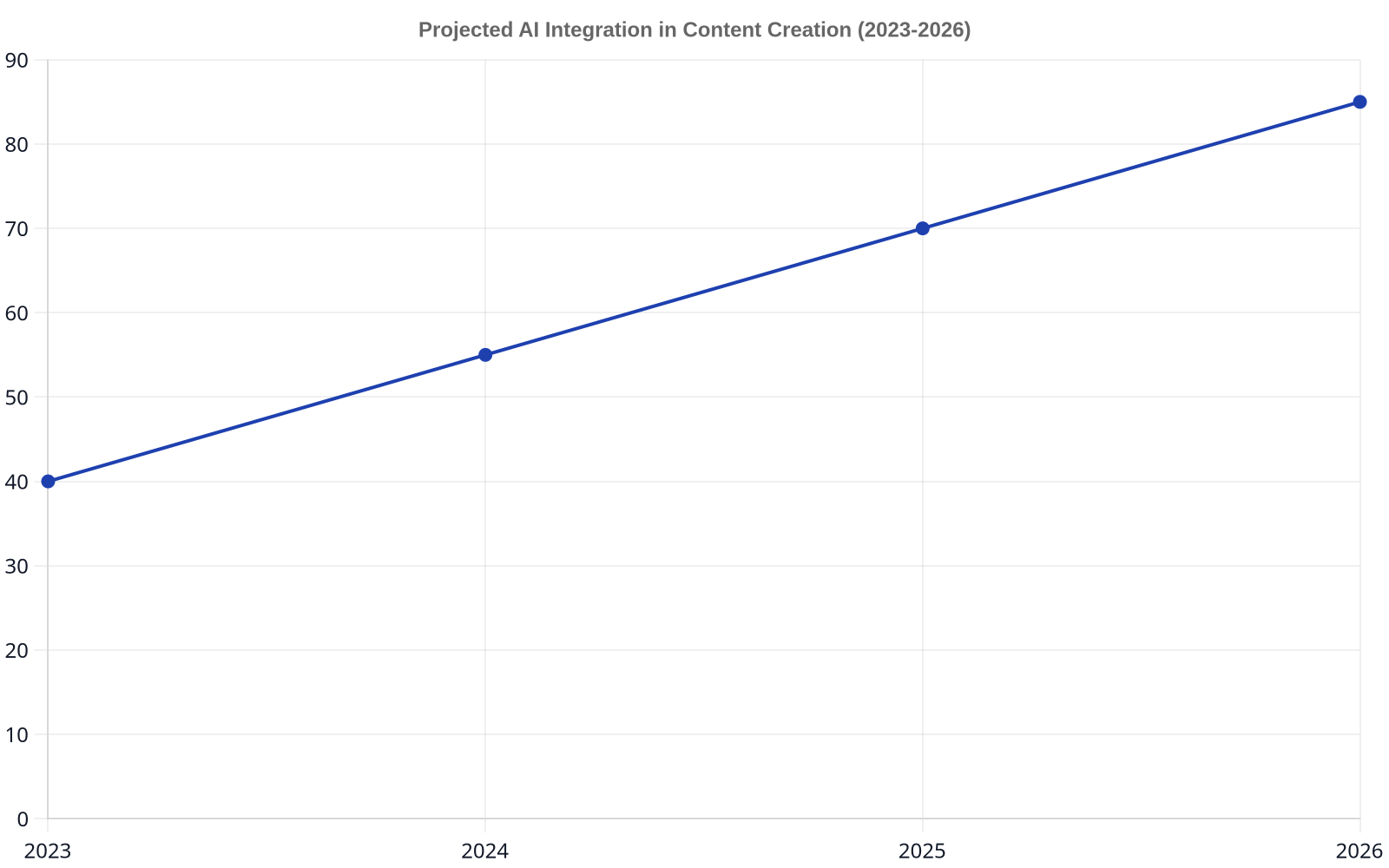
Projected AI Integration in Content Creation (2023-2026)
The progress in generative AI is relentless. The tools and techniques we use today will seem primitive within 18-24 months. As we look toward the near future, several key trends are defining the next wave of AI in content creation, a sentiment echoed by forward-looking analysis on AI’s impact on content.
Hyper-Personalization at Scale
The holy grail of marketing has always been the “segment of one.” AI is finally making this possible. By connecting generative AI to customer data platforms (CDPs), companies can create dynamically personalized website content, emails, and even ad creatives. Imagine a visitor arriving on your homepage and seeing copy and imagery that reflects their specific industry, previous browsing history, and geographic location. This level of personalization dramatically increases engagement and conversion rates.
AI in Video and Audio Content Generation
Text was just the beginning. The latest AI models can generate realistic human-like speech from text, create entire video sequences from a simple prompt, and even compose unique background music. By 2026, it will be common for marketing teams to produce a weekly podcast and a series of YouTube videos by simply feeding their blog posts into an AI multimedia engine, with a human editor providing the final polish. This collapses the cost and complexity of video production.
Predictive Analytics for Content Strategy
The next frontier isn’t just creating content; it’s predicting what content will perform best before you even write it. Advanced AI models can now analyze SERP volatility, competitor content velocity, and emerging user intent signals to forecast which topics are likely to trend and what content format is most likely to rank. This allows strategists to move from a reactive to a proactive content plan, allocating resources to topics with the highest probability of success.
The Tools and the Trade-Offs: A 2026 Snapshot
Choosing the right AI model is like choosing the right employee—each has its own strengths, weaknesses, and ideal role. A sophisticated content strategy relies on a portfolio of tools, not a single one-size-fits-all solution.
Comparing Large Language Models (LLMs)
Different models are optimized for different tasks. Sticking to just one is a mistake. Here’s how the major players stack up in 2026:
Feature
OpenAI’s GPT-4 & Successors
Google’s Gemini Family
Anthropic’s Claude 3 Family
Open-Source Models (e.g., Llama 3)
Best For
General-purpose text, code generation
Multimodality, search integration
Safety, long context, brand voice
Customization, fine-tuning
Key Strength
Massive user base, vast API ecosystem
Real-time information access
Constitutional AI, nuanced writing
Transparency, lower cost
Limitation
Can be generic without expert prompting
Output can be “Googley”
Can be overly cautious or verbose
Requires significant technical overhead
Navigating the Legal and Ethical Minefield
The rapid evolution of AI has created a host of complex legal and ethical questions. Who owns the copyright to an AI-generated image? Is it fair use to train a model on publicly available web content? These questions are far from settled. As the Electronic Frontier Foundation notes, the legal landscape is a patchwork of conflicting court rulings and pending legislation. The most prudent approach for businesses is to assume that AI-generated output is not automatically protected by copyright and to use AI as a tool to augment human creativity, not as a replacement for it. The final, published work should always have significant human authorship.
The most valuable skill in content marketing is no longer just writing. It’s the ability to ask the right questions—of your data, of your audience, and now, of your AI.
The Unspoken Challenges of AI Content
While the promise of AI is immense, a clear-eyed view reveals significant challenges that are often glossed over by tool vendors. Ignoring them is a recipe for failure.
The Plague of “AI Sameness” and How to Beat It
As more companies adopt the same AI tools, the internet is becoming flooded with content that looks and sounds identical. It shares the same structure, uses the same transitional phrases, and offers the same generic advice. This “AI sameness” is a major threat. The only way to combat it is with a strong brand voice and original thought. Your content must contain proprietary data, unique perspectives, personal stories, and strong opinions—the very things an AI cannot generate on its own. Your goal is to make your content recognizably yours.
Copyright, IP, and the Question of Originality
Can you claim ownership of something your AI created? The legal answer is murky and varies by jurisdiction. Training data is another concern; many models have been trained on copyrighted material without permission, creating a potential liability risk. To mitigate this, many businesses are turning to smaller, custom-trained models that use only their own proprietary data. This ensures a unique output and avoids thorny IP issues. For most, the safest path is to ensure that every piece of published content is substantially modified and enhanced by a human creator.
The Hidden Costs: Training, Oversight, and Tooling
The subscription price for an AI tool is just the tip of the iceberg. The real costs are in human capital. You need to invest significant time in training your team to use these tools effectively. You need to budget for the hours of human oversight, editing, and fact-checking required to bring AI drafts up to a publishable standard. And you need to account for the cost of the entire supporting tech stack—the project management software, the analytics platforms, and the specialized tools that make a modern content workflow function. AI isn’t a cost-cutting measure; it’s a capital investment in a more sophisticated and scalable content engine.
FAQ
Will AI replace content writers completely?
No. AI will replace mediocre, low-skill content tasks, but it will not replace skilled content strategists, editors, and writers. The role is evolving. AI acts as a powerful assistant, handling the initial research and drafting, which allows human experts to focus on higher-level tasks like strategy, originality, brand voice, and fact-checking. The demand for high-quality human oversight is actually increasing.
What is the biggest mistake companies make with AI content in 2026?
The biggest mistake is treating AI as a “one-click” solution. They paste a keyword into a generator, copy the output directly into their CMS, and hit publish. This results in generic, often inaccurate, and soulless content that fails to rank, engage, or build trust. Successful implementation requires a human-in-the-loop process for strategic briefing, editing, and brand alignment.
How do you ensure AI-generated content is accurate and original?
You can’t rely on the AI alone. Every claim, statistic, and key fact in an AI-generated draft must be rigorously fact-checked by a human expert against primary sources. Originality comes from the human enhancement process—adding unique insights, proprietary data, personal anecdotes, and a distinctive brand perspective that the AI cannot replicate.
Can Google detect AI-generated content, and does it matter?
Google is very effective at detecting patterns indicative of low-quality, unedited AI content. However, their official stance is that they reward high-quality content, regardless of how it’s produced. The focus isn’t on AI vs. human, but on helpfulness. If AI helps you create excellent, useful, and original content that satisfies user intent, it’s fine. If you use it to spam the web with low-value articles, you will likely be penalized.
What’s the best way to start using AI in my content workflow?
Start small and focus on a single, high-leverage task. A great starting point is using an AI tool to generate outlines and first drafts for blog posts based on a detailed brief created by a human. Measure the time saved and the quality of the output. As your team gets comfortable, you can gradually integrate AI into other areas like generating social media copy, brainstorming titles, or creating video scripts.
AI is not a magic bullet, but it is the most powerful tool ever given to content creators. By embracing a strategy of human-led, AI-powered content creation, businesses can build a moat of authority that is impossible to replicate with automation alone. The future of SEO belongs not to the robots, but to the strategists who command them. If you’re ready to build a content engine that runs on autopilot and delivers consistent organic growth, Rank My Website can help.
Next Generation On-Page SEO Trends 2027: A Practitioner’s Guide to the Post-Keyword Era
“Most SEOs are still playing a game that ended two years ago. They’re obsessing over keyword density and chasing backlinks while Google’s AI has already moved the goalposts to a different stadium. The old playbook isn’t just outdated; it’s a liability. The next generation of on-page SEO trends for 2027 centers on a decisive shift away from simple keyword matching. To master next-gen seo strategies, success now depends on optimizing for entities and concepts, building demonstrable topical authority, and mastering technical UX signals to satisfy both human users and AI-driven search engines. The new core tasks involve structuring data for machine consumption, creating content that serves as a trustworthy source for Large Language Models (LLMs), and adapting to an evolving definition of a ‘page’ itself.”
The End of Keywords: Semantic SEO and Entity Optimization
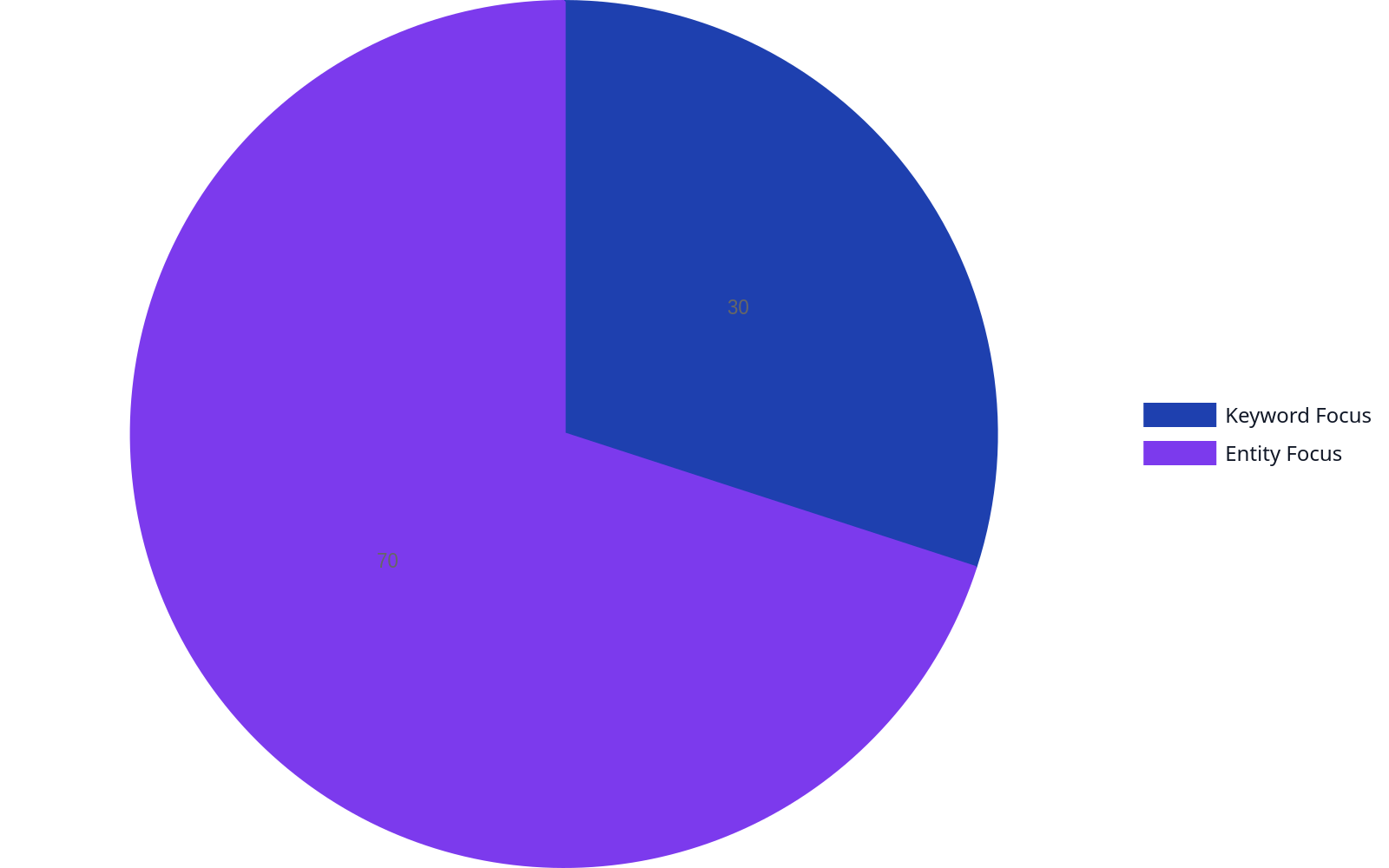
Content Keyword vs. Entity Focus
For years, keyword research was the bedrock of SEO. That era is over. While keywords still matter for initial discovery, the real work is in entity optimization. An “entity” is a well-defined thing or concept like a person, place, product, or company—for instance, our client Wolverine Assemblies. Google no longer just matches strings of text; it understands the relationship between these entities. This is the core of semantic search, and by 2027, it will be the only game in town.
Building Topic Clusters for Authority
Topical authority isn’t just a buzzword; it’s a prerequisite for ranking. Instead of creating one-off articles, you must build comprehensive topic clusters. This involves creating a central “pillar” page for a broad topic and surrounding it with “cluster” content that addresses specific sub-topics and long-tail questions in detail. For example, a pillar page on “Supply Chain Automation” would be supported by cluster articles on “Robotic Process Automation in Warehousing,” “AI for Demand Forecasting,” and “IoT Sensor Implementation.” This structure proves to search engines that you are a comprehensive authority on the subject. Platforms like ours automate the creation of daily articles and the crucial internal linking that connects these clusters, building a web of authority that is difficult for competitors to replicate.
The Power of Structured Data
If content is king, structured data is the kingmaker. Schema markup is the language that explains your content to search engines. It turns ambiguous text into concrete entities and relationships. Are you writing about a product? Use Product schema. An event? Event schema. A recipe? Recipe schema. According to a 2020 study (still relevant for its foundational finding), pages with schema markup can achieve significantly higher click-through rates. By 2027, pages without robust, detailed schema will be at a severe disadvantage, effectively invisible to the nuanced understanding of AI-driven search.
From Keywords to Concepts
Your content needs to answer questions, not just target keywords. This means thinking about the user’s intent behind the query. Someone searching for “best running shoes” isn’t just looking for those three words. They’re looking for information on shoe types, brand comparisons, price points, and features for different running styles. The goal is to create a resource so comprehensive that it satisfies every logical next step in the user’s journey. This approach, often called “programmatic SEO” when done at scale, is about anticipating user needs and building content that serves the entire topic, not just a single keyword.
The Rise of AI-Powered Content Optimization
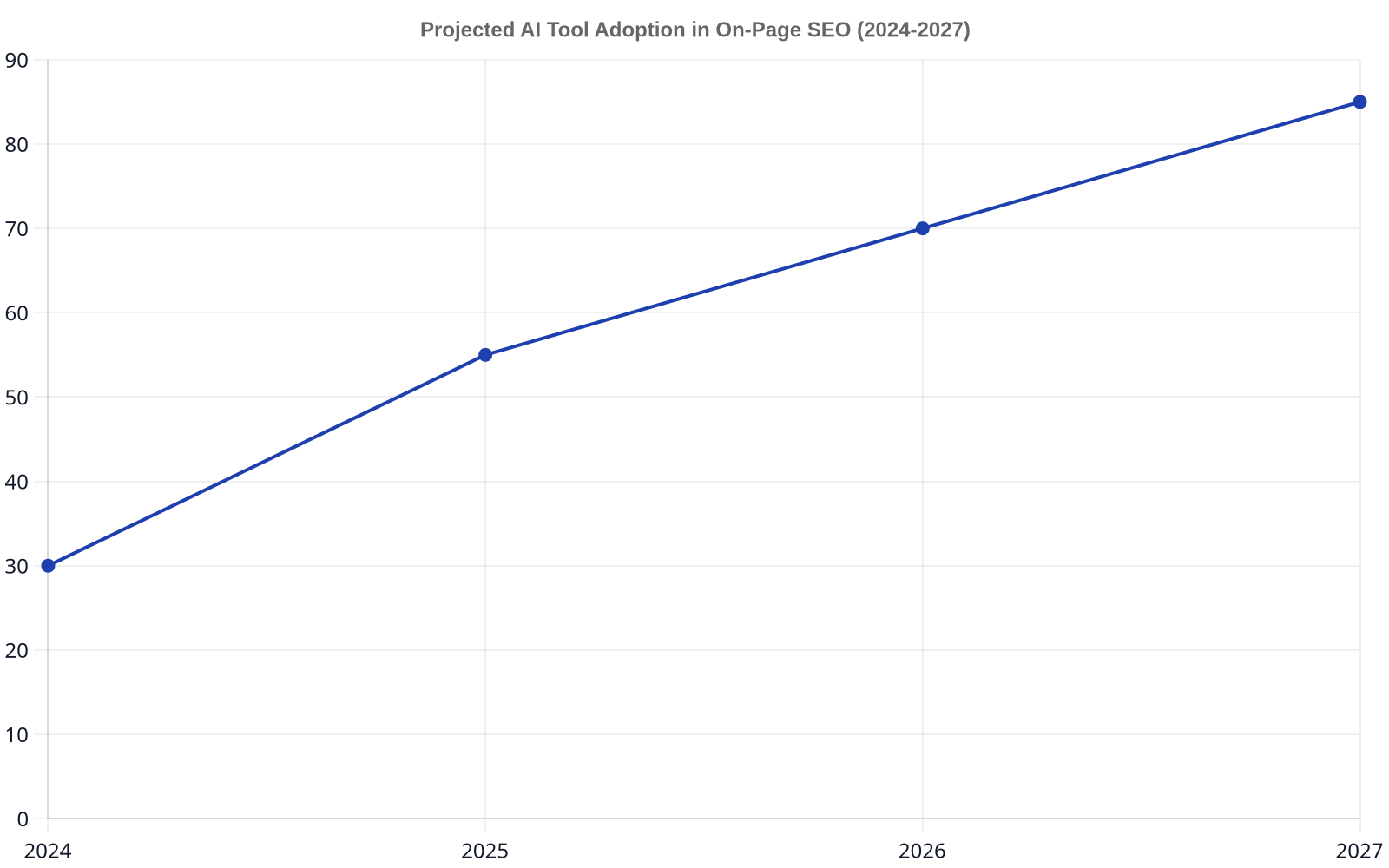
Projected AI Adoption in SEO
Artificial intelligence is no longer a novelty; it’s a core component of the modern SEO workflow. From content generation to technical analysis, AI tools are essential for operating at the scale and speed required for 2027. Gartner predicts that by 2026, generative AI will be a primary mechanism for businesses to access and work with information. For SEO, this has profound implications.
Using AI for Content Generation and Auditing
AI isn’t here to replace writers; it’s here to augment them. AI tools can analyze top-ranking content, identify semantic gaps, and generate structured briefs for human writers to execute. They can produce first drafts, rephrase content for different audiences, and ensure consistent tone and style. On the auditing side, AI can crawl an entire site in minutes, identifying thin content, keyword cannibalization, and opportunities for consolidation. Using AI for the foundational keyword research and content outlining frees up human strategists to focus on high-level messaging and unique insights—tasks machines can’t replicate.
Measuring ROI for AI-Driven Strategies
As you integrate more AI into your workflows, measuring its return on investment becomes critical. Don’t just look at traffic and rankings. Tie your SEO efforts to business outcomes. For an e-commerce site, this could be the number of qualified leads from organic search or the conversion rate of traffic to a specific product category. For a B2B company, it might be demo requests or whitepaper downloads. The key is to set up proper goal tracking in analytics platforms and use a “first-touch” or “multi-touch” attribution model to understand how your AI-optimized content contributes to the entire customer journey, not just the final click.
AI is not a magic wand for SEO. It’s a force multiplier. It automates the 80% of tasks that are repetitive and time-consuming, freeing up your best people to focus on the 20% that requires true human creativity and strategic insight.
Core Web Vitals and User Experience as Ranking Factors
Impact of Core Web Vitals on Rankings
For the past decade, SEOs have been saying “user experience matters.” In 2027, it’s a non-negotiable, technically measured ranking factor. Google’s Core Web Vitals (CWV) — Largest Contentful Paint (LFP), Interaction to Next Paint (INP), and Cumulative Layout Shift (CLS) — are no longer just suggestions. They are direct, measurable signals that tell Google whether your site provides a good user experience. A slow, janky site is not just annoying for users; it’s a direct signal to Google that your page is low quality.
Optimizing for Speed and Interactivity
Achieving good CWV scores requires a deep dive into technical SEO. This includes:
Optimizing Images: Compressing images, using next-gen formats like WebP, and implementing lazy loading.
Minifying Code: Removing unnecessary characters from HTML, CSS, and JavaScript.
Reducing Server Response Time: Investing in a quality host and using a Content Delivery Network (CDN).
Prioritizing Above-the-Fold Content: Deferring the loading of non-critical CSS and JavaScript.
These aren’t one-time fixes. They require ongoing monitoring and optimization, as every new feature or piece of content can impact performance. Solving these issues is often the biggest hurdle for established sites, where overcoming technical debt can feel like an impossible task, much like the common ecommerce seo challenges we see daily.
Mobile-First is Now Mobile-Only
Google moved to mobile-first indexing years ago. In practice, however, you should be thinking “mobile-only.” The vast majority of users will experience your site on a mobile device. This means your design and development process must start with the smallest screen and scale up, not the other way around. Test on actual devices, not just browser emulators. Pay attention to tap target sizes, font legibility, and navigation simplicity. A site that is merely “responsive” is no longer enough; it must be truly mobile-native in its design and performance.
Beyond Text: Voice, Visual, and Immersive Search
The definition of a “search” is expanding. People are no longer just typing queries into a box. They are speaking to smart speakers, using their phone cameras to identify objects, and exploring content in augmented reality. Your on-page strategy must evolve to capture this traffic.
Optimizing for Voice Search
Voice search queries are typically longer and more conversational than typed queries. Over 50% of adults use voice search daily, and they’re asking full questions. To capture this traffic, your content needs to provide direct, concise answers. Use a natural, conversational tone. Structure your content with question-and-answer formats, and use FAQ schema to explicitly signal these Q&A pairs to search engines. The goal is to become the featured snippet that Alexa or Google Assistant reads back to the user.
The Rise of Visual and AR Search
Tools like Google Lens and Pinterest Lens have turned the camera into a search bar. Users can now search with images, not just words. This opens up a new frontier for on-page SEO. For e-commerce, this means high-quality, multi-angle product photos with descriptive alt text and filenames are crucial. For publishers, it means marking up images with relevant structured data. As we move towards 2027, we can expect augmented reality (AR) to play a larger role. Imagine a user pointing their phone at a historic building and your article about its architecture appearing as an overlay. This requires thinking about your content not just as a page, but as a layer of data on top of the physical world. Preparing for this means structuring your content with geographic coordinates and connecting it to other entities in a machine-readable way.
Proving Trust and Authority in the Age of Generative AI
As AI generates more and more of the web’s content, search engines will place an enormous premium on signals of trust and authority. Generative AI like Google’s Search Generative Experience (SGE) needs to cite its sources, and it will preferentially cite content that it deems credible, expert, and trustworthy. Your job is to make your content that source.
E-E-A-T: The North Star of Content Quality
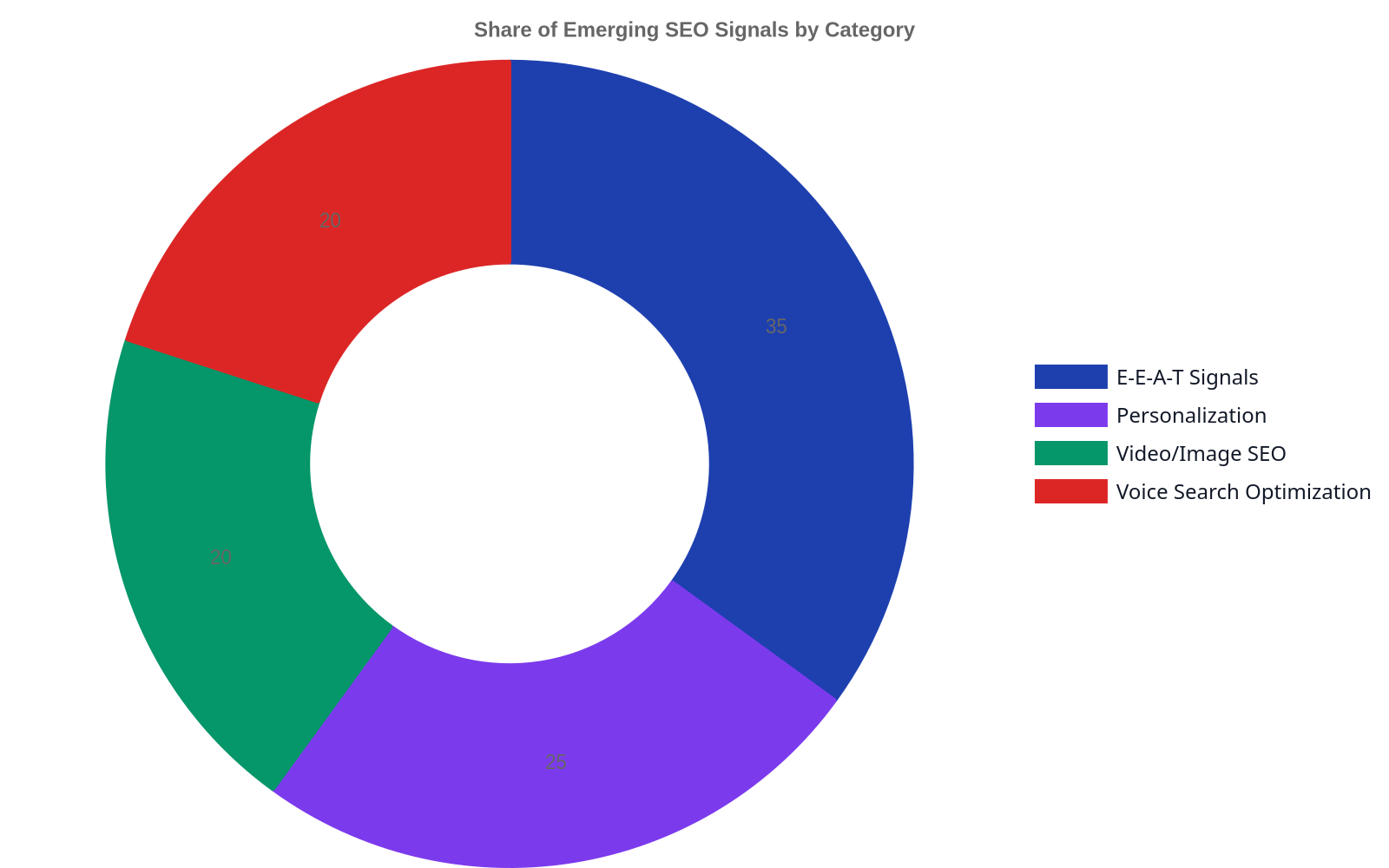
Experience, Expertise, Authoritativeness, and Trustworthiness (E-E-A-T) is Google’s framework for evaluating content quality. For 2027, this is not optional.
Experience: Show, don’t just tell. Include first-hand accounts, case studies, and original research. Author bios should detail real-world experience.
Expertise: Is the content written by a subject matter expert? Does it demonstrate a deep understanding of the topic?
Authoritativeness: Is your site a well-known source for this topic? This is where building strong topic clusters and pillar pages pays dividends.
Trustworthiness: Is your site secure (HTTPS)? Are your privacy policies and contact information easy to find? Do you cite your sources?
The Ethics of AI in SEO
With great power comes great responsibility. The rise of AI in SEO brings a host of ethical considerations. How do we prevent AI from amplifying existing biases in data? How do we ensure transparency when an AI is making decisions about what content to show? As practitioners, we must be vigilant. This means auditing our AI tools for bias, being transparent about our use of AI in content creation, and prioritizing the user’s best interest over short-term ranking gains.
Stop thinking about your website as a collection of pages. Start thinking about it as a database of verifiable facts and authoritative answers that both humans and AI can trust.
Navigating the New Data Landscape: Privacy and Personalization
The way we collect and use data for SEO is undergoing a fundamental change, driven by privacy regulations and the deprecation of third-party cookies. The “data-driven” SEO of the past, fueled by granular user tracking, is giving way to a new model based on privacy-first analytics and aggregated data.
The Impact of Privacy Regulations
Regulations like GDPR in Europe and CCPA in California have set new standards for user consent and data privacy. The GDPR site itself outlines strict rules for processing personal data. For SEOs, this means we can no longer rely on having detailed demographic and behavioral data for every user. Personalization will need to be done on a broader, cohort-based level, or derived from on-site actions rather than third-party tracking. This makes first-party data—the data you collect directly from your users with their consent—more valuable than ever.
The Shift to Privacy-First Analytics
Platforms like Google Analytics 4 are built for this new reality. They use machine learning and modeling to fill in the gaps left by cookie-less tracking and consent-mode restrictions. Instead of seeing exact user paths, you’ll see aggregated trends and probabilistic models. Success in this new landscape requires a shift in mindset. You must become adept at interpreting modeled data, understanding its limitations, and using it to make directional decisions rather than relying on perfect, granular reporting.
Comparison: Traditional vs. Next-Generation On-Page SEO
Feature
Traditional On-Page SEO (2020)
Next-Generation On-Page SEO (2027)
Primary Focus
Keyword Matching & Density
Entity Optimization & Topical Authority
Content Goal
Rank for a specific keyword
Comprehensively answer user intent for a topic
Key Metric
Organic Traffic & Keyword Rank
Topic-driven conversions & Business Impact
Technical SEO
Meta tags, site speed
Core Web Vitals, Structured Data, Mobile-Native UX
Fully integrated into workflow for content, auditing, & automation
The Evolving Definition of ‘On-Page’ and Technical SEO
Finally, the very concept of a “page” is becoming obsolete. As content is consumed on smart speakers, in AR overlays, and within AI chat interfaces, “on-page SEO” is evolving to mean “on-platform SEO.” The goal is no longer just to get a click to your website. It’s to have your content be the answer, wherever the user is.
Optimizing for the Zero-Click Search
Many searches are now answered directly on the search engine results page (SERP) through featured snippets, knowledge panels, and generative AI overviews. While this can reduce clicks, it also presents an opportunity. By structuring your content with clear headings, lists, and direct answers, you can win these placements, building brand visibility and establishing your site as the authority, even if the user never clicks through. This is a new form of on-page seo automation where content is designed for machine consumption first.
Preparing for Real-Time, AI-Driven Algorithm Changes
The era of waiting for announced “core updates” is ending. With AI at the helm, search algorithms can and will adjust in near real-time based on user interaction signals. This makes chasing algorithms futile. The only durable strategy is to align your goals with the search engine’s goals: provide the best possible answer and the best possible user experience. A technically sound website, a deep well of authoritative content, and a relentless focus on the user are the only things that will provide stability in an ecosystem of constant flux.
What is the biggest change in on-page SEO for 2027?
The most significant change is the shift from a keyword-centric to an entity-centric approach. Instead of focusing on matching specific search terms, the emphasis is now on building topical authority around concepts and entities. This means creating comprehensive content clusters and using structured data to help search engines understand the relationships between different pieces of information on your site.
Is keyword research still relevant for future SEO?
Yes, but its role has changed. Keyword research is no longer about finding high-volume, low-competition terms to target with individual pages. Instead, it’s the starting point for understanding user intent and mapping out broader topics. The keywords inform the structure of your topic clusters and help you understand the language your audience uses, but they are not the end goal in themselves.
How does generative AI affect on-page SEO?
Generative AI impacts on-page SEO in two primary ways. First, it creates a new “surface” where your content can appear, like Google’s SGE. This requires optimizing content to be easily citable and trustworthy for LLMs. Second, AI tools are becoming integral to the SEO workflow for tasks like content generation, technical audits, and data analysis, which allows teams to operate with greater speed and scale.
What’s more important for 2027: technical SEO or content quality?
This is a false choice—they are two sides of the same coin. You cannot have one without the other. The most brilliant, authoritative content will fail if it’s on a slow, insecure site that provides a poor user experience. Conversely, a technically perfect website with thin, low-quality content will also fail to rank. In 2027, success requires excellence in both.
Preparing for the future of on-page SEO isn’t about predicting the exact algorithm changes of 2027. It’s about building a durable, resilient strategy focused on authority, user experience, and technical excellence. By shifting your focus from chasing keywords to building a definitive resource for your topic, you create an asset that will thrive in the AI-driven search landscape. At Rank My Website, we automate this entire process, helping you build topical authority and grow organic traffic on autopilot. Explore how we can build your content engine.
Best Practices for On-Page SEO Automation: Your Team, Amplified
Most SEOs picture automation as a dumb robot that blindly stuffs keywords into auto-generated pages. They see it as a trade-off: scale for the price of quality. This is a fundamental misunderstanding of the technology. The best practices for on-page SEO automation aren’t about replacing your team; they’re about giving them superpowers. True automation is a system that uses software to execute repetitive, rule-based on-page tasks with perfect consistency, freeing up human experts for high-level strategy. It handles meta tag generation, schema markup, and internal link mapping, allowing for greater accuracy, real-time optimization, and massive scale without sacrificing quality. To achieve this, many leverage powerful on-page seo tools. For example, on-page seo automation helped Wolverine Assemblies increase organic traffic by 400%.
Think of it less like an assembly line and more like a surgical assistant—it hands you the right tool at the right time, letting you focus on the complex operation. The goal isn’t to remove the human, but to amplify their impact by removing the tedious work that burns hours and invites errors. Companies that implement this correctly don’t fire their SEO team; they promote them to strategists.
What On-Page SEO Automation Actually Is (and Isn’t)
On-page SEO automation is the use of software and systems to perform tasks on your website that directly influence search engine rankings. It’s not a magic button. It’s a deliberate strategy to codify your SEO rules and apply them consistently across thousands of pages, something no human team could ever do manually. It’s about taking the “best practices” out of a dusty Google Doc and building them directly into your content workflow.
The Core Components of an Automated System
At its heart, any effective automation system has three parts:
A Trigger: An event that initiates an action. This could be publishing a new page, a change in keyword rankings, or a detected content gap.
A Condition: A set of rules that must be met for the action to proceed. For example, “IF a meta description is over 160 characters, THEN trigger an alert.” or “IF a new blog post is published, THEN find 3 related articles to link from.”
An Action: The task the software performs. This could be rewriting a title tag, generating structured data, or adding an internal link.
Without these three components, you don’t have automation; you have a manual tool.
Automation vs. AI: A Critical Distinction
People often use “automation” and “AI” interchangeably, but they are not the same. Automation follows pre-programmed rules. AI, specifically generative AI, creates new content or makes predictions based on patterns in data. A system that automatically shortens title tags to 60 characters is automation. A system that writes three title tag variations based on user intent and SERP analysis is AI-powered automation.
The use of automation and AI to generate content is acceptable, provided it is not used to create spammy content primarily to manipulate search rankings. The focus is on the quality and usefulness of the content, not how it was produced. This is a key principle in establishing the best practices for on-page SEO automation.
Examples of On-Page Automation in Practice
Instead of abstract concepts, consider these concrete examples:
Meta Tag Generation: A new e-commerce product is added. The system automatically creates a title tag and meta description using a template: [Product Name]
[Category]
[Brand Name]
and Shop the [Product Name] at [Brand Name]. Features include [Feature 1], [Feature 2]. Free shipping on orders over $50.
Image Alt Text: A blogger uploads an image named golden-retriever-playing-fetch.jpg. The system automatically generates the alt text “golden retriever playing fetch” and adds it to the HTML.
Schema Markup: A new article is published. The system reads the headline, author, and publish date and automatically generates and injects valid Article schema markup into the page header, a task that is tedious and prone to syntax errors when done manually. Platforms like Schema.org provide the vocabulary that these automated systems use to make content understandable to search engines.
On-Page SEO Automation Workflow
Automated On-Page SEO Workflow
Implementing automation isn’t a single event; it’s a cyclical process of refinement. A successful workflow ensures that automation supports, rather than dictates, your SEO strategy. It requires careful planning to ensure the outputs align with your brand voice and strategic goals, especially for businesses like Wolverine Assemblies that may have thousands of technical pages to manage.
Here is a typical five-step process:
Strategy & Rule Definition: This is the most critical human-led step. Your SEO strategists define the rules and templates. What is the ideal title tag structure? What are the criteria for an internal link? What schema types should be applied to which content types? This initial input determines the quality of the entire system.
Content & Data Ingestion: The system pulls in the necessary data. This could be a new product feed, a batch of daily articles from your content team, or a crawl of your existing site to identify pages missing key on-page elements.
Automated Execution: The software applies the rules defined in step one. It generates meta tags, injects schema, optimizes image file names and alt text, and identifies internal linking opportunities based on your predefined criteria.
Human Review & Approval (The “Human-in-the-Loop”): For many tasks, especially those involving creative text or brand voice, a 100% automated approach is risky. A “human-in-the-loop” model sends the automated outputs to a queue for a quick review and approval by an editor or SEO specialist. This combines the speed of automation with the quality control of a human expert.
Performance Monitoring & Refinement: The system tracks the performance of the optimized pages (rankings, CTR, traffic). This data feeds back into step one. Did the new title tag template increase click-through rates? Are the automated internal links leading to higher engagement? This feedback loop allows for continuous improvement of the automation rules.
Automation doesn’t mean you stop doing on-page SEO. It means you stop doing the boring parts of on-page SEO, freeing your most valuable people to focus on strategy and analysis.
Key Areas for On-Page SEO Automation
Time Savings by Automated On-Page SEO Task
While you can automate dozens of small tasks, the biggest returns on investment come from focusing on the most time-consuming and impactful areas. These are the tasks that are both rule-based and required at a scale that makes manual execution impractical.
Bulk Meta Tag Optimization
For a site with 50,000 pages, manually checking and optimizing every title tag and meta description is impossible. Automation can instantly identify and fix common problems:
Truncation: Find and shorten all titles over 65 characters or descriptions over 160.
Duplication: Identify pages with identical or near-identical meta tags.
Missing Tags: Find all pages that are missing a title or description.
Template-based Generation: Apply consistent, keyword-rich templates across entire categories of pages, like products, locations, or blog posts.
Automated Schema Markup Deployment
Structured data (schema) is a powerful ranking signal, but it’s a technical nightmare for most marketing teams to implement. It’s also a perfect candidate for automation. An automated system can:
Identify the content type (article, product, recipe, event) and apply the correct schema.
Extract key information from the page (author name, price, review rating, cook time) and map it to the correct schema properties.
Validate the generated markup against Google’s Rich Result Test to ensure it’s error-free before deployment.
This removes the need for developers to manually add JSON-LD scripts to page templates. Marketing and sales departments have seen a 10-20% increase in productivity with the adoption of automation tools.
Dynamic Internal Linking
Building a smart internal linking structure is one of the most underrated SEO levers. Manually finding relevant linking opportunities is incredibly time-consuming. Automation can supercharge this process. Instead of having a human read every new post and search for old articles to link to, a system can:
Analyze the text of a new article upon publication.
Scan a database of all existing content for semantic relevance and keyword overlap.
Automatically suggest or even insert contextual links between the new post and the most relevant existing pages.
This ensures that new content is immediately integrated into your site’s topic clusters, improving crawlability and authority distribution.
The Impact of On-Page SEO Automation
Impact of On-Page SEO Automation on Key Metrics
Implementing a smart automation strategy does more than just save time. It creates a cascading effect of benefits that translate directly to traffic and revenue. The impact is felt in three main areas: efficiency, accuracy, and scalability. By automating the low-level tasks, you enable high-level gains that are simply not possible with a purely manual approach. This shift is critical for moving from a reactive SEO posture to a proactive one.
ROI of On-Page SEO Automation Tools
Average ROI of On-Page SEO Automation Tools
Measuring the return on investment for on-page SEO automation goes beyond simple time savings. While calculating (hours saved per month) x (average team member hourly rate) is a start, the true ROI is found in the performance gains and risk reduction that automation enables. A 2023 report from Forrester highlights that companies investing in marketing automation see significant improvements in lead generation and sales productivity, a principle that applies directly to SEO automation.
Calculating the True Return
To get a full picture of your ROI, you need to measure:
Efficiency Gains: The reduction in person-hours spent on manual tasks like writing meta descriptions, finding internal links, and checking for errors. This is your most direct cost saving.
Performance Uplift: The increase in organic traffic, impressions, and click-through rates on pages managed by the automation system. Use analytics to compare a cohort of automated pages against a control group of manually optimized pages.
Error Reduction: Quantify the “cost of errors.” How much traffic was lost in the past due to broken schema, duplicate titles, or keyword cannibalization? Automation acts as an insurance policy against these human errors.
Scalability Value: How much would it cost to achieve the same output manually? If your system optimizes 10,000 pages a month, what would the headcount cost be to hire enough SEOs to do that work by hand? This reveals the true value of scalable systems.
The Risk of Inaction
There is also a cost to not automating. While you spend hundreds of hours manually fixing meta tags, your competitors who use automation are focusing on higher-level strategy. They are analyzing market trends, building better content, and running experiments while your team is stuck in the tactical weeds. In a competitive SERP, the team that can implement changes fastest often wins.
Tools for On-Page SEO Automation
Rank My Website
Surfer SEO
MarketMuse
Primary Focus
Content generation & on-page optimization
Content optimization & SERP analysis
Content strategy & inventory analysis
Keyword Research
Built-in
Integrated
Advanced
Content Optimization
Automated suggestions
Real-time editor
Content briefs
Publishing
Direct to CMS
Manual export
External integration
Comparison of On-Page SEO Automation Tools
No single tool is the “best” for everyone. The right choice depends on your team’s technical skills, your budget, and the scale of your website. The market for on-page SEO automation tools generally falls into three categories, each with distinct advantages and disadvantages.
Choosing the Right On-Page SEO Automation Tool
Selecting the right tool requires an honest assessment of your internal resources and long-term goals. An e-commerce giant with a dedicated development team has very different needs than a small business using a simple CMS.
Tool Category
Best For
Key Advantages
Key Disadvantages
All-in-One Platforms
Businesses wanting a unified solution
Comprehensive features, single interface, good support.
Higher cost, can be complex, may lack depth in specific areas.
Point Solutions
Teams needing to solve one specific problem
Deep functionality for one task (e.g., schema), lower cost, easy to implement.
Creates a fragmented toolset, potential for data silos.
Custom Scripts
Large enterprises with development resources
Complete control and customization, integrates perfectly with internal systems.
High upfront cost, requires ongoing maintenance and in-house expertise.
The most common mistake isn’t choosing the wrong tool; it’s choosing a tool before you’ve defined your automation strategy and rules. A tool is a vehicle, not a roadmap.
The Human Element: What Not to Automate
For all its power, automation has its limits. The goal of the best practices for on-page SEO automation is to achieve a balance where machines handle the repetitive work and humans handle the strategic and creative work. Blindly automating everything is a recipe for creating a generic, soulless website that doesn’t connect with users and may even trip algorithmic quality filters.
Tasks Requiring Human Nuance
Certain on-page SEO tasks should always have a human-in-the-loop, if not be entirely manual. These are tasks that require brand understanding, creative judgment, and a deep understanding of user intent.
Final Content Approval: AI can generate a draft, but a human editor must ensure it meets quality standards, is factually accurate, and aligns with the brand’s voice and perspective.
Complex User Intent Analysis: While tools can analyze keywords, a human strategist is needed to understand the subtle nuances of user intent. Is the searcher looking to buy, learn, or compare? The content strategy depends on this judgment call.
Brand Voice and Tone: Automation can follow templates, but it can’t replicate a unique brand voice. The final polish that makes content sound like it came from your brand must be applied by a person.
Strategic Keyword Selection: While platforms can suggest thousands of keywords, a human needs to make the final decision on which terms to prioritize based on business goals, competition, and strategic relevance.
The Risk of Losing Your Brand
Over-reliance on automation, especially for top-of-funnel content, can dilute your brand’s unique point of view until it sounds like everyone else. Your content is often the first interaction a customer has with your brand. If it’s generic and robotic, they will assume your products or services are, too. The human element is your primary defense against becoming a commodity.
What is the biggest benefit of on-page SEO automation?
The single biggest benefit is scalability. Automation allows you to apply your on-page SEO best practices consistently across tens of thousands of pages—a scale that is impossible to achieve with manual effort. This leads to massive efficiency gains and frees up your SEO team for more strategic work.
Can on-page SEO automation hurt my rankings?
Yes, if implemented poorly. Using automation to generate low-quality, spammy content or to keyword stuff at scale can absolutely lead to algorithmic penalties. The key is to use automation to enforce good SEO practices, not to take shortcuts. Always prioritize quality and user experience, and keep a human in the loop for creative and strategic tasks.
How do I get started with on-page SEO automation?
Start small. Don’t try to automate everything at once. Pick one repetitive, time-consuming task, like optimizing meta descriptions for a specific category of pages. Define the rules, use a tool or script to execute, review the results, and measure the impact. This iterative approach allows you to learn and build confidence before tackling more complex automation workflows.
Is on-page SEO automation expensive?
It can be, but it doesn’t have to be. While enterprise-level all-in-one platforms can have significant subscription fees, many point solutions are very affordable. Furthermore, the cost should be weighed against the man-hours saved and the potential uplift in traffic and revenue. Often, the ROI is extremely positive.
What is the future of on-page SEO automation?
The future lies in greater integration with AI for predictive analytics. Instead of just reacting to problems, future systems will predict them. For example, a tool might analyze SERP trends and proactively suggest content updates before your rankings start to decline. The focus will shift from reactive fixes to proactive optimization.
Automating your on-page SEO isn’t about building a machine that does your job. It’s about building a system that helps you do your job better, faster, and at a scale you never thought possible. By focusing on the best practices for on-page SEO automation, you can eliminate tedious manual work, reduce human error, and empower your team to focus on the high-impact strategies that drive real growth. Rank My Website is built on this principle, turning the complexities of keyword research, content creation, and optimization into an automated engine for organic traffic.
Stop Chasing Keywords: A Topic Clusters and Pillar Pages Explainer for 2026
Stop chasing individual keywords. You’re playing a game that Google stopped rewarding five years ago. The belief that ranking is about targeting one specific phrase with one specific page is a relic of a simpler search era. Today, SEO is about demonstrating comprehensive authority on a subject.
Topic clusters and pillar-pages-topics-and-subtopics) pages are an SEO strategy that organizes content architecture around a central ‘hub’ or pillar page, which covers a broad topic comprehensively. This pillar links out to multiple ‘cluster’ pages, each detailing a specific subtopic. This model signals deep topical authority to search engines, improving rankings for a whole family of related terms, not just one. It’s the difference between building a single bookshelf and building an entire, interconnected library.
What Is a Topic Cluster?
A topic cluster is a collection of interlinked articles and pages on a website that all relate to one broad, central subject. Think of it as a micro-site within your main website. Instead of publishing a random assortment of blog posts, you deliberately create a group of articles that, together, provide a thorough exploration of a core topic. For instance, rather than writing a single article on “project management,” a topic cluster would include separate, detailed posts on “Gantt charts,” “Agile methodology,” “Kanban boards,” and “resource allocation”—all linking back to a central pillar about project management.
This structure isn’t just for organization. It’s a direct response to how search engines have evolved. Google’s systems now prioritize understanding the meaning behind a query, not just matching keywords. By grouping related content, you create a powerful semantic network that tells search algorithms, “this website is an authority on this subject.” This is a fundamental shift from the hub-and-spoke model. While hub-and-spoke also features a central page, the “spokes” are often a collection of less related pages. A topic cluster is more intentional, with each cluster piece designed to support the pillar and the overall topic.
What Is a Pillar Page?
A pillar page is the foundation of a topic cluster. It’s a single, comprehensive piece of content that provides a broad overview of the main topic. Following our previous example, the “Ultimate Guide to Project Management” would be the pillar page. This page is typically long-form, often exceeding 3,000 words—some of the most successful ones, like a well-known guide on content marketing, famously ran over 6005 words. It touches upon all the major subtopics covered in the cluster content, but it does so at a higher level.
The pillar page’s primary job is to act as a directory for the cluster. It introduces the reader to the overarching subject and then provides links to the more detailed cluster pages for those who want to explore a specific facet in greater depth. For a pillar page to be effective, it must be one of the most useful, authoritative resources on the topic available on the internet. It can’t be a superficial summary; it must deliver substantial value on its own while serving as the gateway to your cluster.
Pillar Page vs. Cluster Content: Key Differences
Understanding the distinct roles of pillar and cluster content is crucial for executing the strategy correctly. One is broad and foundational; the other is narrow and deep.
Feature
Pillar Page
Cluster Content Page
Scope
Broad, covers a large topic comprehensively
Narrow, focuses on one specific subtopic in detail
Length
Typically long-form (2,500-7,000+ words)
Varies, but often shorter (1,000-2,500 words)
Purpose
To be the authoritative hub and rank for broad, high-volume keywords
To rank for specific, long-tail keywords and support the pillar
Internal Links
Links OUT to all related cluster pages
Links UP to the pillar page and to other relevant cluster pages
User Intent
User is in the learning/research phase, seeking an overview
User has a specific question or is exploring a niche aspect
The Real Benefits for SEO and AI-Driven Search (AEO)
The shift to a topic cluster model isn’t just an organizational exercise; it produces tangible SEO and business results. The core benefit is establishing topical authority. Instead of being seen as having one good article, Google sees you as an expert on an entire subject. This authority cascades down, making it easier for all pages within the cluster to rank.
Other key benefits include:
Improved Rankings for Competitive Keywords: It is notoriously difficult to rank for a broad, high-volume term with a single page. By surrounding your pillar page with dozens of supporting cluster articles, you create an authority signal so strong that it can compete for these valuable terms.
Increased Organic Traffic: More pages ranking for more keywords naturally leads to more traffic. The cluster model targets hundreds or even thousands of long-tail variations, capturing a much wider net of search queries.
Deeper User Engagement: By linking related content together, you create a “stickier” user experience. Visitors who arrive on one cluster page are easily guided to the pillar and other related articles, increasing time on site and pages per session—both positive signals to search engines.
Streamlined Content Strategy: The model provides a clear roadmap for content creation. Instead of asking “What should we write about this week?”, your team knows exactly which subtopics need to be built out to support a strategic pillar. It simplifies the work of planning daily articles and ensures every piece contributes to a larger goal.
How to Create Topic Clusters: A Step-by-Step Guide
Building a topic cluster strategy requires a methodical approach that starts with deep research and ends with precise execution. It’s a process we’ve refined while managing content for a diverse set of clients, including B2B companies like Wolverine Assemblies.
Step 1: Choose Your Core Topic
The first step is identifying the broad, high-level topics you want your business to be known for. These core topics should be central to your product or service and have significant search volume. A good core topic isn’t a long-tail keyword; it’s a 2-3 word phrase that represents a major pain point or area of interest for your target audience. For us, a core topic might be “automated SEO” or “content scaling.” The real work begins with extensive keyword research to validate that people are actually searching for this topic and to begin identifying potential subtopics. Using a tool like Ahrefs or Semrush is non-negotiable here; you need data to back your intuition. You can conduct keyword research by focusing on relevance and search intent, not just volume.
Step 2: Brainstorm and Validate Subtopics
Once you have your core topic (your future pillar page), you need to brainstorm the cluster content. What are all the specific questions, sub-themes, and related concepts someone would need to understand to master the core topic? Think about questions that begin with “how,” “what,” “why,” and “best.” Each of these will become a cluster page.
For example, if your pillar is “Content Marketing,” your subtopics might be:
What is a content calendar?
How to write a blog post
Best social media content formats
Measuring content marketing ROI
Content distribution strategies
Use keyword research tools again to validate these subtopics. You want to see that each has its own search volume, indicating that it’s a distinct topic worthy of its own page. As you do this, you’ll find that a single pillar can support anywhere from 10 to 100 cluster pages.
A pillar page isn’t just a long blog post. It’s a strategic declaration that you intend to own a topic, backed by an army of cluster content that proves you have the expertise to do so.
Step 3: Audit Existing Content and Map to Subtopics
Before you write a single new word, audit your existing content. You likely already have pages on your site that can serve as part of a cluster. This process, often called content pruning and optimization, is critical for efficiency.
Crawl Your Site: Use a tool like Screaming Frog to get a complete list of your site’s URLs, titles, and H1 tags.
Pull Performance Data: Export performance data (clicks, impressions) for your pages from Google Search Console for the last 6-12 months.
Combine and Analyze: In a spreadsheet, combine your crawl data with your GSC data. You can now see every page, its target keyword, and its performance.
Identify Cluster Candidates: Look for articles that align with the subtopics you identified in Step 2. Tag them in your spreadsheet.
Find Overlap and Gaps: You may find multiple articles competing for the same subtopic (cannibalization). These should be consolidated. You will also identify subtopic gaps where you have no content at all—these form your new content plan.
Update and Relaunch: For existing pages you’ve identified as cluster content, refresh them, optimize them for their specific subtopic, and most importantly, add the necessary internal links.
How to Build an Effective Pillar Page
The pillar page is the centerpiece, and its construction must be flawless. It has to be both an excellent user resource and a perfectly optimized SEO asset.
Structuring for Readability and SEO
A pillar page for a topic like “topic clusters and pillar pages explained” needs to be structured for two audiences: human readers and search engine crawlers. For humans, this means using plenty of headings (H2s, H3s), short paragraphs, bullet points, and visuals to break up the text. No one wants to read a 5,000-word wall of text. For search engines, this means a logical heading structure, a clear table of contents with jump links at the top, and optimized metadata.
The Critical Role of Internal Linking Strategy
The linking structure is what turns a collection of pages into a topic cluster. It’s what signals the relationships between your content to Google. The rules are simple but absolute:
The Pillar Page MUST link out to every single one of its cluster pages. This is non-negotiable. This is how the pillar passes authority and relevance to the cluster.
Every Cluster Page MUST link up to the pillar page. This is equally non-negotiable. This reinforces the pillar’s role as the central hub.
Optionally, cluster pages can link to each other where it makes sense for the user, but the primary link path is always cluster-to-pillar and pillar-to-cluster. We see many companies fail here; they write the content but neglect the architecture. Proper internal linking ensures the whole system works. It’s a core component of what we deliver through our automated SEO platform.
Advanced Strategies & Common Mistakes
Once you’ve mastered the basics, you can apply more advanced techniques and learn to avoid common pitfalls that sabotage the effectiveness of this model.
Integrating Clusters with E-E-A-T and Schema Markup
A well-executed topic cluster is a powerful way to demonstrate Experience, Expertise, Authoritativeness, and Trustworthiness (E-E-A-T), which are critical quality factors for Google. The pillar page demonstrates your breadth of knowledge (Authoritativeness), while the detailed cluster pages showcase your depth (Expertise). You can further enhance this by adding author bios, citing sources, and updating content regularly. For more on this, see our guide on e-e-a-t for ai content. Furthermore, using Schema markup, specifically Article and BreadcrumbList schema, can help Google better understand the content’s structure and its place within your site’s hierarchy.
Tools for Topic Cluster Implementation
While you can manage topic clusters manually with spreadsheets, several tools make the process far more efficient:
SEO Platforms (Ahrefs, Semrush): Essential for the initial keyword research, competitor analysis, and identifying core topics and subtopics. They also provide rank tracking to measure your cluster’s impact.
Content Optimization Tools (Clearscope, SurferSEO): These tools analyze top-ranking content to provide recommendations on terms and concepts to include in your pillar and cluster pages, ensuring you create truly comprehensive content. Some analysis shows that the top content is consumed by over 10M marketing professionals monthly, setting a high bar for quality.
Site Crawlers (Screaming Frog, Sitebulb): Invaluable for auditing your existing content and, more importantly, for visualizing your internal linking structure to ensure your clusters are properly connected.
Automated Platforms (Rank My Website): For businesses that need to scale, our platform automates the entire workflow—from keyword research and generating daily articles to building the internal linking structure and publishing, which is especially useful for programmatic SEO approaches.
Your content might be solid, but if your site structure is a mess, Google won’t reward you. SEO has evolved from focusing on keywords and metadata to focusing on how content fits together. Google cares more about context, relevance, and structure than ever before.
Common Mistakes to Avoid
Choosing a Core Topic That’s Too Broad or Too Narrow: “Marketing” is too broad. “Early-stage SaaS content marketing in Finland” is too narrow. “SaaS content marketing” is just right.
Weak Internal Linking: Forgetting to link from every cluster page back to the pillar is the most common and damaging mistake. It breaks the model.
Creating a Pillar Page That Is Just a List of Links: The pillar must provide independent value. It should be a comprehensive guide, not just a table of contents.
Not Committing to the Cluster: Publishing a pillar and only two cluster pages won’t work. You need to build out a significant portion of the cluster to signal authority. Some topics require a baseline of 15-20 articles before seeing significant traction.
Ignoring User Intent: Creating a cluster page on “what is a Gantt chart” when searchers are really looking for “Gantt chart templates” will lead to high bounce rates and poor performance.
Measuring the Performance and ROI of Your Clusters
How do you know if your topic cluster strategy is working? You need to track the right metrics. While tracking the rank of individual cluster pages is useful, the real measure of success is the performance of the pillar page for its broad, competitive term. That is the ultimate prize.
In Google Search Console, filter your performance report by page and enter the URL of your pillar page. Are you seeing a steady increase in impressions and clicks for a wide range of relevant queries? Are you starting to rank for the core topic? Another key metric to watch is the total traffic to all pages within the cluster. You can track this by creating a content group in Google Analytics 4. A successful cluster will show a rising tide of traffic that lifts all boats, not just one.
Frequently Asked Questions
What is the ideal number of cluster pages for one pillar page?
There is no magic number. It depends entirely on the breadth of the topic. A simple topic might be covered by 8-10 cluster pages, while a complex subject like “corporate finance” could require 50+. A good starting point is to aim for 15-22 cluster articles to achieve critical mass and signal authority.
How is a pillar page different from a category page?
A pillar page is a comprehensive piece of content designed to teach and inform. A category page, especially on e-commerce or media sites, is typically a navigational page that simply lists other articles or products with minimal unique content. A pillar page is the content; a category page points to content.
Can an existing blog post be turned into a pillar page?
Yes, absolutely. If you have a high-performing blog post that covers a broad topic and already attracts backlinks and traffic, it’s an ideal candidate. You would need to expand it to ensure it’s truly comprehensive, add links to new and existing cluster pages, and then re-promote it as your new, authoritative guide.
How long does it take for a topic cluster strategy to work?
SEO is a long-term investment. You should not expect to see dramatic results in the first month. Typically, it takes 6-9 months to see significant ranking improvements and traffic growth from a new topic cluster, assuming you are building it out consistently. The impact is compounding; the more relevant clusters you build, the faster your site’s overall authority grows.
Should every piece of content be part of a cluster?
Not necessarily. You will always have timely content like news announcements, case studies, or company updates that don’t fit neatly into a topic cluster. It’s perfectly fine for these to exist as standalone pieces. However, the majority of your strategic, evergreen content should be organized within a cluster framework.
Ultimately, implementing a topic clusters and pillar pages model is about future-proofing your SEO strategy. It aligns your content with how modern search engines work and how real people look for information. It requires more strategic thinking than just chasing keywords, but the rewards—sustainable traffic, enhanced authority, and a library of assets that work together—are well worth the effort. At Rank My Website, we automate this entire process, turning your keywords into a fully structured, SEO-optimized content library that continuously builds your organic traffic.
Top SEO Trends to Watch in 2027: A Practitioner’s Guide to the New Search
Forget trying to “trick” an algorithm. The most significant shift in SEO has nothing to do with new tactics and everything to do with search engines becoming sentient, conversational partners. For years, we treated Google like a vending machine: insert keyword, get ranking. In 2027, you’re not talking to a machine; you’re building a relationship with a digital brain that thinks in concepts, not just strings of text.
The top SEO trends to watch in 2027 are the definitive shift from keyword-based tactics to entity-based strategies, driven by AI. This means focusing on Answer Engine Optimization (AEO) for generative AI overviews, building deep topical authority instead of chasing single keywords, and embracing privacy-first marketing in a cookieless world. For a deeper dive into these evolving practices, explore seo content trends and next-gen SEO strategies. However, it’s crucial to understand what truly matters in SEO beyond fleeting trends. Success will depend on integrating AI for personalization and content generation while doubling down on human experience, demonstrable expertise (E-E-A-T), and robust technical SEO fundamentals.
The Rise of AI in SEO: From Tool to Teammate
Projected AI Adoption in SEO
Artificial intelligence isn’t a new visitor to SEO, but its role has undergone a radical promotion. It’s no longer just a helpful intern fetching data; it’s a strategic partner embedded in every facet of our workflow. By 2027, any SEO strategy that doesn’t fundamentally integrate AI is already obsolete. A 2024 Gartner analysis predicts that generative AI will be a workforce partner for 90% of creative professionals by 2026, a trend accelerating rapidly in the SEO space.
AI-Powered Personalization and Content Generation
Generative AI models like Google’s own Gemini are not just powering search results; they’re becoming content creation engines. At Rank My Website, we see this firsthand in how we approach content. The era of writing one article for one keyword is over. Now, we use AI to generate clusters of content around a topic, personalized for different user intents and stages of the buyer’s journey. The rote work of keyword research has evolved from finding simple phrases to identifying complex user questions and semantic relationships that AI can then help us answer at scale.
However, this introduces profound ethical questions. The ease of generating content floods the internet with low-quality, derivative articles. The winning strategy in 2027 isn’t just using AI—it’s using AI to augment human creativity. AI can outline, research, and draft, but the final layer of unique insight, experience, and brand voice must come from a human expert. This is how you build trust, not just rankings.
AI Chatbots and Conversational Marketing
Conversational AI is another critical piece of the puzzle. On-site chatbots and AI assistants are no longer simple FAQ bots. They are now sophisticated tools that can guide users through complex funnels, answer nuanced questions, and collect valuable zero-party data. By integrating your site’s content repository with a powerful Large Language Model (LLM), you can provide instant, accurate answers 24/7. This not only improves user experience but also creates a new signal for search engines: your site is a reliable source of information, capable of satisfying user queries directly.
AEO: The New Frontier is Answer Engine Optimization
The most disruptive trend is the evolution of Search Engine Optimization (SEO) into Answer Engine Optimization (AEO). Google isn’t just showing a list of links anymore; it’s synthesizing information from those links to provide a direct answer in AI Overviews. If your content isn’t structured to be the source of that answer, you will become invisible.
Your new goal isn’t to rank #1. It’s to become the canonical, cited source within the AI-generated answer. Your content needs to be the fact that the machine quotes.
Optimizing for AI Overviews and LLMs
To succeed in AEO, you must shift your mindset from “keywords” to “entities” and “answers.” An entity is a specific, well-defined thing or concept—a person, a place, a company, a product. Google’s Knowledge Graph is built on entities. To optimize for answer engines, you must:
Be Direct and Factual: Answer questions clearly and concisely. Use simple language and structure your content with clear headings. The first paragraph of a section should directly answer the question posed by its heading.
Use Structured Data: Schema markup is the language of search engines. Implementing detailed schema (like FAQPage, HowTo, Product, etc.) gives search engines the specific, structured information they need to generate accurate answers. It’s no longer optional.
Prioritize E-E-A-T: Google must trust the source of its answers. This means demonstrating Experience, Expertise, Authoritativeness, and Trustworthiness is more critical than ever. Author bios, cited sources, and clear evidence of first-hand experience are non-negotiable.
SEO vs. AEO: A Shift in Metrics
The key performance indicators for search are changing. While old metrics still have a place, a new set of AEO-focused measures is emerging to define success.
Metric Type
Traditional SEO Metric
Modern AEO Metric
Visibility
Keyword Ranking Position
Percentage of AI Overviews Sourced
Engagement
Click-Through Rate (CTR)
Brand Mentions within Answers
Content
Pages per Session
Query Satisfaction Rate
Authority
Domain Authority (DA)
Entity Salience & Topical Authority
Measuring the ROI for these new efforts requires a shift in analytics. You need to track how often your domain is cited as a source in AI Overviews and monitor the traffic coming from these features. It requires looking beyond simple clicks to understand your brand’s overall visibility and authority within the search engine’s “brain.”
Topical Authority: Why Deep Expertise Beats Broad Content
In 2027, an “inch-deep, mile-wide” content strategy is a recipe for failure. To become a trusted source for an answer engine, you must prove deep, comprehensive expertise on a specific topic. This is topical authority. Instead of writing one blog post about “industrial assemblies,” a company like our client wolverine-llc.com would need a complete hub of content covering everything from materials and processes to logistics and quality control for that industry. This signals to Google that they are a definitive authority on the subject.
Building Content Hubs and Clusters
Building topical authority is a deliberate, structured process. It’s about creating a universe of content, not just a single star.
Identify Your Core Topic: Start with the central pillar of your expertise. This should be a broad topic that is fundamental to your business.
Map Out Subtopics: Brainstorm every possible question, sub-topic, and related concept around your core topic. Use tools to find what your audience is asking.
Create Pillar and Cluster Content: Write a long-form “pillar” page that provides a comprehensive overview of your core topic. Then, create dozens of “cluster” articles that dive deep into each subtopic, all linking back to the pillar page.
Master Internal Linking: This is where the magic happens. A strong internal linking structure connects all of your related content, creating a web of expertise that search engines can easily crawl and understand. These logical connections are a powerful signal of authority. We’ve seen how a well-planned structure is key to achieving automated organic traffic growth.
The Role of E-E-A-T in Authority
Topical authority is intrinsically linked to E-E-A-T. You can’t build authority without demonstrating real expertise. As outlined in Google’s own documentation on helpful content, search systems are designed to reward content that is created for a specific audience and shows it was produced by someone with relevant life experience or deep knowledge. This is why human oversight is so critical. An AI can generate text, but it can’t fake a decade of hands-on experience in an industry.
Core Web Vitals and User Experience: The Non-Negotiables
Impact of Core Web Vitals on Rankings
For all the focus on AI and content, the technical foundation of your website has never been more important. If a user (or a search crawler) has a poor experience on your site, nothing else matters. Core Web Vitals (CWV)—Largest Contentful Paint (LCP), Interaction to Next Paint (INP), and Cumulative Layout Shift (CLS)—are direct measures of user experience and established ranking factors.
Technical SEO is Still Foundational
By 2027, perfect CWV scores are table stakes. Users expect pages to load instantly, be interactive immediately, and remain visually stable. A slow, janky website isn’t just an annoyance; it’s a direct signal to Google that your site is low-quality. Beyond CWV, a clean site architecture, mobile-first design, and efficient crawlability are essential. These are not exciting trends; they are the fundamental prerequisites for even competing in modern search. They are a significant part of the seo ranking factors and will only become more critical.
The Human Element of UX
User experience goes beyond technical metrics. Is your content readable? Is your navigation intuitive? Does your site design inspire trust? AI can’t answer these questions for you. This is where human creativity and empathy come in. Testing your site with real users, gathering feedback, and continuously iterating on the user journey are essential parts of a holistic SEO strategy. A user who is confused or frustrated will bounce, sending a powerful negative signal back to the search engine.
In an AI-driven world, the most defensible SEO advantage you can have is a genuinely superior human experience. Machines can replicate facts, but they can’t replicate feeling.
The Evolving Content Landscape: Video, Voice, and Verification
Content is no longer just the written word. To dominate search in 2027, you must be present in the formats your audience prefers, and that increasingly means video and audio.
The Dominance of Video Content
Short-form video (YouTube Shorts, TikTok, Instagram Reels) and long-form video (YouTube explainers, tutorials, webinars) are essential for both engagement and search visibility. Google is indexing and ranking video content more prominently than ever. In fact, projections show that online video will account for 66 percent of mobile data traffic in 2027. Your content strategy must include video. This means creating video versions of your key articles, optimizing your YouTube channel, and embedding relevant videos within your blog posts to increase dwell time and user satisfaction.
Voice Search Optimization is AEO in Practice
Voice search is not a separate discipline; it is the epitome of answer-engine optimization. When a user asks a question to a smart speaker, they get one answer. The number of digital voice assistants is exploding, with Statista projecting their numbers to have reached 8.4 billion units worldwide back in 2024, making this a massive interface for search. To win the voice search answer, your content needs to be structured for AEO: be direct, be factual, and use natural, conversational language. Think about the questions your customers ask out loud and create content that answers them perfectly.
SERP Feature Evolution: Thriving in a Post-Link World
SERP Feature Distribution 2027
The traditional “10 blue links” are a relic. The Search Engine Results Page (SERP) of 2027 is a dynamic, modular interface dominated by AI Overviews, “People Also Ask” boxes, video carousels, and knowledge panels. Clicks are becoming less important than impressions and visibility within these features.
Adapting to a Zero-Click Future
A significant percentage of searches are now “zero-click,” meaning the user gets their answer from the SERP itself without clicking a link. This is terrifying for those who rely on website traffic. But it’s an opportunity for those who adapt. The goal is to own the SERP real estate for your brand and topics. This means optimizing for featured snippets, ensuring your business appears in the local pack with stellar reviews, and having your videos show up in carousels. It’s about being the answer, wherever the answer is displayed.
Emerging Search Platforms
While Google remains the giant, it is not the only search engine that matters. Younger audiences, in particular, are increasingly using platforms like TikTok, Instagram, and even Roblox as search engines for discovery and product research. An effective 2027 SEO strategy must consider these platforms. This doesn’t mean you need to be a dance-challenge star on TikTok, but it does mean understanding how information is discovered on these platforms and ensuring your brand is present in a way that is authentic to the environment.
The Privacy Pivot: Navigating a Cookieless and Regulated Future
The digital marketing world is being reshaped by a seismic shift toward user privacy. The demise of the third-party cookie, driven by regulations like GDPR and CCPA and browser changes via initiatives like Google’s Privacy Sandbox, fundamentally alters how we track and target users. The old ways of ad targeting and retargeting are disappearing.
Thriving in a Cookieless Environment
Success in a privacy-first world depends on building direct relationships with your audience and collecting zero-party and first-party data. Zero-party data is information customers intentionally share with you (e.g., through quizzes or preference centers). First-party data is information you collect from user interactions on your own website. An SEO strategy that drives engaged, loyal traffic to your owned properties is the best way to build this data asset. Content that solves problems and builds trust encourages users to share their information willingly.
AI Governance and Future Regulations
Beyond privacy, a new wave of regulations around AI is coming. Issues of data bias, transparency in AI-generated content, and copyright are already being debated. As an SEO professional, staying ahead of these regulatory changes is crucial. This means clearly labeling AI-generated content where appropriate, ensuring your AI models are trained on ethically sourced data, and being transparent with users about how you are using AI. Building an ethical and compliant SEO practice is not just good governance; it’s a prerequisite for long-term survival.
Search Engine Optimization (SEO) is the traditional practice of optimizing a website to rank high in a list of links. Answer Engine Optimization (AEO) is the modern practice of structuring content to be the direct source of information for an AI-powered answer engine, like Google’s AI Overviews. AEO focuses on providing clear, factual answers and building topical authority.
Will AI make SEO writers obsolete in 2027?
No, AI will not make expert SEO writers obsolete; it will make lazy ones obsolete. AI is a powerful tool for research and drafting, but it cannot replicate genuine first-hand experience, unique strategic insights, or a distinct brand voice. In 2027, the most valuable writers will be those who can collaborate with AI to produce content that is both factually deep and creatively human.
How important are backlinks in 2027?
Backlinks are still a signal of authority, but their relative importance is diminishing compared to topical authority and E-E-A-T signals. A link from an irrelevant, low-quality site is worthless. A link from a recognized, topical authority in your field is still incredibly valuable. The focus has shifted from quantity to quality and topical relevance.
What is the most overlooked SEO trend for 2027?
The most overlooked trend is the impact of emerging search platforms beyond Google. Billions of searches are happening on TikTok, YouTube, Instagram, and Amazon every day. Brands that continue to focus 100% of their effort on Google are ignoring a massive shift in user behavior, especially among younger demographics. A multi-platform discovery strategy is essential.
How do I measure the ROI of AI-driven SEO?
Measuring the ROI requires new metrics. Instead of just tracking keyword rankings and organic traffic, you need to measure your brand’s share of voice within AI Overviews (how often you are cited), your entity’s salience in the knowledge graph, and the conversion rate of traffic coming from answer-engine features. It’s a shift from measuring clicks to measuring authority and influence.
Ultimately, navigating the top SEO trends to watch in 2027 requires a dual focus: embrace the power of AI to operate at scale and with precision, but double down on the human elements that build trust and loyalty. At Rank My Website, we automate the technical and content generation processes, freeing up strategists to focus on what matters most: creating genuinely helpful experiences that establish you as the definitive authority in your field.
“Stop chasing the mythical “200 Google ranking factors.” It’s a decade-old legend that distracts from the real work. Most of those “factors” are either microscopic sub-signals or outdated relics. Focusing on them is like trying to win a grand prix by polishing your car’s radio knobs. The truth is, high-performance SEO in 2026 is about mastering a handful of core principles, not ticking off an endless list, especially as we look at seo trends 2027.”
The top SEO ranking factors in 2026 are not a secret checklist of 200 items, but a strategic focus on three core pillars. The most critical is creating high-quality content that satisfies user intent and demonstrates strong E-E-A-T (Experience, Expertise, Authoritativeness, Trustworthiness). This must be supported by a technically sound website with a good page experience (Core Web Vitals) and mobile-first design. Finally, off-page authority, built through high-quality backlinks and strong brand signals, remains essential for competitive visibility.
The “200 Factors” Myth and the Rise of AI
The idea of 200 ranking factors originated from a blog post years ago and has been repeated so often it’s mistaken for fact. Modern search algorithms, particularly since the introduction of AI systems like RankBrain and BERT, don’t operate on a simple checklist. They are designed to understand concepts, context, and, most importantly, user satisfaction.
Instead of 200 discrete inputs, think of Google’s algorithm as a complex neural network that weighs signals contextually. What matters for a medical information query is vastly different from what matters for a local pizza delivery search. The AI’s job is to interpret the user’s query and find the most satisfying answer, not to count how many times you used a keyword in your H2 tags.
This is why SEO now revolves around three core pillars: content quality (including E-E-A-T), technical site health, and off-page authority. Mastering these three areas is the only “secret” you need.
The First Pillar: Content, User Intent, and E-E-A-T
Content is the foundation of any SEO strategy. But not just any content. It must be expert, trustworthy, and precisely aligned with what the user came to find. This is where most websites fail.
Matching User Intent is Non-Negotiable
User intent is the “why” behind a search query. Does the user want to buy something (transactional), learn something (informational), find a specific website (navigational), or research before buying (commercial investigation)? If your content doesn’t match the intent, it will not rank, no matter how well-optimized it is.
For example, if someone searches for “best running shoes,” they are likely in a commercial investigation or transactional mindset. A long-form article about the history of running shoe technology (purely informational) will fail to satisfy them. They expect comparisons, reviews, and links to purchase. Misaligning with intent leads to high bounce rates and low dwell times—clear signals to Google that your page isn’t the right answer.
E-E-A-T: Proving Your Content’s Value
E-E-A-T (Experience, Expertise, Authoritativeness, Trustworthiness) is the framework Google uses to measure content quality, particularly for “Your Money or Your Life” (YMYL) topics. As detailed in Google’s own quality rater guidelines, it’s not a direct ranking factor but a lens through which Google evaluates your site.
Experience: Does the content creator have firsthand life experience with the topic? A review of a hiking backpack by someone who has actually hiked the Appalachian Trail carries more weight.
Expertise: Does the author possess specialized knowledge? This is crucial for topics requiring formal education or skill, like financial or medical advice.
Authoritativeness: Is the author or website a recognized authority in its field? This is established by citations, mentions, and links from other respected sites.
Trustworthiness: Is the site secure (HTTPS)? Is contact information clear? Are reviews and claims verifiable? Trust is the bedrock of the entire framework.
A website is no longer just a collection of pages; it is an entity. Google evaluates the reputation and credibility of the entire entity, not just the keyword density of a single article.
The Impact of Generative AI and SGE
With Google’s Search Generative Experience (SGE) becoming more prevalent, the bar for “high-quality content” has been raised. SGE provides AI-powered snapshots and summaries directly in the search results. This means your content must offer unique value that can’t be summarized away by an AI. This includes unique data, firsthand experiences (the “E” in E-E-A-T), and deep, actionable insights. Simply regurgitating facts is a losing game; SGE can do that better and faster. Success in 2026 requires building an information-rich destination that serves as a primary source, not an echo.
The Second Pillar: Technical SEO & Page Experience
A technically sound website is the price of admission to the SEO game. If Googlebot can’t find, crawl, and understand your content efficiently, your ranking potential is zero. Technical SEO isn’t about tricks; it’s about removing barriers.
Core Web Vitals are Table Stakes
The Page Experience update integrated Core Web Vitals (CWV) as a set of signals for user experience. These metrics measure how a user perceives the speed, responsiveness, and visual stability of a page:
Largest Contentful Paint (LCP): Measures loading performance. Aim for under 2.5 seconds.
First Input Delay (FID) / Interaction to Next Paint (INP): Measures interactivity. For INP, which is replacing FID, a value below 200 milliseconds is good.
Cumulative Layout Shift (CLS): Measures visual stability. Aim for a score below 0.1.
These are no longer optional. As confirmed by Google’s own developer resources, poor CWV scores can directly hinder your rankings, especially on mobile, where users are less patient. Think of it as digital curb appeal—a slow, jumpy site tells users (and Google) that you don’t care about their experience.
Crawlability, Indexing, and Mobile-First
Google primarily uses the mobile version of your site for indexing and ranking (mobile-first indexing). If your site isn’t responsive or provides a poor mobile experience, you are at a significant disadvantage. Beyond that, a logical site structure with a clear hierarchy is crucial. It helps Googlebot understand the relationship between your pages and which pages are most important. Clean URLs, a well-organized XML sitemap, and proper use of robots.txt are fundamental tools for managing how your site is crawled and indexed.
We ensure our automated content systems produce a clean internal linking structure, which is critical for helping search engines discover new content and understand its topical relevance. Without this, even the best articles can get lost in the digital abyss.
HTTPS and Site Structure
HTTPS has been a lightweight ranking signal for years. In 2026, it’s a non-negotiable trust signal. A site without a valid SSL certificate will be flagged by modern browsers and shunned by users. Similarly, a clean and descriptive URL structure (e.g., domain.com/category/specific-topic) is better for both users and search engines than a messy URL with random parameters (domain.com/p?id=123). It provides a small but meaningful clue about the page’s content before it’s even loaded.
The Third Pillar: Off-Page Authority and Brand Signals
What other authoritative sources say about you matters just as much as what you say about yourself. Off-page SEO is primarily about building your site’s authority and reputation across the web.
Backlinks: Quality Over Quantity
Backlinks—links from other websites to yours—remain one of the most powerful ranking factors. However, the game has shifted entirely from quantity to quality. A single, relevant link from a high-authority site in your industry is worth more than a thousand links from low-quality directories. As Ahrefs data consistently shows, pages with more high-quality backlinks tend to rank higher and get more organic traffic.
Effective off-page SEO involves creating content so valuable that other sites want to link to it. It also involves strategic outreach. For many of our clients, managing a portfolio of high-quality backlinks is a complex, full-time effort, forming a key part of our service.
Forget about link-building “hacks.” The only sustainable strategy is to become a source of authority that people reference. Your goal is to be the citation, not the one citing.
Brand Signals and Entity Recognition
Google is increasingly an entity-based search engine. It understands that “Apple” is a company, a brand, and an entity with certain attributes (makes phones, founded by Steve Jobs, etc.). It builds this understanding from mentions across the web, even unlinked ones. Strong brand signals—such as branded search volume (how many people search for your brand name), press mentions, and a consistent presence in relevant online conversations—are powerful indicators of authority. A company like wolverine-llc.com, known for industrial assemblies, benefits when Google recognizes its entity as a specialist in that niche, reinforcing its topical authority.
Comparison: Traditional vs. Modern Ranking Factors
To succeed, you must adapt your focus from outdated tactics to modern realities.
Looking ahead, the landscape continues to evolve. Staying competitive means anticipating the next shifts.
Personalization and Localization
Search results are already highly personalized based on location, search history, and other user data. This trend will only accelerate. For businesses, this means optimizing for local search (if applicable) through Google Business Profile and creating content that resonates with specific user segments. A generic, one-size-fits-all approach is becoming less effective.
Voice, Image, and Video Search Optimization
More users are interacting with search through voice assistants, smart speakers, and visual search tools. Optimizing for voice search often means targeting long-tail, conversational keywords and structuring content for direct answers (think FAQ sections). For image and video, it means going beyond alt tags to include descriptive filenames, structured data, and high-quality media that add value to the page. Some reports suggest that a significant portion of searches are already happening without a screen.
How to Conduct an E-E-A-T Audit
To ensure your site meets Google’s quality standards, periodically review your content through the lens of E-E-A-T.
Identify Your YMYL Pages: Pinpoint content dealing with health, finance, safety, or happiness. These pages receive the highest scrutiny.
Assess Author Experience/Expertise: For each page, ask: Is the author named? Is their bio available? Do their credentials or experience justify them writing on this topic? If not, add clear author bios and link to their expert profiles.
Evaluate Authoritativeness: Look for external validation. Are experts in your field citing your work? Do you have testimonials or case studies? Feature these prominently.
Check for Trust Signals: Ensure your site has an “About Us” page, clear contact information, and a privacy policy. For e-commerce, customer service and return policies must be easy to find. All claims, especially medical or financial, should be cited with links to authoritative sources.
Review Content for Value: Does the content offer a unique perspective, data, or experience? Or is it a rehash of the top 10 search results? Update or remove content that doesn’t add distinct value.
Google uses hundreds of signals, but the concept of “200 ranking factors” is a misleading oversimplification. SEO success comes from focusing on the three main pillars: content quality and E-E-A-T, technical site health and page experience, and off-page authority through backlinks and brand signals.
Is keyword research still important?
Yes, but its role has evolved. Modern keyword research is less about finding specific phrases to repeat and more about understanding the topics, questions, and intent of your target audience. It is the strategic foundation for creating content that satisfies users.
How important are Core Web Vitals for rankings?
Core Web Vitals are a confirmed, though weighted, part of the Page Experience ranking signal. While excellent content can sometimes overcome a poor technical score, a slow or unstable site creates a poor user experience, which directly hurts your ability to engage and convert visitors. They are a crucial component of technical SEO.
Can AI-generated content rank on Google?
Yes, content can rank regardless of how it is produced, as long as it is high-quality, helpful, and satisfies user intent. Google’s policies target low-quality, spammy content, not AI-generated content itself. However, creating content that demonstrates true experience and unique insight—the “E” in E-E-A-T—remains a key differentiator that is difficult to automate.
Is E-E-A-T a direct ranking factor?
No, E-E-A-T itself is not a single, direct factor like page speed. It is a framework used by Google’s human quality raters to evaluate content quality. The signals they assess (like author reputation, citations, and site trustworthiness) are then used to train the main ranking algorithms. So while not a direct input, excelling at E-E-A-T is critical for long-term success.
Mastering SEO in 2026 isn’t about chasing algorithms. It’s about building a genuine authority in your niche and providing real value to users. By focusing on the core pillars of content, technical excellence, and authority, you can build a robust SEO strategy. Automating parts of the content workflow can free up your team to focus on the high-level strategy that truly matters—a core principle behind our work at Rank My Website in automating organic traffic growth for our clients.