BlogSEO Insights & TipsExpert advice on SEO strategy, AI content, and growing your organic traffic.

  • SEO Content Automation for Agencies: Beyond the Headcount Ceiling

    SEO Content Automation for Agencies: Beyond the Headcount Ceiling

    Most SEO agencies aren’t built to scale; they’re built to bill hours. The model is predicated on a simple, flawed equation: more clients = more people. This…

    Most SEO agencies aren’t built to scale; they’re built to bill hours. The model is predicated on a simple, flawed equation: more clients = more people. This linear growth model creates a ceiling. You can only hire so fast, train so quickly, and manage so many bodies before quality suffers and margins evaporate. SEO content automation for agencies breaks this model. It’s not about replacing talented strategists with robots; it’s about equipping them with a force multiplier that handles the repetitive, time-consuming tasks, freeing them to focus on high-value strategy, creative campaigns, and client relationships that drive retention and growth.

    The Agency Hamster Wheel: Why Manual SEO Can’t Scale

    For years, the agency grind has been accepted as the cost of doing business. Your day is a frantic blur of manual, repetitive tasks. It starts with keyword research, moves to content brief creation, then a lengthy writing and editing cycle, followed by on-page optimization, publishing, and finally, reporting. Each step is a potential bottleneck. A junior SEO takes a week to learn your SOP for keyword clustering. A writer misses the target intent. A client is slow to approve a draft. The entire assembly line grinds to a halt.

    This manual reality is the single biggest inhibitor to agency growth. According to a 2022 survey by Aira, SEO professionals spend a significant portion of their time on tasks like analysis and implementation, much of which can be streamlined. This isn’t just inefficient; it’s a time thief that steals focus from strategic work. Instead of analyzing a client’s market position or developing a long-term competitive strategy, your best minds are stuck checking title tags and meta descriptions. This reactive posture, dictated by the relentless pace of manual execution, is what keeps your agency from achieving exponential growth. You end up servicing the work instead of leading the client.

    The Benefits of SEO Content Automation for Agencies

    Shifting from a manual to an automated workflow isn’t just about saving time; it’s about fundamentally changing what your agency is capable of delivering. The benefits create a ripple effect across your entire operation, from profitability to client satisfaction.

    Radically Improved Efficiency and Scalability

    This is the most immediate and obvious win. Automation takes tasks that consume dozens of human hours—like generating 50 content briefs or performing initial keyword research for a new client—and condenses them into minutes. This allows an agency to decouple its revenue from its headcount. You can take on two, three, or even ten more clients without a corresponding increase in staff. Your capacity to produce high-quality, SEO-optimized content expands dramatically, enabling you to service more clients more deeply. Imagine being able to deliver daily articles for every client, a service level that would be impossible manually.

    Enhanced Client Results and Consistency

    Humans, no matter how skilled, are prone to error and inconsistency. An AI agent executing a defined workflow does it perfectly every time. It never forgets to include internal links, optimize image alt text, or structure an article with the right semantic headings. This baseline of quality and consistency across all client accounts leads to better, more predictable SEO results. When you can guarantee a high standard of on-page SEO for every single piece of content, you eliminate a major variable in performance. For clients like our partner Wolverine Assemblies, this means a reliable and steady drumbeat of optimized content that continuously builds their organic footprint.

    Automation isn’t about doing the same work faster. It’s about being able to do a different class of work altogether—shifting from reactive task execution to proactive strategic leadership.

    Higher Strategic Value and Agency Margins

    When your team is freed from the drudgery of manual SEO tasks, they have the bandwidth to focus on what clients truly value: strategy. They can spend their time on competitive analysis, identifying new content opportunities, building high-authority backlinks, and consulting with clients on their broader business goals. This elevates the perception of your agency from a vendor that checks boxes to a strategic partner that drives business outcomes. This shift directly impacts your bottom line. You can deliver superior results more efficiently, which protects and even grows your agency’s margins.

    The SEO Content Automation Workflow

    A flowchart showing the steps of an automated SEO content workflow: Keyword Research, Content Brief Generation, AI Content Generation, Human Review and Editing, On-Page SEO Optimization, Publishing and Scheduling, and Performance Monitoring.
    Automated SEO Content Workflow

    An automated content engine is not a single “on” switch. It’s a series of interconnected stages where AI agents perform specific tasks, often integrating with the tools you already use. The goal is to create a seamless flow from initial keyword to a fully optimized, published article.

    Here’s a common workflow:

    1. Keyword & Topic Ingestion: The process starts with your target keywords. These can be imported via CSV, synced from a tool like Ahrefs, or entered directly. The platform then analyzes the SERP for each keyword to understand intent and top-ranking content.
    2. AI-Generated Brief: Using SERP data, the AI constructs a detailed content brief. This isn’t a simple list of keywords. It outlines the ideal structure, headings, word count, user intent, internal link opportunities, and key topics to cover. This brief becomes the “blueprint” for the article.
    3. Automated Content Drafting: The AI writes a first draft based on the blueprint. Modern platforms like Rank My Website don’t just spin content; they generate original, semantically rich articles designed to satisfy both search engines and human readers. This includes handling complex tasks like our own approach to thorough keyword research and strategic internal linking.
    4. On-Page SEO & Refinement: The draft is automatically optimized. This includes adding title tags, meta descriptions, image alt text (placeholders), schema markup, and ensuring the content aligns with on-page best practices. The user—your agency strategist—can then review and refine the output.
    5. Approval & Autopublishing: Once approved, the content is automatically published to the client’s website through direct CMS integrations, such as WordPress or Webflow. This eliminates the incredibly tedious and error-prone process of manually copy-pasting content into a CMS.

    Integrating AI with Your Agency’s Existing Processes

    Bringing automation into your agency doesn’t mean throwing out your existing workflows and tools. It’s about smart integration. The best SEO automation platforms act as a central hub that connects with your current tech stack, augmenting your processes rather than replacing them.

    Connecting Your Tool Stack

    You don’t need to abandon Semrush or Ahrefs. A robust automation platform will integrate with them, typically via API. You can pull keyword lists from your favorite research tool, feed them into the automation engine, and push the final content to the client’s CMS. The same applies to Google Search Console (GSC), which can be used to identify new content opportunities or pages ripe for a refresh, with the automation platform executing the updates.

    Adjusting Your Agency Workflow

    The biggest shift is procedural. Your team’s role changes from “doer” to “reviewer and strategist.”

    • Old Way: An account manager assigns a keyword to a writer, who writes a draft, which goes to an editor, then to an SEO for on-page optimization, and finally to a web producer for publishing.
    • New Way: An account manager inputs a batch of keywords into the automation platform. The AI generates drafts for all of them. The account manager reviews the drafts, makes strategic tweaks, and clicks “approve” to publish them. The time saved is astronomical.

    This requires training your team to manage the AI agents, review their output, and understand how to customize workflows for different client needs. It’s an upskilling process that transforms your account managers into highly efficient, tech-enabled growth consultants.

    Choosing the Right Automation Tools

    A mind map illustrating key considerations for selecting automation tools, branching into Features (Scalability, AI Capabilities, Integrations, Customization), Cost (Subscription Models, ROI), Support (Onboarding, Documentation), Security, and User Experience.
    Key Considerations for Automation Tools

    Not all “AI SEO” tools are created equal. Many are thin wrappers around basic AI models that produce generic, low-quality content. A true SEO content automation platform for agencies must have features built specifically for scalability and quality control. Here’s what to look for.

    Key Differentiators for Agency-Grade Platforms

    Feature Basic AI Writer Agency-Grade Automation Platform
    Core Function Generates text from a prompt. Manages end-to-end content workflow (keyword > publish).
    SEO Capability Keyword stuffing, basic suggestions. Deep SERP analysis, semantic optimization, internal linking.
    Scalability One-at-a-time article generation. Batch processing of hundreds of keywords and articles.
    Integrations None or very few. Direct CMS publishing (WordPress, Webflow) & SEO tool sync.
    Customization Limited tone/style options. Customizable AI agents, workflow templates per client.
    Team Features Single-user focus. Multi-seat accounts, approval workflows, client-specific settings.

    A Detailed Comparison of Different AI SEO Automation Platforms

    When evaluating platforms, focus on the output and the workflow. Does the tool consistently produce content that can rank? Does it save your team meaningful time? Platforms like Rank My Website are built for this purpose, combining keyword research, content generation, and on-page SEO into a single, automated pipeline. Competitors like Keytomic or Outrank.so offer similar features, but the key is to run a trial focused on a real client project. Measure the time saved and the quality of the content produced. The best platform is the one that fits your agency’s specific client mix and quality standards.

    Measuring ROI from SEO Content Automation

    The case for automation becomes undeniable when you look at the numbers. The return on investment isn’t just about cost savings; it’s about revenue expansion and improved client retention.

    The cost-benefit analysis is straightforward. Calculate the total employee hours spent per month on manual content production (research, briefing, writing, optimizing, publishing). A conservative estimate from various industry discussions places this at 8-12 hours per article. If your agency produces 20 articles a month, that’s 160-240 hours. The cost of an automation platform is a fraction of the cost of that labor.

    However, the true ROI comes from what you do with those reclaimed hours. If that time is reinvested into higher-value services—more client strategy sessions, building better backlinks, or expanding service offerings—the revenue potential grows exponentially. The growth in the AI market, particularly in automation, shows that this is where leading firms are placing their bets.

    The goal of SEO automation isn’t to spend less time on SEO. It’s to spend less time on bad SEO work so you can invest more time in great SEO work.

    Don’t Fire Your Strategists: The Human Role in an Automated Future

    There is a pervasive fear that AI will make SEO professionals obsolete. This is fundamentally wrong. Automation handles the execution, but it doesn’t—and can’t—handle the strategy. According to Google’s own documentation on how to think about AI-generated content, their focus is on the quality and helpfulness of content, regardless of how it’s produced. This places an even greater emphasis on human oversight.

    An AI can’t understand a client’s shifting business goals. It can’t build a personal relationship with a client’s Head of Marketing. It can’t devise a clever, non-obvious content strategy that flanks a competitor. Your agency’s success in an automated world will be defined by its ability to maintain a human touch and provide strategic oversight. The best agencies will use automation to build a highly efficient content production engine, which then fuels the strategic insights and creative campaigns that only skilled human experts can deliver. Ethical considerations and strategic oversight are becoming paramount; blindly trusting AI output without review is a recipe for brand damage and poor results.

    Your team’s a-game is no longer about their words per minute, but their strategic insights per month.

    Frequently Asked Questions

    Can AI completely replace an agency’s content team?

    No. AI is a tool to augment, not replace. It handles repetitive production tasks, freeing up human writers and strategists to focus on higher-value work like creative strategy, editing for brand voice, in-depth research, and building client relationships. The human element remains critical for quality control and strategic direction.

    How does SEO automation integrate with tools like Ahrefs or Semrush?

    Most robust automation platforms connect to major SEO tools via API. This allows you to pull keyword lists, backlink data, or technical audit information from Ahrefs/Semrush and feed it directly into the automation workflow to generate and optimize content at scale.

    What are the challenges of implementing AI automation in an agency?

    The primary challenges are procedural and cultural. It requires changing established workflows and training your team to shift from “doers” to “reviewers.” There can be an initial learning curve, and it’s important to choose a platform with good support and establish clear standard operating procedures (SOPs) for how the tool will be used for different clients.

    Is AI-generated content penalized by Google?

    Google has been clear that it rewards high-quality, helpful content, regardless of how it is produced. Low-quality, spammy content will perform poorly whether it’s written by a human or an AI. The key is to use automation platforms that produce well-researched, original, and reader-focused content, and to always have a human strategist review and refine the final output before publishing.

    What is the typical ROI for SEO content automation?

    The ROI comes from two main areas: cost savings and revenue growth. Agencies save hundreds of hours in manual labor, drastically reducing the cost per article. This efficiency allows them to take on more clients without increasing headcount, directly fueling revenue growth and improving profit margins.

    Ready to stop billing by the hour and start scaling your results? Rank My Website provides the SEO content automation platform built for agencies that want to grow. Generate high-quality, optimized content from keywords and publish it directly to your clients’ sites—all on autopilot. See how it works.

  • WordPress Autopublish Integrations for SEO: 2026 Guide

    WordPress Autopublish Integrations for SEO: 2026 Guide

    Thinking that WordPress autopublishing is a “set it and forget it” tool is like thinking a Formula 1 car drives itself. Handled by an amateur, it’s a fast way…

    ”’

    WordPress Autopublish Integrations for SEO: A Practical Guide for 2026

    Thinking that WordPress autopublishing is a “set it and forget it” tool is like thinking a Formula 1 car drives itself. Handled by an amateur, it’s a fast way to crash. But in the hands of a skilled driver—the strategist—it’s an engine for winning. The goal isn’t to remove the human, but to give them a machine that executes their strategy at a scale impossible to achieve manually.

    WordPress autopublish integrations for SEO are tools that automatically publish content from a third-party platform directly to your WordPress site. Their primary purpose is to scale content production for organic traffic growth by connecting AI content generators or programmatic SEO platforms to your blog. This eliminates manual uploads, ensures consistent publishing schedules, handles on-page SEO elements like titles and meta descriptions, and allows marketers to focus on strategy instead of tedious, repetitive content management tasks. Over 2,500 sites have already been connected using these modern systems.

    What is WordPress Autopublishing for SEO, Really?

    At its core, autopublishing is about creating a content supply chain. Instead of manually crafting, formatting, optimizing, and uploading every single blog post, you build a system that handles the logistical heavy lifting. This transforms the role of an SEO or content manager from a content producer into a content architect. You design the blueprint; the machine handles the construction.

    Beyond Just “Hitting Publish”

    True wordpress autopublish integrations for SEO do more than just drop a block of text into your CMS. A robust integration handles the full on-page SEO checklist. This includes:

    • SEO Titles & Meta Descriptions: Automatically populated based on the target keyword.
    • URL Slugs: Clean, keyword-rich slugs generated for every post.
    • Categories & Tags: Assigning posts to the correct taxonomies to structure your site.
    • Featured Images & Alt Text: Setting a featured image and ensuring it has optimized alt text.
    • Internal Linking: Placing contextual links to other relevant articles on your site, a service we also manage for clients.

    This isn’t just about saving time. It’s about enforcing consistency and ensuring that no critical SEO step is ever missed due to human error or oversight.

    Who Is This For?

    This technology is not just for massive enterprises. The primary users are often lean, growth-focused teams:

    • Marketing Agencies: Managing content for dozens of clients becomes streamlined, allowing for better results and higher margins.
    • E-commerce Businesses: Creating thousands of optimized pages for long-tail product or category searches to capture purchase-intent traffic.
    • Startups and SMBs: Competing with established players by producing content at a velocity that would otherwise require a full-time content team. Many of the 27,000+ startup founders using these tools fit this mold.
    • Solopreneurs: Automating a core part of their business to focus on product development and customer service.

    The Core Benefits of Auto-Publishing for SEO

    Why restructure your workflow around automation? Because the competitive advantages are no longer theoretical. For clients like Wolverine Assemblies, the ability to scale specialized content is a significant advantage.

    Achieving Unprecedented Scale

    The most obvious benefit is the sheer volume. A human can write, optimize, and publish maybe one or two high-quality articles a day. An automated system can publish hundreds. We assist clients by creating daily articles, but with automation, the ceiling is much higher. This allows you to target thousands of keywords, blanketing your niche with helpful content and establishing topical authority in weeks, not years.

    Ironclad Publishing Consistency

    Search engines reward consistency. A steady drumbeat of new content signals that your site is active and relevant. Autopublishing tools let you schedule content to be released at optimal times, maintaining a perfectly consistent publishing cadence without ever needing to log in. This “always-on” approach builds ranking momentum over time. A common goal is to publish articles of 2,000 words per blog post on average to provide substantial value.

    Reclaiming Your Time for Strategy

    How much time does your team spend on the mechanics of publishing? Copy-pasting from Google Docs, uploading images, checking SEO plugin settings—it all adds up. Automating these tasks frees up dozens of hours per month. This is time that can be reinvested into higher-value activities: deeper keyword research, building partnerships, analyzing performance data, and refining your overall SEO strategy.

    The Autopublishing Workflow

    A flowchart showing the steps of an automated SEO content publishing workflow: Keyword Research, Content Generation, SEO Optimization, Content Approval/Review, Scheduling & Publishing, and Performance Monitoring.
    Automated SEO Content Publishing Workflow

    A successful automated content engine isn’t a black box; it’s a well-defined process. While specific tools vary, the workflow generally follows a clear sequence:

    1. Strategic Input: It begins with human strategy. You provide the system with a list of keywords, article briefs, or topic clusters. This is the critical guidance that directs the automation.
    2. AI Content Generation: The platform uses advanced AI models to generate a draft based on your input. This draft is often structured with headings, lists, and paragraphs from the outset.
    3. SEO Optimization Layer: The system then optimizes this draft. It refines the title, writes a meta description, adds internal links, and ensures the content aligns with SEO best practices.
    4. Scheduled Push to WordPress: Once optimized, the article is sent to your WordPress site via an integration (like the REST API). It can be published immediately or, more commonly, added as a scheduled draft to go live at a future date.
    5. Post-Publish Monitoring: The job isn’t done at publication. The final step is tracking the performance of the automated content in Google Analytics and your rank tracker of choice, using the data to refine future keyword inputs.

    Integrating WordPress with Autopublishing Platforms

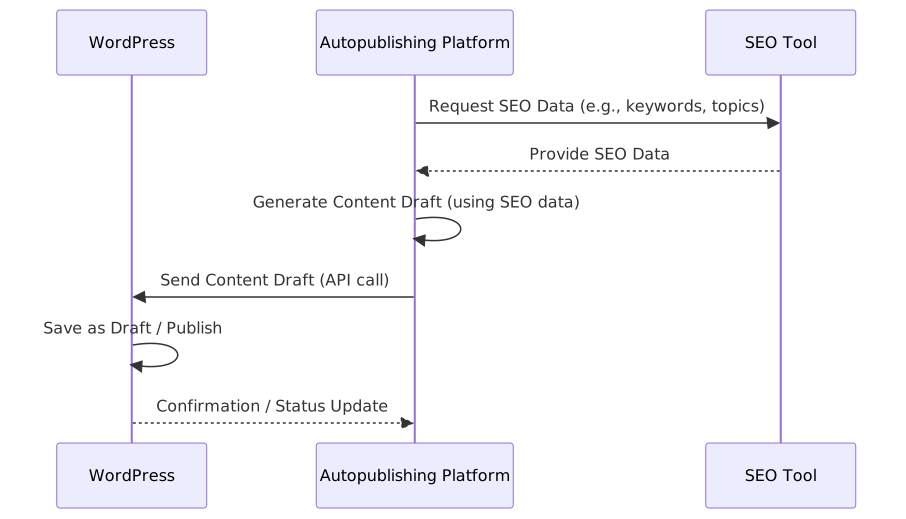
    A sequence diagram depicting the interaction between WordPress, an Autopublishing Platform, and an SEO Tool. The platform requests SEO data from the tool, uses it to generate a content draft, sends the draft to WordPress, and WordPress confirms the action.
    WordPress Autopublishing Integration Sequence

    Connecting your content engine to your WordPress site is the crucial final step. There are two primary methods for achieving this, each with its own set of trade-offs.

    Direct REST API Integration

    The WordPress REST API is a powerful interface that allows applications to “talk” to your WordPress site programmatically. SaaS platforms like Rank My Website use this method because it’s robust, secure, and highly flexible. It allows for the creation of posts with full control over every detail—content, titles, custom fields, SEO metadata, and more. According to the official wordpress handbook, the REST API provides a standardized way to interact with site data.

    Dedicated WordPress Plugins

    The alternative is a dedicated plugin installed on your WordPress site. The third-party platform sends content to the plugin, which then creates the post. This can be simpler to set up initially (“setup in 2 minutes” is a common claim), but it adds another piece of software to maintain and update on your site. It can also be less flexible than a direct API integration, potentially limiting the types of content or on-page elements you can control.

    Compatibility with Yoast, Rank Math, and Others

    Any credible autopublishing integration must work with the dominant SEO plugins. More than 7 million websites use yoast seo, and Rank Math is also incredibly popular. A good integration won’t just create a post; it will populate the specific fields used by these plugins, such as the focus keyphrase, meta description, and social sharing titles, ensuring your technical SEO foundation is solid.

    An autopublishing tool doesn’t replace your SEO plugin. It works through your SEO plugin, using it as the vehicle to implement on-page SEO at scale.

    Choosing the Right Autopublishing Integration

    A mindmap showing factors for autopublishing integration selection, branching into Features, Compatibility, Cost, Ease of Use, and Scalability, with further sub-branches for each.
    Factors for Autopublishing Integration Selection

    Not all integrations are created equal. Choosing the right one depends on your technical comfort, budget, and long-term goals.

    SaaS Platforms vs. Custom Scripts

    For most businesses, a fully-managed SaaS platform is the superior choice. Building your own scripts is a significant technical undertaking that requires ongoing maintenance.

    Feature SaaS Platform (e.g., Rank My Website) Custom-Built Script
    Setup Simple, often wizard-based Complex, requires development expertise
    Features Rich features (SEO, images, scheduling) Limited to what you can code
    Maintenance Handled by the provider Your responsibility; breaks with WP updates
    Cost Monthly/annual subscription High upfront development cost + maintenance
    Support Dedicated support team You are the support team

    Essential Features for SEO Success

    When evaluating platforms, look beyond the simple “publish” button. Key features include:

    • Image Handling: Can it add featured images, insert images into the content, and set alt text?
    • AI-Powered Internal Linking: Does it intelligently link to your existing content to build a strong site structure?
    • SEO Plugin Sync: Does it fully integrate with Yoast, Rank Math, or your plugin of choice?
    • Content Originality: Does it have measures to ensure the AI-generated content is unique and passes plagiarism checks?

    The Hidden Risks of Automated Content (and How to Avoid Them)

    With great power comes great responsibility. Mindlessly flooding your site with low-quality AI content is a fast track to an algorithmic penalty and a destroyed brand reputation.

    The Quality Control Mandate

    Automation is for execution, not for strategy or quality assurance. You must have a human-in-the-loop process. This means reviewing batches of content before they are scheduled, spot-checking published articles, and using performance data to identify and improve or remove underperforming content. Treat the AI as a very fast, very capable junior writer—it still needs an editor.

    The moment you stop reading the content your machine publishes is the moment you start gambling with your brand and your rankings.

    Navigating AI Detection and Search Engine Policies

    Google’s stance, as clarified in their guidance on ai-generated content, is that high-quality content is rewarded, regardless of how it’s produced. Their focus is on penalizing low-quality, spammy content intended to manipulate rankings. The risk isn’t the AI; it’s the quality. If your autopublished content is generic, unhelpful, and created solely for search engines, it will fail. If it’s genuinely useful and well-structured, it aligns with Google’s goals.

    Ethical Guardrails for Scaled Publishing

    Just because you can publish 500 articles about a topic doesn’t always mean you should. As this technology becomes more widespread, there are important ethical questions to consider. Are you adding value to the internet, or just noise? Ethical marketing practices suggest focusing on user benefit, not just automated output. A good strategy focuses on comprehensively covering a topic to serve user intent, not just to rank for every possible keyword variation.

    Measuring the ROI of Your Auto-Publishing Strategy

    How do you prove that your investment in automation is paying off? You need a clear measurement framework that connects content output to business results.

    Tracking Keyword Rankings and Organic Traffic

    The most direct metrics are found in your SEO tools and Google Analytics. You should be tracking:

    • Impressions and Clicks (GSC): Are the new pages being seen and clicked on in search results?
    • Keyword Movement: Are you seeing a steady increase in the number of keywords you rank for?
    • Organic Traffic Growth: Is the overall traffic to your blog or /blog/ subdirectory increasing month-over-month?

    Connecting Content to Conversions

    Traffic is good, but revenue is better. Set up goals in Google Analytics to track how many visitors from your automated content go on to perform a valuable action, such as signing up for a newsletter, requesting a demo, or making a purchase. This allows you to tie the cost of your content automation platform directly to the revenue it generates, calculating a clear ROI.

    Frequently Asked Questions

    Can Google penalize you for using autopublishing tools?

    Google does not penalize sites for using AI or automation, but for producing low-quality, spammy content. If you use autopublishing to scale high-quality, helpful, and original content, it is perfectly safe. If you use it to generate unedited, generic spam, you risk a penalty.

    How much content should I autopublish?

    This depends on your niche, resources, and goals. The focus should be on quality and relevance over pure quantity. A good starting point is to identify a topic cluster and aim to build comprehensive authority there, which might mean 20-50 articles, rather than publishing 5 articles on 10 different topics. Consistency is more important than volume.

    Do I still need to know SEO if I use an autopublishing tool?

    Yes, absolutely. In fact, your strategic SEO knowledge becomes even more valuable. The tool handles the execution, but you are responsible for the strategy—keyword research, topic selection, competitive analysis, and performance review. The tool is an amplifier for your expertise, not a replacement for it.

    What’s the difference between autopublishing and programmatic SEO?

    Programmatic SEO is a strategy that involves creating pages at scale by programmatically combining data with templates (e.g., “Best hotels in [City]”). Autopublishing is the mechanism used to publish content to a CMS like WordPress. You can use an autopublishing tool to execute a programmatic SEO strategy, but you can also use it to publish individual AI-generated articles.

    Investing in WordPress autopublish integrations for SEO is one of the single most effective ways to scale your organic growth in 2026. It allows you to build topical authority, save hundreds of hours, and focus your team on the strategic work that truly drives results. With over 500K+ articles already published through these systems, the proof is in the rankings. If you’re ready to put your content strategy on autopilot (the right way), try building your website with our free trial and get 7 free articles. ”’

  • Webflow CMS Autopublish SEO in 2026: Scale Your Content

    Webflow CMS Autopublish SEO in 2026: Scale Your Content

    Your Webflow site is a design masterpiece. The animations are slick, the user experience is flawless, and the branding is pixel-perfect. But if you’re serious…

    The Bottleneck in Your Beautiful Webflow Site: Manual SEO Content Publishing

    Your Webflow site is a design masterpiece. The animations are slick, the user experience is flawless, and the branding is pixel-perfect. But if you’re serious about organic growth, you’ve hit the wall: manually copy-pasting, formatting, and publishing every single blog post. It’s a tedious, soul-crushing bottleneck that kills content velocity.

    “Automating SEO content publishing in Webflow connects your content generation tools directly to your CMS, bypassing manual uploads. This allows you to publish a high volume of optimized articles consistently, a key factor in building topical authority and ranking faster. The core benefit is shifting your team’s focus from the tedious mechanics of publishing to the high-level strategy of what content to create. This lets you finally run a Webflow CMS autopublish SEO content strategy that actually scales, much like how wordpress autopublish integrations can scale content production.”

    Understanding Webflow CMS Autopublishing

    At its core, autopublishing is about creating a programmatic bridge between where your content is created and your Webflow CMS. Instead of a human downloading a Google Doc, logging into Webflow, creating a new CMS item, and manually mapping every field (title, body, meta description, author), a machine does it instantly via an API. This isn’t just about saving a few minutes. It’s about changing the fundamental economics of content production.

    When you’re only publishing a few articles a month, manual work is an annoyance. When you’re aiming to publish daily articles to build topical authority—a strategy we use to drive significant growth—the manual process becomes an operational impossibility. The hours spent on administrative tasks are hours not spent on keyword research, strategy, or analyzing performance.

    Manual vs. Automatic Publishing Mode

    In a manual workflow, a content manager is the gatekeeper. They are responsible for not just the quality of the content but also the fidelity of its presentation in Webflow. This includes everything from setting the correct Open Graph image to ensuring all internal links are correct. It’s a high-touch, error-prone process.

    An automatic publishing workflow delegates these tasks to a pre-configured system. You define the rules once—mapping your content fields to the corresponding Webflow CMS fields—and the integration handles the execution. A new article can be generated by an AI content platform like Rank My Website and appear as a fully-formatted, live post on your site moments later, with no human intervention required.

    API vs. App-Based Integration

    There are two primary ways to achieve this automation:

    1. App-Based Integration: This is the most user-friendly approach, typically involving “connector” apps like Zapier or Make. You use a visual interface to create a “recipe” or “scenario”: when a new piece of content is ready in Platform A (like an Airtable base or Google Sheet), it triggers an action to create a new CMS item in Webflow. It’s relatively easy to set up but can have limitations in handling complex content or custom fields.
    2. Direct API Integration: This is a more powerful and flexible method that involves writing code to communicate directly with Webflow’s API. The Webflow API provides extensive documentation for developers to create, update, and delete CMS items. This route offers maximum control but requires engineering resources. A platform like Rank My Website builds this direct integration so you get the power of the API without needing a developer.

    How Webflow CMS & Autopublish Work Together

    A flowchart showing the process of content creation to autopublishing. A content creator drafts content in Webflow CMS, which triggers an autopublish tool to publish the content live to Webflow CMS, making it accessible to website visitors.
    Webflow CMS Autopublish Process

    Connecting content generation to your Webflow CMS is a logical sequence of events managed by technology. The goal is to move from a keyword to a published, SEO-optimized article as efficiently as possible.

    The process generally follows these steps:

    1. Content Generation: An article is created, often by an AI content tool or delivered by a writer into a system (like a project management tool).
    2. Trigger: The completion of the article acts as a trigger. This could be a status change in a database, a new file in a folder, or a button press in a dedicated platform.
    3. Data Mapping: The autopublishing tool reads the content and its associated metadata (title, slug, author, custom fields).
    4. API Call: The tool makes a POST request to the Webflow API’s “Create Item” endpoint, sending the mapped data as a JSON payload.
    5. Webflow Creates Item: Webflow receives the API call, validates the data, and creates a new item in the specified CMS Collection.
    6. Publishing: The API call can specify whether to publish the item immediately or save it as a draft for review. For true automation, the item is published live.

    The entire sequence, from trigger to published post, can take less than a minute. This is how you achieve the content velocity required for modern SEO.

    How Webflow CMS Autopublishing Boosts SEO Efficiency

    A mindmap showing the SEO benefits of autopublishing. Main branches are Speed, Efficiency, Freshness, and Keyword Targeting. Sub-branches include Consistent Publishing, Faster Indexing, Reduced Manual Work, Scalability, Regular Content Updates, Improved Rankings, Automated Optimization, and Long-tail Opportunities.
    SEO Benefits of Autopublishing

    The most significant impact of autopublishing is the sheer gain in efficiency, which directly translates to better SEO results. Scaling content is a numbers game. The more high-quality, relevant pages you have indexed, the more opportunities you have to rank for a wide array of keywords.

    Consider the time breakdown for publishing 20 articles a month manually versus automatically. A conservative estimate for manual publishing—including formatting, SEO checks, and scheduling—is 30 minutes per article. That’s 10 hours a month of pure administrative work. With an automated system, that time drops to virtually zero, freeing up an entire workday plus change for strategic activities.

    This efficiency empowers a more aggressive content strategy. What was once a ceiling of 20 articles per month can become 60, 80, or more. This level of output is transformative for SEO, allowing a business to rapidly build a deep library of content that Google sees as an authoritative resource.

    The goal of SEO automation isn’t to remove the human strategist. It’s to remove the human from the machine’s job, liberating them to focus on what humans do best: planning, analyzing, and making high-level decisions.

    Setting Up Your Webflow CMS for Autopublishing

    Before you can flip the switch on automation, you need to structure your Webflow CMS to be machine-readable. A clean and logical CMS setup is the foundation of a successful autopublishing workflow. Here’s a step-by-step guide.

    1. Define Your CMS Collections

    First, ensure your CMS Collection (e.g., “Blog Posts,” “Articles,” “Resources”) is well-defined. According to Webflow’s own guides on the CMS, a Collection is a database for a specific type of content. The fields in this collection are the “sockets” that your automated content will plug into. Your “Blog Posts” collection should be distinct from “Case Studies” or “Team Members.”

    2. Configure SEO-Critical Custom Fields

    Out of the box, a Webflow collection is basic. You need to add custom fields to hold all the data required for on-page SEO. Go to your Collection settings and add the following fields:

    • Meta Title: A Plain Text field. While Webflow has a default “Title” field, having a separate one for the SEO Title gives you more control.
    • Meta Description: A Plain Text field (limit 2-3 lines).
    • Schema Markup: A Multi-line Text field. This is crucial for injecting advanced schema (like FAQ, HowTo, or Article schema) into your page.
    • Author Name: A Plain Text field or a Reference field linking to an “Authors” collection.
    • Canonical URL: A Plain Text field to specify the canonical URL if needed, preventing duplicate content issues.
    • Featured Image Alt Text: A Plain Text field to programmatically set the alt text for your main blog post image.

    3. Map Fields in Your Automation Tool

    With your Webflow CMS prepared, you’ll turn to your integration tool. Whether it’s a custom solution like Rank My Website or a connector like Zapier, the process is conceptually the same. You’ll create a visual or code-based map that tells the system:

    • “Take the ‘headline’ from my source and put it in the ‘Name’ and ‘Meta Title’ fields in Webflow.”
    • “Take the ‘body_content’ and put it in the ‘Rich Text’ field.”
    • “Take the ‘schema_json’ and put it in the ‘Schema Markup’ field.”

    4. Test with Draft Posts

    Never start by publishing live. Configure your automation to create new items in Webflow as “Drafts.” This allows you to inspect the results without impacting your live site. Check one or two draft posts to ensure all fields are populated correctly, formatting is preserved, and no data is missing. Once you’ve confirmed the mapping is perfect, you can switch the automation to publish live.

    Integrating Autopublish Tools with Webflow CMS

    A flowchart illustrating integration methods for autopublish tools with Webflow CMS. An autopublish tool can connect to Webflow CMS via Webflow API, Zapier/Integrations, or Custom Webhooks.
    Integration Methods for Autopublish Tools

    Choosing your integration method depends on your budget, technical expertise, and desired level of control. There is no single “best” way, only the best way for your team’s needs. Companies like Wolverine Assemblies are focused on delivering their products, not on becoming API integration experts; for them, a managed solution is far more effective.

    Comparison of Webflow Autopublishing Solutions

    Feature DIY (Zapier/Make) Custom API Script Managed Platform (Rank My Website)
    Setup Time Low (Hours) High (Weeks/Months) Very Low (Minutes)
    Maintenance Medium (Requires monitoring zaps) High (Requires developer oversight) None (Platform handles it)
    SEO Intelligence None (Simple data passing) Low (Only what you code) High (Built-in SEO optimization)
    Field Mapping Basic to Medium Fully Custom Pre-configured for SEO
    Cost Subscription Fee + Time Developer Salary All-Inclusive Platform Fee
    Best For Simple blogs, low volume Enterprises with dev teams Businesses focused on growth

    Key Features of a Robust Autopublishing Solution for Webflow CMS

    Not all autopublishing tools are created equal. When evaluating a solution for scaling SEO content, look for features that go beyond simple data transfer. A truly robust system acts as a co-pilot for your SEO strategy.

    Key features include:

    • Advanced Field Mapping: The ability to map to any custom field in your Webflow CMS, including rich text, reference fields, and option fields.
    • Automated Schema Generation: Manually writing JSON-LD schema is a significant pain point. A great tool generates and injects necessary schema (Article, FAQ, etc.) automatically based on the content, boosting your chances of earning rich snippets.
    • Automated Internal Linking: The best platforms don’t just publish content; they enrich it. By analyzing your existing site content, a tool can automatically insert relevant internal links into new articles, a critical and time-consuming SEO task that we include as part of our service.
    • Content Performance Tracking: The job isn’t done once the article is published. A top-tier solution should integrate with tools like Google Search Console to track the performance of the content it publishes, creating a feedback loop for your strategy.
    • Image Handling: The ability to not just set a featured image but to also programmatically set its alt text from a dedicated field is essential for accessibility and image SEO.

    Don’t just automate the act of publishing. Automate the intelligence that surrounds it. Your tool should handle schema, internal links, and performance tracking, not just push text from one box to another.

    Best Practices for AI-Generated SEO Content in Webflow

    Automating the publishing of AI-generated content is powerful, but it requires a commitment to quality. The “garbage in, garbage out” principle applies with devastating accuracy.

    Quality Assurance is Non-Negotiable

    Even the best AI content models require a human in the loop. This doesn’t mean a human needs to approve every single article before it goes live, but it does mean establishing a rigorous quality assurance process. At Rank My Website, our workflow combines AI generation with human oversight to ensure every article is factually accurate, readable, and strategically sound. Regularly audit a percentage of your automatically published content. Check for:

    • Factual Accuracy: AI can and does “hallucinate” facts. Spot-check any claims, statistics, or data points.
    • Brand Voice: Does the content sound like it came from your company? Fine-tune your prompts and guidelines to maintain a consistent voice.
    • Formatting & Readability: Ensure the output uses proper headings, short paragraphs, and lists to create a positive user experience. A wall of text, even if perfectly optimized, will have a high bounce rate.

    Prompt Engineering for SEO

    Your results are a direct reflection of your prompts. Instead of a simple prompt like “write a blog post about X,” develop detailed prompts that specify the target keyword, secondary keywords, desired tone, and required entities to include. A good prompt might even include a negative constraint, such as “Do not mention competitor Y.” Investing time in creating a library of sophisticated prompts is one of the highest-leverage activities in an automated content system. A study from Nielsen Norman Group confirms that iterative prompting and providing clear context drastically improves AI output quality.

    Troubleshooting and Performance

    Occasionally, integrations will fail. An API key might expire, or Webflow might change a data requirement. Your team should have a simple process for diagnosing issues. Most tools provide logs that show the exact data sent and the response received from the Webflow API, which is the first place to look.

    On the performance side, if a batch of content isn’t ranking, the issue is rarely the automation itself. The culprit is almost always the content strategy. Are you targeting the right keywords? Is the content truly the best answer for the user’s query? Automation scales execution; it doesn’t fix a flawed strategy.

    Frequently Asked Questions

    What Webflow plan do I need for API access?

    To use the Webflow CMS API for auto-publishing, you need a site plan that includes API access. As of early 2026, this means you need the CMS plan or higher (Business, Enterprise). The lower-tier Basic and Site plans do not include API access.

    Can I auto-publish content from a Google Sheet to Webflow?

    Yes, this is a very common workflow. You can use a tool like Zapier or Make to watch a Google Sheet for new rows. When a new row is added and filled out, the tool can be configured to take the data from each column and map it to the corresponding fields in your Webflow CMS collection, creating a new item.

    How does auto-publishing handle schema markup?

    It depends on your integration. A simple Zapier integration might require you to have a full JSON-LD script in a cell in your Google Sheet, which is then mapped to a custom HTML embed field in your Webflow post. More advanced platforms like Rank My Website automatically generate the appropriate schema based on the content itself, so you don’t have to write any code.

    Is auto-publishing bad for SEO?

    No, the method of publishing is irrelevant to Google. What matters is the quality, relevance, and consistency of the content. Auto-publishing is simply a tool to achieve the scale and consistency required for a competitive SEO strategy. Publishing 100 high-quality articles automatically is infinitely better for SEO than publishing 5 high-quality articles manually.

    What are the security risks of integrating third-party tools?

    The primary risk is exposing your Webflow API key. Treat your API key like a password. Only use trusted, reputable platforms. When creating an API key in Webflow, you can set its permissions. For an autopublishing tool, the key only needs permissions to create and update items in your CMS, not access your site design or user data. Use the principle of least privilege.

    Scaling your content is the single most effective way to scale your organic traffic. By implementing a Webflow CMS autopublish SEO content workflow, you move your team from being content mechanics to content architects. You stop wasting time on manual uploads and start investing that time in building a true content engine for your business. Rank My Website provides this an end-to-end solution, from keyword research and AI-powered content creation to fully automated publishing, so you can focus on growth.

  • AI Content Tools: Accelerating SaaS Marketing Without the Hype

    AI Content Tools: Accelerating SaaS Marketing Without the Hype

    Everyone is selling the AI dream: a magical black box that spits out perfect blog posts, triples your traffic overnight, and books demos while you sleep. This…

    ”’

    Stop Chasing Unicorns: A Realistic Guide to AI Content Tools for SaaS Marketing Teams in 2026

    Everyone is selling the AI dream: a magical black box that spits out perfect blog posts, triples your traffic overnight, and books demos while you sleep. This is a fantasy. For SaaS marketing-tools) teams, AI content tools are not a replacement for strategy, but a powerful accelerant. The best AI content tools for SaaS marketing teams are those that augment human expertise by automating repetitive tasks, optimizing content for search, and providing deep analytical insights. Success comes from integrating these tools into a well-defined workflow, not from expecting them to run on autopilot. This requires a human-led approach focusing on strategy, quality control, and creative direction.

    The Rise of AI in Content Marketing

    AI in marketing isn’t new. We’ve had algorithmic recommendations and programmatic ad buying for years. What is new is the accessibility and power of generative AI. The recent explosion in generative AI adoption, which doubled to 65% between 2023 and 2024, has fundamentally changed the toolset available to SaaS marketers. Over 60% of enterprise SaaS platforms now include some form of embedded AI features, making these capabilities table stakes.

    An AI marketing tool uses artificial intelligence, machine learning, and natural language processing to automate and augment marketing tasks. For a SaaS company, this can range from a simple AI-powered headline generator to a complex platform that manages the entire content lifecycle. The goal isn’t just to create more content faster, but to create smarter content that performs better and drives measurable business outcomes.

    Key Benefits of AI for SaaS Content Teams

    Why bother with this new toolset? Because the pressure on SaaS marketing teams has never been higher. Customer acquisition costs are rising, and an overwhelming 81% of B2B buyers now make their vendor choice before ever talking to a sales representative. Your content has to do the heavy lifting.

    When implemented correctly, AI delivers tangible results. Some studies claim companies report a 42% reduction in CAC after integrating AI into their marketing. The primary benefits fall into three buckets:

    1. Efficiency and Scale: This is the most obvious benefit. AI can draft a blog post, generate social media updates, and create email copy in minutes, not hours. This frees up your team to focus on higher-value strategic work.
    2. Performance and Optimization: AI tools can analyze SERPs, identify keyword gaps, and suggest on-page SEO improvements. They can A/B test headlines and personalize content for different audience segments, leading to higher engagement and conversion rates.
    3. Data-Driven Insights: AI can analyze vast datasets to uncover trends, predict customer behavior, and measure content ROI more accurately than a human ever could. This allows for smarter budget allocation and a more defensible marketing strategy.

    The purpose of AI isn’t to replace your marketing team. It’s to give them superpowers, automating the tedious work so they can focus on the strategic insights that no machine can replicate.

    Building Your SaaS AI Marketing Stack: A Category Breakdown

    An “AI marketing stack” sounds intimidating, but it’s just a collection of tools that work together to achieve your goals. Your stack could be as simple as two or three tools or as complex as a dozen integrated platforms. The key is to choose tools that solve specific problems within your workflow.

    AI for Content Generation & Optimization

    These tools are the most well-known. They use large language models (LLMs) to generate written content. The leaders in this space are platforms like Jasper, Copy.ai, and the API from OpenAI. However, the real power for SaaS teams comes from more specialized platforms. Tools like Rank My Website don’t just generate text; they integrate keyword data and SEO best practices to create content that’s primed to rank. This moves you from a blank page to a nearly-finished, optimized draft.

    AI for SEO and Keyword Research

    Traditional SEO tools are rapidly integrating AI. Ahrefs and Semrush now use AI to cluster keywords, analyze SERP intent, and forecast traffic potential. Platforms like SurferSEO and MarketMuse specialize in AI-driven content optimization, giving you a data-backed score and specific recommendations to improve your on-page SEO before you even publish. This is a critical function for us at Rank My Website, where our automation handles the initial keyword research to inform content strategy.

    AI for Marketing Task Automation and CRM

    This is where AI gets deeply integrated into your go-to-market motion. Platforms like HubSpot and Salesforce use AI to score leads, predict churn, and recommend next best actions for sales reps. For marketing automation, tools like Zapier or Make can use AI actions to create intelligent workflows, such as automatically generating a personalized follow-up email sequence based on a user’s interaction with your content. This bridges the gap between marketing activity and sales outcomes.

    AI for Analytics and Reporting

    How do you prove your content is working? AI-powered analytics tools provide the answer. Google Analytics 4 has predictive audiences built in. Tools like Tableau or Looker use AI to surface insights from your marketing data that you might have missed. They can identify which content formats drive the most pipeline or which channels have the highest ROI, moving beyond simple traffic and engagement metrics to tie content back to revenue.

    How AI Content Tools Are Changing SaaS Marketing Workflows

    Stitching these tools together fundamentally alters the traditional, linear content workflow. The old way was a factory assembly line: Ideate -> Write -> Edit -> Publish -> Promote. The new way is a dynamic, cyclical process.

    1. Strategy & Discovery (Human + AI): Instead of brainstorming topics in a vacuum, you use an AI tool to analyze competitor content and identify high-opportunity, low-competition keywords.
    2. Creation & Augmentation (AI + Human): An AI platform like Rank My Website generates a first draft of an article based on the target keyword and SERP data. Your subject matter expert then reviews, edits, and adds unique insights, examples, and brand voice. This is where we see the most value, providing clients with daily articles that still have a deep layer of human expertise.
    3. Optimization & Pre-flight (AI): An AI optimization tool scores the draft for readability, SEO, and topical completeness, providing specific suggestions for improvement.
    4. Publication & Distribution (Automated): The content is published to your CMS, and AI tools help generate social posts, email newsletters, and other promotional assets.
    5. Analysis & Iteration (AI + Human): An AI analytics platform tracks the content’s performance—not just traffic, but leads generated and pipeline influenced. The insights feed back into the strategy and discovery phase for the next content cycle.

    Choosing the Right AI Content Tool for Your SaaS Team

    A mindmap visualizing factors for choosing AI content tools, branching into features (content types, SEO integration, workflow automation, collaboration), team size and structure, budget, niche and industry fit (target audience, brand voice), and integration needs (CMS, CRM, SEO tools).
    AI Content Tool Selection Factors

    With hundreds of tools on the market, choosing the right one is daunting. The decision comes down to your team’s size, technical niche, and primary goal.

    A startup with a two-person marketing team has very different needs from a 50-person enterprise department. For small teams, an all-in-one platform is often best. For larger teams, a “best-of-breed” approach, integrating specialized tools via APIs, may be more effective.

    Here’s a comparison of how different tool types fit different needs:

    Tool Category Best for… Example Tools Pricing Model
    All-in-One Content Platforms Small/Medium SaaS teams needing a unified workflow. Rank My Website, Jasper, Copy.ai Subscription (per seat/per word)
    Point-Solution SEO Optimizers Teams with existing writers who need data-driven guidance. SurferSEO, MarketMuse Subscription (per article/per user)
    Generative AI APIs Enterprise teams with developer resources to build custom solutions. OpenAI (GPT-4), Anthropic (Claude 3) Usage-based (per token)
    Embedded CRM/MAP AI Sales-aligned B2B teams focused on lead nurture and conversion. HubSpot AI, Salesforce Einstein Add-on to existing platform subscription

    The biggest mistake is buying a tool without a process. An AI tool amplifies your existing workflow. If your workflow is chaotic, AI will just help you create more chaos, faster.

    Assess the trustworthiness of AI-generated content, especially in a technical SaaS niche. An LLM might not know the nuances of your specific API or the regulatory landscape of your industry. This is where human oversight is non-negotiable. It’s why we see success with companies like our client Wolverine Assemblies, who operate in a specific industry but benefit from a content strategy that integrates expert knowledge with automated production.

    Integrating AI Content Tools into Your Existing Workflow

    Adopting a new tool is easy. Getting your team to actually use it effectively is hard. A shocking 74% of companies struggle to achieve real value from their AI initiatives. Success hinges on integration and training, not just technology.

    Start with a pilot project. Choose one part of your workflow—like blog post drafting or SEO optimization—and introduce a single tool. Document the process, train the relevant team members, and measure the results. Don’t try to boil the ocean by replacing your entire stack overnight.

    The most important piece is developing the skills of your human team. Marketers now need to be expert “AI wranglers.” They need to know how to write effective prompts, critically evaluate AI output, and add the strategic and creative layer that machines cannot provide. Your budget for AI tools should be matched with a budget for training and skill development.

    Real-World SaaS Use Cases (and a Word on Ethics)

    AI is not a monolithic entity. Its application varies dramatically across different SaaS marketing functions.

    • For Product-Led Growth (PLG): AI can analyze user behavior within a free trial to identify activation patterns. It can then trigger personalized in-app messages or email sequences to guide users toward “aha!” moments, increasing the trial-to-paid conversion rate.
    • For B2B Demand Generation: AI can build and score lead lists, personalize outreach emails at scale, and even generate case study drafts by summarizing customer interviews and data. This allows a small team to run sophisticated, multi-touch campaigns that were previously only possible for large enterprises.
    • Ethical Considerations: This power comes with responsibility. You must be transparent about when users are interacting with an AI (like a chatbot). You must protect user data and be aware of the inherent biases in AI models. Generating fake reviews, creating intentionally misleading content, or violating privacy are not marketing strategies; they are landmines.

    Ultimately, the technology is a tool. Its ethical use is determined by the human wielding it. As SaaS marketers, we have a responsibility to use these powerful tools to create better, more helpful experiences for our customers, not just to create more noise.

    Ready to move beyond the chaos? Rank My Website automates the entire top-of-funnel content process—from keyword research to publishing optimized daily articles—so you can focus on strategy and growth. See how we build content engines.

    FAQ

    What are the best AI content tools for a small SaaS startup?

    For a small startup, the best tools are typically all-in-one platforms that combine content generation, SEO optimization, and publishing. Look for a solution like Rank My Website, Jasper, or Copy.ai that offers a unified workflow. This minimizes the need to subscribe to and learn multiple, separate tools, making it more cost-effective and efficient for a small team.

    How can a SaaS company measure the ROI of AI content tools?

    Measure ROI by tracking metrics beyond simple traffic. Connect your content to business outcomes. Key metrics include: Cost per Lead (CPL) and Customer Acquisition Cost (CAC) for content-generated leads, pipeline value influenced by marketing content, and conversion rates on pages with AI-personalized elements. Compare these to your pre-AI baseline to quantify the impact.

    Can AI replace my SaaS marketing team?

    No. AI is an augmentation tool, not a replacement. It excels at data processing and repetitive tasks, but it cannot replicate human creativity, strategic thinking, industry expertise, or brand understanding. The most effective teams use AI to handle the 80% of grunt work, freeing up humans to focus on the 20% of high-value strategic work that drives real growth.

    How important is human editing for AI-generated content?

    It is absolutely critical, especially in SaaS. AI models are generalists and often lack the specific, nuanced knowledge of a technical product or a niche audience. A human expert must review every piece of AI-generated content for accuracy, tone, brand voice, and unique insights. Skipping this step is a recipe for creating generic, untrustworthy content that can damage your brand’s credibility.

    What is an AI marketing stack?

    An AI marketing stack is the collection of different AI-powered tools a marketing team uses to execute their strategy. Instead of a single platform, it’s often a combination of tools for different functions, such as an AI writer for content creation, an SEO tool for optimization, a CRM with AI for lead scoring, and an analytics platform for reporting. These tools are often integrated to share data and automate workflows. ”’

  • Content Production Workflow for SEO Teams: Beyond the Chaos

    Content Production Workflow for SEO Teams: Beyond the Chaos

    Your content-creation-workflow/) team isn’t an art studio. It’s an assembly line. While creativity is essential, treating content production like an…

    Your content-creation-workflow/) team isn’t an art studio. It’s an assembly line. While creativity is essential, treating content production like an unpredictable muse is why most in-house SEO teams fail to generate consistent traffic. They wait for inspiration instead of building a machine. A structured content production workflow for in-house SEO teams is a systematic, repeatable process for moving content from idea to published asset. It defines each step—from keyword research to performance analysis—ensuring every piece of content is strategically aligned with SEO goals, produced efficiently, and optimized for maximum organic impact from day one.

    What is a Content Production Workflow? (And Why Most Teams Get It Wrong)

    A content production workflow is a documented, step-by-step framework that guides your team through the entire lifecycle of creating and publishing content. For an in-house SEO team, this isn’t just about writing and editing; it’s about embedding SEO considerations into every single stage. Most teams have an informal process, which usually means chaos. The writer gets a vague topic, the editor checks for typos, and someone hits “publish” whenever they have a spare moment. There’s no accountability or predictability.

    A real workflow is different. It’s a deliberate system designed for:

    • Efficiency: It eliminates bottlenecks and guesswork. A 2023 survey from Orbit Media found the average blog post now takes over 4 hours to write. A workflow ensures that time is spent on high-value tasks, not chasing approvals or searching for files.
    • Consistency: It ensures every article meets a predefined standard for quality, tone, and on-page SEO. This builds brand authority and reader trust.
    • Quality: By building in review gates and optimization checklists, you guarantee that no piece of content goes live without being thoroughly vetted for accuracy, readability, and SEO best practices.
    • Scalability: A documented workflow is the only way to scale output without sacrificing quality, whether you’re moving from 4 to 10 articles a month or onboarding a new writer.

    The Stages of a Robust SEO Content Workflow

    A proper content production workflow for in-house SEO teams maps every action from conception to post-publication analysis. While specifics vary, the core stages are non-negotiable. Breaking it down ensures that SEO isn’t an afterthought but the foundation of the entire process.

    Stage 1: Strategy & Ideation (The SEO Foundation)

    This is where SEO impact is made or lost. Before a single word is written, the SEO team must define the article’s purpose. This involves deep keyword research, a service we see as fundamental to any content plan. It’s about more than just picking a high-volume term; it’s about understanding user intent, analyzing the SERPs for content formats, and identifying a unique angle. A Content Marketing Institute report revealed that 71% of the most successful B2B marketers have a documented content strategy, proving you can’t wing this part and expect results.

    Stage 2: Creation & Optimization (Writing for Robots and Humans)

    With a clear brief in hand, the writer gets to work. This stage is about translating the SEO strategy into a compelling narrative. The draft should be structured with headings, answer the primary keyword’s query directly, and incorporate related subtopics for topical authority. This is where on-page SEO becomes tangible. The writer should be thinking about internal linking opportunities, image alt text, and clear calls-to-action. Content depth is also critical; a Backlinko analysis of 11.8 million Google search results found a clear correlation between comprehensive content and first-page rankings.

    Stage 3: Review & Technical SEO Checks (The Quality Gate)

    No piece of content should go directly from the writer to the CMS. The review stage involves multiple stakeholders:

    • Editor: Checks for grammar, style, tone, and clarity.
    • SEO Specialist: Verifies keyword usage, meta tags, schema markup, and internal link placement. This is a critical check to ensure the article is technically sound before indexing.
    • Subject Matter Expert (SME): Reviews for factual accuracy, especially in technical niches.

    This multi-layered review prevents errors and ensures the final product is polished, accurate, and perfectly optimized.

    Stage 4: Publishing & Promotion (Going Live)

    Publishing is more than just hitting a button in WordPress. This stage involves a pre-publish checklist: finalizing the URL slug, ensuring images are compressed, double-checking the meta description, and confirming schema is correctly implemented. Once live, the work isn’t over. The Content Manager should submit the URL for indexing via Google Search Console and begin initial promotion efforts, such as sharing it on social channels or with an email list.

    Stage 5: Analysis & Iteration (Closing the Loop)

    A workflow without a feedback loop is a dead end. After 30-90 days, the SEO team must analyze the content’s performance. Using tools like Google Analytics and Google Search Console, they should track rankings, organic traffic, and conversions. Did the article rank for its target keyword? Is it driving traffic? This data informs future content strategy. If a post is underperforming, it may need to be updated, better optimized, or supported with more backlinks.

    A workflow isn’t a rigid set of rules you never change. It’s a living system that you must analyze and refine every quarter to remove bottlenecks and adapt to what the data tells you.

    Content Production Stages (Visualized)

    A flowchart showing the steps of a SEO content production workflow: Keyword Research and Topic Selection leads to Content Brief Creation, then Content Writing, followed by SEO Optimization and Editing, then Review and Approval, leading to Publishing and Promotion, and finally Performance Monitoring and Iteration.
    SEO Content Production Workflow

    To better understand the flow, it helps to visualize the sequence of events. Each step builds on the last, creating a chain of value from raw keyword to ranked article.

    Building Your In-House SEO Workflow: A Step-by-Step Guide

    Creating a workflow from scratch can feel daunting, but it can be done systematically. Follow these steps to build a process that turns your content chaos into a predictable growth engine.

    1. Define Goals and KPIs: Start with the end in mind. What is the business goal of your content? Is it to generate leads, drive e-commerce sales, or build brand awareness? Define clear KPIs like “increase organic traffic to product pages by 15% in 6 months” or “achieve a top-3 ranking for X high-intent keywords.” These goals will dictate the entire workflow.
    2. Assign Roles and Responsibilities: Ambiguity is the enemy of efficiency. Clearly define who is responsible for each stage of the workflow. Who does keyword research? Who writes? Who edits? Who has final approval? Create a RACI (Responsible, Accountable, Consulted, Informed) chart if needed. This step alone can solve half of your production problems.
    3. Standardize with Templates & SOPs: Create detailed templates for everything. This includes the content brief, writer guidelines, and pre-publish checklists. Standard Operating Procedures (SOPs) should document every step, from how to name files to how to format a meta description. This reduces errors and makes it easy to onboard new team members. Companies like our client Wolverine Assemblies thrive on such process-driven efficiency.
    4. Choose Your Technology Stack: Select tools that facilitate your workflow, not complicate it. You don’t need a dozen different platforms. A solid project management tool, an SEO platform, and your CMS are the core components. Ensure they integrate where possible to create a smoother process.
    5. Document and Train: Once the workflow is defined, document it in a central, accessible location like Confluence or Google Docs. Hold a training session with the entire team to walk through the new process, answer questions, and get buy-in. An undocumented workflow is just a rumor.

    Team Roles & Responsibilities

    A flowchart showing collaboration between roles: SEO Strategist creates Content Brief, which goes to Content Writer. Writer produces Draft Content, which goes back to SEO Strategist and also to SEO Editor. Editor produces Optimized Content, which goes to SEO Strategist and Publisher/Developer. Publisher/Developer produces Live Content, which goes to SEO Strategist.
    Cross-Functional Team Collaboration

    For a content production workflow for in-house SEO teams to function properly, every member must have a clearly defined role. Overlapping responsibilities and unclear ownership are a primary source of friction and delays.

    Technology Stack for Efficiency

    A mindmap detailing essential tools for an SEO content workflow, categorized into: Reporting & Analytics (Google Analytics, Search Console, Rank Tracking), Keyword Research (Semrush, Ahrefs, Google Keyword Planner), Content Creation & Optimization (Google Docs/Word, Grammarly, Surfer SEO/Frase.io), Project Management (Asana, Trello, Jira), and Publishing (CMS like WordPress, Webflow).
    Essential Tools for SEO Content Workflow

    A streamlined workflow runs on a well-chosen set of tools. The goal isn’t to have the most tools, but the right tools that integrate and reduce manual work. Here’s a look at the essential categories.

    Comparing Project Management Tools for Content Workflows

    Your project management tool is the backbone of your workflow. It provides a single source of truth for your entire content pipeline. Choosing the right one depends on your team’s size, complexity, and budget.

    Feature Asana Trello ClickUp
    Core Concept Task-based projects with lists/boards Kanban boards with cards All-in-one suite with multiple views
    Best For Teams needing structured, multi-step projects and timeline views. Visual thinkers and teams who prefer a simple, drag-and-drop interface. Power users who want customization and multiple apps in one place.
    SEO Use Case Building a template for the entire content process, with dependencies for review and approval. Visualizing content status (e.g., Ideation, Writing, Editing, Published) across a board. Creating custom fields for keyword, target URL, and other SEO metrics directly within tasks.
    Complexity Moderate Low High

    Common Workflow Pitfalls and How to Avoid Them

    Even a well-designed workflow can fail if you fall into common traps. Being aware of these pitfalls is the first step to avoiding them and keeping your content machine running smoothly.

    Pitfall 1: SEO as an Afterthought

    The most common failure is treating SEO as a final step before publishing. An editor asks the SEO team to “sprinkle in some keywords” after the article is already written. This never works. How to aovid it: Embed SEO from Stage 1. The SEO strategist must create the content brief, providing the keyword strategy, target SERP, and structural outline before the writer begins.

    Pitfall 2: Vague Briefs & Endless Review Cycles

    A brief that just says “write about topic X” is a recipe for disaster. It leads to multiple drafts, frustrated writers, and subjective feedback. How to avoid it: Your content brief template should be exhaustive. It must include the primary keyword, secondary keywords, target audience, key questions to answer, word count, internal links to include, and a sample SERP analysis.

    Pitfall 3: Ignoring Performance Data

    Publishing content and never looking at it again is like running a race without a finish line. Many teams are so focused on production volume that they never measure what actually works. How to avoid it: Schedule a formal content performance review every month or quarter. Create a system for updating and refreshing underperforming content. This practice of content pruning and optimization is critical for long-term growth.

    Don’t just create content; manage it as a portfolio of assets. Some will be winners, some will be duds. The job is to invest more in the winners and divest from the duds.

    Integrating AI into Your SEO Content Workflow

    The rise of AI-powered SEO tools and writers presents a massive opportunity to accelerate your content workflow. The key is to use AI as an assistant to augment your team’s expertise, not as a replacement for it. At Rank My Website, we use automation to help clients scale the production of high-quality daily articles without the traditional overhead.

    Here’s how AI can be integrated at different stages:

    • Ideation: Use AI tools to brainstorm clusters of related topics from a single keyword, generate dozens of potential titles, or create a comprehensive outline based on top-ranking competitors.
    • Creation: AI can generate a first draft based on a detailed brief. This draft should then be heavily edited and refined by a human writer to add unique insights, brand voice, and factual accuracy. A survey by Databox showed it takes most marketers over two hours to write a blog post; AI can significantly shorten that first-draft time.
    • Optimization: AI platforms can suggest internal linking opportunities, generate optimized meta descriptions, and even analyze a draft for topical completeness against the SERP. We even handle internal linking and backlinks as part of our automated offering.

    By strategically applying AI, you can free up your in-house team to focus on higher-value tasks like strategy, expert review, and performance analysis.

    FAQ

    How do you measure the ROI of a content production workflow?

    Measure ROI by tracking the cost of content production (salaries, tool subscriptions) against the value it generates. Value can be measured through SEO metrics (organic traffic growth, keyword rankings), conversion metrics (leads generated, sales from organic traffic), and even production metrics (reduced time per article, increased output).

    What is the ideal team size for an in-house SEO content team?

    There is no one-size-fits-all answer. A small team can be effective with a very streamlined workflow and can consist of one SEO strategist who also edits and a freelance writer. Larger teams may have dedicated roles for a Content Manager, multiple writers, a technical SEO, and a link-building specialist.

    How long should a content production cycle take?

    A typical cycle, from approved brief to publication, should take 1-2 weeks for a standard blog post. Complex or long-form content may take longer. Rushing the process often leads to skipping the critical review and optimization stages, diminishing the content’s SEO value.

    What’s the difference between a content workflow and an editorial calendar?

    An editorial calendar plans what content will be published and when. A content workflow defines how that content gets made from start to finish. The calendar is the strategic schedule; the workflow is the operational process to meet that schedule. You need both.

    Your Workflow is Your Growth Engine

    Stopping the content chaos is the first step toward predictable, scalable organic growth. A well-documented content production workflow for in-house SEO teams transforms your content efforts from a series of disjointed tasks into a powerful, efficient system for ranking. It holds people accountable, ensures quality, and most importantly, produces assets that consistently perform.

    If building and managing this entire machine sounds like too much, platforms like Rank My Website can put your content production on autopilot. We build your SEO strategy, generate optimized daily content, and handle the technical details so you can focus on running your business. Learn more about how you can automate your seo content engine.

  • Scale Organic Traffic: Automate Your SEO, Amplify Your Strategy

    Scale Organic Traffic: Automate Your SEO, Amplify Your Strategy

    Stop thinking of SEO automation as a magic button. It isn’t. Treating it like one is why so many businesses see it fail. Scaling organic traffic with…

    Stop thinking of SEO automation as a magic button. It isn’t. Treating it like one is why so many businesses see it fail. Scaling organic traffic with automation is not about replacing human strategy but about amplifying it with perfectly executed, scalable processes. To effectively scale organic traffic with automation, you must first create a repeatable SEO workflow, then use tools to execute the high-volume, low-creativity tasks within it. This involves automating keyword research, content creation pipelines, social promotion, and technical SEO monitoring, freeing up strategists to focus on high-impact insights and creative direction.

    Understanding the Pillars of Organic Traffic – And How Automation Supports Them

    Before we can automate growth, we have to agree on what drives it. Organic traffic doesn’t appear by accident. It’s the result of a deliberate, sustained effort across three core pillars. Automation acts as a force multiplier for each one.

    Pillar 1: Technical SEO

    Technical SEO is the foundation of your website. If search engine crawlers can’t efficiently find, understand, and index your content, nothing else matters. It’s the non-negotiable prerequisite for getting a single visitor from Google, which still accounts for a staggering 89.66% of global traffic. Manually auditing a site with thousands of pages for issues like broken links, slow page speed, or improper canonical tags is a Sisyphean task.

    Automation tools like Screaming Frog or the site audit feature in Ahrefs can crawl your entire site in minutes, generating prioritized lists of errors. Setting up automated weekly crawls means you catch technical fires before they burn down your rankings.

    Pillar 2: Content

    Content is how you meet user intent and prove your authority. To scale organic traffic, you need a steady stream of high-quality, relevant content that answers the specific questions your audience is asking. This is where many businesses get stuck, bogged down by slow, manual content creation processes.

    Automation helps you build a content engine. It starts with our approach to keyword research, where tools can identify thousands of opportunities. Then, AI-driven platforms can generate structured a first draft, which your human experts refine and enrich. At Rank My Website, we use automation to help produce daily articles for clients, creating a flywheel of new content that consistently targets valuable keywords.

    Pillar 3: Authority (Backlinks)

    Authority, in Google’s eyes, is largely measured by the quantity and quality of backlinks pointing to your site. These are votes of confidence from other websites. While the outreach and relationship-building part of link building requires a human touch, automation plays a huge role in the prospecting and monitoring stages.

    Tools like Hunter.io or BuzzStream can automate finding contact information for websites you want a link from. You can also set up alerts using tools like Ahrefs Alerts to know when your competitors earn a new backlink, revealing new opportunities for you to pursue. This turns a manual guessing game into a data-driven process.

    The Organic Traffic Automation Flywheel

    A flowchart showing a continuous loop starting with keyword research, leading to content creation, then SEO optimization, publishing and promotion, traffic and ranking monitoring, and finally back to keyword research.
    The Organic Traffic Automation Flywheel

    Scaling traffic isn’t a linear process. It’s a self-reinforcing cycle, or flywheel. Each automated step feeds the next, creating momentum that drives exponential growth over time. When you successfully automate one part of the process, it creates data and opportunities that make the next part easier and more effective.

    1. Automated Keyword Discovery: Tools constantly scan for new ranking opportunities, content gaps, and competitor keywords.
    2. Automated Content Pipeline: These keywords feed a content creation system that uses AI to generate drafts and manages workflow, ensuring consistent publishing.
    3. Automated Promotion: As new content is published, automation pushes it to social media channels, email lists, and internal linking workflows.
    4. Automated Analytics: Tools monitor traffic, rankings, and engagement for the new content, providing performance data.
    5. Data-Driven Insights: This performance data feeds back into the keyword discovery phase, identifying what’s working and what’s not. The cycle begins again, but smarter this time.

    A Step-by-Step Audit for Automation Opportunities

    Ready to build your own automation engine? Don’t just buy a bunch of tools. Start by auditing your current manual processes to find the biggest points of friction. This is where you’ll get the highest return on your automation investment.

    1. Map Your Current Workflow: Get your team in a room and whiteboard every single step you take to go from a keyword idea to a published, ranking article. Be brutally honest. Where do things get stuck? What takes the most manual effort?
    2. Identify High-Volume, Low-Creativity Tasks: Look for repetitive tasks. Are you manually checking rankings every day? Are you copying and pasting data between spreadsheets? Is someone spending hours finding email addresses for outreach? These are your prime candidates for automation.
    3. Categorize Bottlenecks: Group the friction points you identified. Do they fall under technical SEO (audits, speed checks), content creation (drafting, formatting, scheduling), or promotion (social sharing, backlink monitoring)?
    4. Research Point Solutions: Instead of looking for one giant “SEO button,” find the best tool for each bottleneck. You might need a technical crawler, a content generation platform, and a social media scheduler. The goal is to build an integrated stack.
    5. Start Small and Measure: Implement one new automation. For example, set up automated weekly technical SEO reports. Measure the time saved and the impact (e.g., “We now fix critical errors 75% faster”). Use this small win to get buy-in for the next automation project.

    The goal of SEO automation isn’t to get a robot to do your job. It’s to build a system that handles the 80% of execution work, freeing you up to focus on the 20% of strategy that drives real results.

    Tools for Automating Each Stage

    A flowchart illustrating an automated SEO workflow. Keyword Research (Tool A) leads to Content Creation (Tools B and C), which flows into On-Page SEO (Tool D), then Publishing (Tool E), and finally Monitoring and Reporting (Tool F). This last stage loops back to Keyword Research.
    Automated SEO Workflow

    Your automation stack will be unique to your business, but a powerful setup usually involves a combination of specialized tools. Thinking about it by stage helps clarify what you really need.

    SEO Automation Tool Stack Comparison

    Stage Manual Process Automated Tool Example What It Does for You
    Technical SEO Manually checking pages for errors, checking site speed with web.dev. Sitebulb, Screaming Frog Crawls the entire site on a schedule, identifies critical errors, reports on core web vitals.
    Keyword Research Brainstorming seed keywords, manually checking SERPs. Ahrefs, SEMrush Finds thousands of long-tail keywords, analyzes competitor rankings, identifies content gaps.
    Content Creation Writing every word from scratch, managing a messy spreadsheet calendar. Rank My Website, Jasper Generates SEO-optimized article drafts from keywords, provides a centralized content workflow.
    Content Promotion Manually posting links to Twitter, Facebook, LinkedIn. Buffer, Later Schedules and publishes social media posts across multiple platforms automatically when a new post goes live.
    Link Building Googling for outreach targets, searching for emails. Pitchbox, Hunter.io Discovers outreach opportunities based on keywords, finds and verifies contact information.

    AI-powered SEO and Link Building Automation

    The most significant shift in recent years is the rise of AI-powered features within these tools. It’s one thing to automate a crawl; it’s another for an AI to interpret the crawl data and suggest strategic priorities. For example, platforms like MarketMuse use AI to analyze your content against competitors and recommend specific topics to add to an article to improve its authority.

    In link building, automation can go beyond just finding emails. Some platforms can now automate the initial outreach email, personalizing it with the prospect’s name and website. However, this is an area that requires extreme caution. A poorly executed automated outreach campaign can do more harm than good, getting your domain flagged as spam. The human element of personalization and relationship-building remains critical for high-quality links.

    Email Marketing Automation for Web Traffic

    Don’t forget your owned channels. Email marketing is a powerful way to drive repeat traffic to your site. According to one study, nearly 50% of consumers prefer to hear from brands via email. By setting up an automated RSS-to-email campaign with a tool like Mailchimp or ConvertKit, every new blog post you publish is automatically sent to your subscriber list. This creates an instant traffic spike for every new article and keeps your audience engaged.

    The Impact of AI and Automation on SEO

    AI is not just another tool; it’s a fundamental layer that is being integrated into every aspect of SEO. We’re moving from tools that follow rules to tools that learn and make predictions. For example, some platforms are experimenting with predictive analytics to forecast the potential traffic of a keyword before you even write the article.

    The Ahrefs blog is a prime example of scaling with content, having grown to over 3.5 million organic traffic per month by building a content machine. This wasn’t just manual effort; it was supported by their own powerful toolset for identifying high-value topics at scale.

    This trend is forcing a change in the skillset required for SEO professionals. The future of SEO isn’t about who is best at running a checklist. It’s about who can build the best systems and ask the right questions of the data that these automated tools provide.

    Measuring Automation’s Impact and Proving ROI

    How do you know if your automation efforts are actually working? You need to move beyond vanity metrics like “time saved” and connect your work to bottom-line business results. This is crucial for getting continued investment in your tools and strategy. This is a challenge we’ve seen with clients like Wolverine Assemblies, where manufacturing KPIs are king and marketing has to prove its worth.

    Your key metric is cost per acquired visitor. Calculate the total monthly cost of your automation software stack and the personnel time spent managing it. Then, track the growth in organic traffic. Over time, as your flywheel gains momentum, your cost per visitor should steadily decrease. Tying this to lead generation or sales by tracking goal completions in Google Analytics 4 makes the case even stronger.

    Don’t just automate tasks. Automate a system. A single automated report is a minor convenience; an integrated system of content creation, promotion, and analysis is a growth engine.

    The Ethics of Automation: Avoiding the Spam Trap

    With great power comes great responsibility. The line between efficient automation and outright spam can be thin. Google’s official guidance welcomes high-quality AI-assisted content, but it penalizes content created for the primary purpose of manipulating search rankings.

    Authenticity is your guardrail. Does your automated social media presence sound like a robot? Is your AI-generated content just a rehash of the top 10 search results with no original insight? If so, you’re on the wrong track. Every piece of content, whether a tweet or a 3,000-word article, should still be reviewed and imbued with your unique brand voice and expertise. Using an ai content creator should be about augmenting your team, not replacing their critical thinking.

    Never automate 100% of your content or outreach. Use tools to handle the grunt work, but always have a human expert in the loop for strategy, quality control, and personalization. This human-in-the-loop approach is the only sustainable way to scale.

    FAQ

    How do I start automating my SEO?

    Start with an audit of your current processes. Identify the most time-consuming, repetitive tasks in your workflow. Common starting points are setting up automated technical SEO crawls with a tool like Screaming Frog or scheduling social media posts with Buffer.

    Can AI write all of my SEO content?

    No, it shouldn’t. While AI can generate a solid first draft much faster than a human, it lacks true expertise, original insights, and brand voice. Use AI to create the initial structure and content, but always have a human subject matter expert review, edit, and add unique value before publishing.

    What are the biggest risks of SEO automation?

    Over-automation is the biggest risk. This can lead to low-quality, generic content, spammy outreach, and a brand voice that sounds robotic. It can also cause you to miss strategic shifts if you’re not actively analyzing the data. Always maintain a “human in the loop” for quality control and strategy.

    How much does an SEO automation tool stack cost?

    Costs can range from under $100 per month for a few basic tools to several thousand dollars for a comprehensive enterprise-level stack. A typical small business might spend $300-$500/month on a combination of a core SEO platform (like Ahrefs or SEMrush), a content AI tool, and a social media scheduler.

    How can I measure the ROI of my automation efforts?

    Track the growth in organic traffic against the total cost of your tools and the time spent managing them. The key metric is the change in your “cost per organic visitor.” For a clearer picture, track conversions from that organic traffic (like leads or sales) in Google Analytics to tie your efforts directly to revenue.

    Scaling organic traffic is a systems problem. The right automation turns a manual, inconsistent process into a predictable and scalable growth engine. Platforms like Rank My Website are built on this principle, combining keyword research, content generation, and SEO tools to put your organic growth on autopilot. If you’re ready to stop tinkering and start scaling, see how we build automated content engines for businesses.

  • RankMyWebsite vs Manual SEO: Content Production Comparison

    RankMyWebsite vs Manual SEO: Content Production Comparison

    Most SEOs treat manual content production like a sacred art form. They believe the only path to ranking is through endless hours of meticulous, human-powered…

    Most SEOs treat manual content production like a sacred art form. They believe the only path to ranking is through endless hours of meticulous, human-powered research, writing, and optimization. They are wrong. The true art is knowing what to automate. For the vast majority of SEO content, the debate of RankMyWebsite vs manual SEO content production settles firmly in favor of intelligent automation that delivers scale, consistency, and speed that no manual team can match. Manual effort should be reserved for high-stakes, brand-defining pillar pages, not the daily-driver content that actually builds topical authority.

    Automated SEO content platforms like Rank My Website provide a decisive advantage by handling keyword research, generating optimized drafts, publishing content, and building internal links, all on autopilot. This allows businesses to achieve consistent output, a critical ranking factor, without the high costs and logistical headaches of a large in-house or freelance team. While manual production offers granular control, it’s an inefficient model for building the content velocity needed to compete in 2026.

    The Traditional Manual SEO Content Production Workflow

    A flowchart showing the manual SEO content production workflow: Keyword Research, Content Planning, Outline Creation, Content Writing, On-Page SEO Optimization, Editing & Proofreading, Publishing, and Performance Monitoring & Iteration.
    Manual SEO Content Production Workflow

    To understand the difference in efficiency, you first need to appreciate the sheer, unabated effort involved in a purely manual content process. It’s a multi-stage marathon that even the most organized teams struggle to execute consistently. If you’ve ever wondered why your content production stalls, it’s likely due to one of the bottlenecks in this classic, and frankly outdated, sequence.

    This workflow is why many businesses publish a few blog posts and then give up, claiming “content doesn’t work for us.” It’s not that content doesn’t work; it’s that this process is brutally inefficient at scale.

    Step-by-Step Breakdown of the Manual Grind

    Here is a typical, simplified version of the manual content creation process. Each step involves specialized skills, significant time, and often, different people.

    1. Keyword Research & Selection: This initial phase involves using tools like Ahrefs or Semrush to find target keywords. An analyst pores over data, assessing search volume, keyword difficulty, and user intent. This can take 2-4 hours per primary keyword, just to decide what to write about.
    2. SERP Analysis & Outlining: The SEO then analyzes the top-ranking pages for the chosen keyword to deconstruct their structure, main points, and angles. They create a detailed brief or outline for the writer, specifying H2s, H3s, internal link opportunities, and entities to include. This is another 2-3 hours of strategic work.
    3. Writing & Drafting: A subject matter expert or a skilled writer takes the brief and crafts the article. For a 2,500-word deep-dive like this one, writing can take anywhere from 6 to 10 hours, depending on research depth and complexity.
    4. Editing & Optimization: The first draft goes to an editor for grammar, style, and flow. Then, it often goes back to the SEO for on-page optimization—ensuring the keyword is used correctly, images have alt text, meta descriptions are compelling, and schema is implemented. This adds another 2-4 hours.
    5. Publishing & Formatting: Finally, someone has to transfer the content into the CMS (e.g., WordPress), format it with headings, images, and blockquotes, check all links, and schedule it for publication. This “simple” task can easily eat up an hour.

    The Bottlenecks: Where Manual Processes Fail

    The most glaring issue is the sheer time investment: a single article can consume 15-20+ hours of combined labor. Another major failure point is the dependency chain. A delay at any step—an analyst gets sick, a writer misses a deadline, an editor is backlogged—stalls the entire pipeline. This makes producing content consistently, like the daily articles required to build authority fast, a near-impossibility for most businesses. For one of our clients, Wolverine Assemblies, maintaining a consistent voice and publishing cadence in their industrial B2B market was a challenge their manual process couldn’t solve.

    The Rank My Website Automated Content Production Workflow

    Now, contrast the cumbersome manual process with an automated, platform-driven approach. Rank My Website isn’t about replacing strategists; it’s about equipping them with a machine. It automates the 80% of the work that is repetitive and time-consuming, freeing up human experts to focus on the 20% that drives real strategy: selecting the right keywords and refining the final product.

    This workflow is built for velocity and consistency, doğrudan addressing the primary weaknesses of the manual method.

    AI Draft Generation -> On-Page SEO -> Publish -> Internal Linking, all within a single interface.” />

    How Automation Streamlines Every Step

    Instead of a multi-day, multi-person relay race, the automated workflow is a single, unified process inside the Rank My Website platform.

    • Automated Keyword Discovery: You provide a core topic or a list of seed keywords. The platform’s engine performs the analysis, clustering related keywords and identifying low-competition opportunities in minutes, not hours.
    • One-Click Content Generation: Once you select a keyword, the platform analyzes the current SERP and generates a complete, SEO-optimized draft. It creates the outline, writes the prose, and structures it with correct headings based on proven ranking content. This collapses the 10-15 hours of outlining and writing into about 5 minutes.
    • Built-in On-Page SEO: The generated content is already optimized. Meta descriptions are written. Keyword density is managed. Most importantly, the platform handles crucial elements like automated internal linking, connecting your new post to other relevant articles on your site to build a strong topical cluster—a task that is incredibly tedious to do manually.
    • Direct Publishing: With integrations for platforms like WordPress, you can review the AI-generated article within Rank My Website and publish it directly to your site. The formatting and uploading step is reduced from an hour to a few clicks.

    The debate isn’t about human vs. machine. It’s about augmenting human strategy with machine-level execution. You still need a captain to steer the ship, but you want an engine, not oars, to power it.

    The Role of the Human in an Automated World

    With automation, the SEO’s role evolves from a content project manager to a content portfolio manager. Their job is no longer to chase writers and manage deadlines. It is to set the strategy (which keywords to target), review and refine the AI-generated output for brand voice and accuracy, and analyze the performance data to inform the next round of content. It’s a higher-level, more strategic role that has a much greater impact on business outcomes.

    Key Differences: Manual vs. Automated

    A flowchart comparing manual vs. automated SEO content production. Manual is characterized by high time investment, extensive human effort, slower scalability, and potential for inconsistencies. Rank My Website process is characterized by low time investment, AI-driven automation, rapid scalability, and consistent quality and optimization.
    Comparison of Manual vs. Automated SEO Content Production

    The choice between RankMyWebsite and manual SEO content production comes down to a trade-off between total control and scalable results. While some argue that all automation is bad, others recognize that you can’t win a modern land-grab with historical tools. A common, though outdated, criticism is that “the whole exercise will be rendered redundant and worthless within a few weeks or months, depending on likely changes to the algorithms.” This might have been true of early “spinning” software, but modern AI platforms generate content that is often indistinguishable from human writing and fully compliant with Google’s guidelines on AI content as long as it’s helpful and high-quality.

    Here’s how the two approaches stack up on key factors:

    Feature Manual SEO Content Production Rank My Website (Automated)
    Speed 15-20 hours per article ~15 minutes per article
    Cost High (Writer, SEO, Editor salaries) Low (Fixed platform subscription)
    Volume Low & Inconsistent High & Consistent
    Consistency Difficult to maintain A core strength
    Strategic Focus Mired in project management Focused on high-level strategy
    On-Page SEO Manual, error-prone process Automated & systematic
    Scalability Extremely limited Nearly infinite

    Time-Investment Comparison: Automated vs. Manual SEO Content

    Time is the most valuable resource in SEO. The market doesn’t wait for your team to finish its five-step content approval process. An analysis by the Content Marketing Institute shows that top-performing companies have a documented strategy and a consistent process, something automation excels at providing.

    A manual team might produce 2-4 high-quality blog posts per month. A single user on Rank My Website can produce that same amount of content in a single afternoon. Over a year, this isn’t a small difference; it’s a 10x or even 50x difference in content velocity. This speed allows you to test keywords faster, build topical authority across a wider range of subjects, and respond to market trends immediately.

    Cost Analysis: Automated Content Production vs. Manual SEO

    Let’s talk about the hard numbers. A freelance SEO writer costs between $150 and $1,000+ per article. A good SEO strategist to guide them costs $100-$300 per hour. An editor adds more to the cost. A single 2,500-word article can easily cost over $750 to produce manually. If you want to publish once a week, you’re looking at $3,000 per month, and the output is still only four articles.

    In contrast, a subscription to a platform like Rank My Website gives you the ability to generate dozens or even hundreds of articles for a fixed monthly fee that is a fraction of the cost of producing even one article manually. The return on investment isn’t just monetary; it’s the opportunity cost of what you could achieve with that massive increase in output.

    Content Volume and Consistency

    Why does volume matter? Because of Topical Authority. Google’s algorithms increasingly favor sites that demonstrate deep expertise on a given topic. You don’t achieve this with five masterpiece articles. You achieve it by publishing a comprehensive library of content that covers a topic from every angle, answering every conceivable user question. You build authority by showing up consistently. Automation is the only feasible way for most companies to achieve this level of content production.

    Don’t think of it as automated content. Think of it as scaled authority. You are systematically proving to search engines that you are the most comprehensive answer for your entire topic cluster.

    The Hybrid Approach: Combining Automation with Human Oversight

    The smartest SEO teams of 2026 don’t operate in a binary world. They use a hybrid approach. They use a platform like Rank My Website for 90% of their content needs—the blog posts, the FAQs, the supporting articles that build out topic clusters. This allows them to achieve the necessary scale and velocity.

    Then, they reserve their precious, expensive manual-crafting time for the 10% of content where it really counts: high-intent landing pages, definitive pillar posts, or thought leadership from the CEO. By using automation to handle the heavy lifting, they free up their human experts to focus on a few key pieces that can have an outsized brand and business impact. This hybrid model avoids the ethical pitfalls of unattended, low-quality AI content while capturing the massive efficiency gains of automation.

    Optimizing for Google and AI Search Engines

    Whether your content is written by a human or an AI, it has to be discoverable. Today, that means optimizing for both traditional Google search and the new generation of AI answer engines. These AI engines, like a Perplexity or ChatGPT, consume content differently. They look for clear, concise answers, well-structured data, and authoritative sources.

    This is where an automated, systematic approach shines. Platforms like Rank My Website are designed to structure content in a way that is easily parsed by both Googlebot and AI crawlers. By consistently producing well-structured, factually dense content, you dramatically increase your chances of not just ranking in the SERPs, but being used as a citable source in an AI-generated answer. Understanding user intent and content relevance is key. The goal is to be the best and most comprehensive answer, and automation gives you the scale to do that across hundreds of queries.

    Further reading

    FAQ

    Can AI-generated content rank on Google?

    Yes, absolutely. Google has stated multiple times that its focus is on content quality, not the method of production. High-quality, helpful content that satisfies user intent will be rewarded, regardless of whether it was written by a human or an AI. The key is using AI as a tool to create good content, not as a shortcut to produce spam.

    Is automated SEO content production better than hiring a freelance writer?

    For achieving scale, speed, and cost-efficiency, yes. A platform like Rank My Website can produce more content in a day than a freelance writer can in a month, for a fraction of the cost. However, you might still use a specialized freelance writer for very high-level branding pieces or highly technical topics where a human expert’s nuance is critical.

    What is the biggest drawback of manual SEO content creation?

    The biggest drawback is that it doesn’t scale. The process is slow, expensive, and dependent on multiple people, making it impossible to produce content at the velocity required to build topical authority and compete in modern SEO. A single bottleneck can halt your entire content pipeline for weeks.

    How does Rank My Website ensure content quality?

    Rank My Website uses sophisticated AI models that are trained on vast datasets of high-ranking content. The platform analyzes the specific query and the top-performing content in real-time to generate a draft that is relevant, comprehensive, and structured for SEO success. The human user then applies their expertise in the final review and polish, ensuring brand alignment and factual accuracy.

    Ultimately, the comparison of RankMyWebsite vs manual SEO content production is about choosing the right operating model for growth. Clinging to a purely manual process in 2026 is like insisting on hand-washing laundry for a 500-room hotel. While technically possible, it’s a strategic error in resource allocation. By embracing automation for scale and reserving human expertise for strategy, you can build a content engine that consistently drives organic traffic and leaves your competition wondering how you do it.

  • AI SEO Content Platforms: Building an Automated Content Engine

    AI SEO Content Platforms: Building an Automated Content Engine

    Most content teams are structured like a 1990s assembly line. One person does keyword research, passes a brief to a writer, who sends a draft to an editor, who…

    Most content teams are structured like a 1990s assembly line. One person does keyword research, passes a brief to a writer, who sends a draft to an editor, who then hands it to an SEO specialist for optimization and publishing. It’s slow, expensive, and riddled with gaps. The best AI SEO content platform isn’t just another tool in this broken chain; it replaces the entire assembly line. For businesses focused on growth, the ideal platform automates the whole workflow—from keyword to published, optimized post—making it the most efficient “hire” you’ll ever make.

    Finding the best AI SEO content platform means looking for a system that combines content generation with deep optimization features, an intuitive workflow, and a direct path to publishing. For small businesses, startups, and agencies aiming for rapid, consistent growth without a huge team, an end-to-end automation platform like Rank My Website provides the most direct route to sustainable organic traffic. It’s about building a content engine, not just writing articles one by one.

    What Really Matters in an AI SEO Platform?

    Flowchart depicting the benefits of AI SEO platforms: Increased Content Velocity, Improved SEO Performance, Cost Efficiency, and Enhanced Content Quality all lead to More Organic Traffic and Resource Optimization.
    Benefits of AI SEO Platforms

    The market is flooded with tools that bolt AI onto a text editor and call it an SEO platform. After you’ve tried 18 AI SEO tools, you start to see through the hype. A pretty interface for GPT-4 isn’t enough. True value lies in the degree of automation and strategic insight a platform provides. Instead of asking “Does it write well?”, the better questions are “Does it close the loop from keyword to ranking?” and “Does it eliminate manual, low-value tasks?”

    From Keyword to Published Post

    The most significant bottleneck in content marketing isn’t writing; it’s the dozen steps before and after. An effective platform must automate the entire lifecycle:

    1. Strategic Keyword Research: The platform shouldn’t just tell you what’s popular; it should identify high-intent, low-competition keywords tailored to your business. We believe in automating the grunt work of keyword research to focus human effort on strategy.
    2. Content Generation & Optimization: This is more than just generating text. The AI needs to structure the article with SEO in mind, incorporating target keywords, entities, and semantic variations based on SERP analysis. It must produce content that satisfies both user intent and search engine crawlers.
    3. On-Page SEO Automation: A top-tier platform automatically handles meta descriptions, title tags, and—critically—internal linking. This ensures every new post is woven into your site’s existing topical authority.
    4. Direct Publishing: The final step is publishing directly to your CMS (like WordPress or Shopify) without a clumsy copy-paste process. This closes the loop and maximizes efficiency.

    This end-to-end automation is what helps businesses like Wolverine Assemblies compete in crowded markets without needing a dedicated 10-person marketing department. It changes the game from a slow, manual process to a streamlined content engine.

    Beyond the Text Editor: Integration Capabilities

    A standalone tool creates more work than it saves. The best platforms integrate with your existing stack. Does it connect to Google Search Console to pull in performance data? Can it publish directly to your website? Can it feed data into your analytics dashboards? A lack of integration options is a major red flag, indicating a tool designed in a vacuum rather than for a real-world marketing workflow. You need a platform that understands ai seo automation efforts is about system efficiency, not just writing speed.

    How AI SEO Content Platforms Work

    Flowchart showing the steps of an AI SEO content platform: Keyword Input, AI Content Generation Engine, Draft Content, SEO Optimization Tools, Content Publishing/Integration, Performance Monitoring.
    AI SEO Content Platform Workflow

    The magic of an AI SEO platform isn’t just large language models; it’s the complex workflow orchestration happening behind the scenes. These platforms combine multiple technologies to replicate and accelerate the tasks of an entire content team.

    Here’s a simplified breakdown of the process:

    1. Input & SERP Analysis: The user provides a target keyword. The platform then analyzes the top-ranking pages for that keyword, extracting data on word count, heading structures, common questions (People Also Ask), related keywords, and semantic terms (entities) used by competitors.
    2. Brief & Outline Generation: Using the SERP data, the AI constructs a detailed content brief. This includes a recommended title, meta description, heading outline (H2s, H3s), and a list of essential terms and topics to cover. This step essentially automates the work of an SEO analyst.
    3. Drafting with LLMs: The platform feeds the structured outline and SEO recommendations into a large language model (like GPT-4 or Claude 3) to generate a full draft. The AI is prompted to write section by section, ensuring it adheres to the SEO-driven structure.
    4. Content Optimization Scoring: As the draft is created, the platform scores it against the data collected in step 1. Tools like Surfer SEO and Frase provide a numerical score based on factors like keyword density, inclusion of NLP terms, word count, and readability. This gives the user a clear, data-driven path to improving the content before publication.
    5. Publishing & Linking: Once the content is finalized, premier platforms can publish it directly to a user’s blog and suggest or automatically insert internal links to and from other relevant pages on the site, boosting topical authority.

    Key Features to Look For in an AI SEO Platform

    Mindmap illustrating key features of AI SEO platforms, branching into Keyword Research, Content Generation (AI Writing, Plagiarism Check, Grammar Check), SEO Optimization (On-Page SEO, Internal Linking, Readability Score), Publishing & Integration (CMS Integration, API Access), and Analytics & Reporting.
    Key Features of AI SEO Platforms

    Not all platforms are created equal. When evaluating options, move past the marketing claims and scrutinize the feature set. I’ve seen teams waste thousands on software that only solved one small part of the problem. Your goal is to find a platform that acts as a true force multiplier for your content strategy.

    Core Content Creation and Optimization

    This is the table-stakes feature. The platform must be able to generate high-quality, long-form content based on a keyword. But look deeper. Does it offer different tones of voice? Can it produce various content types, like blog posts versus landing page copy? The optimization side is even more important. Look for real-time content scoring, SERP-based term suggestions (NLP), and readability analysis. Clearscope is a great example of a tool that excels at the term suggestion aspect, helping writers understand the topical depth required to rank.

    SEO Workflow Automation

    This is where the top-tier platforms separate themselves. Workflow automation goes beyond writing. It includes features like:

    • Automated Content Briefs: Saves hours of manual SERP analysis.
    • Internal Linking Suggestions: Automatically identifies opportunities to link to your existing content.
    • Automated Publishing: Direct integration with WordPress, Shopify, or other CMSs.
    • Content Clustering: Groups related keywords to help you build topical authority methodically.

    A platform that only writes articles for you is an assistant. A platform that automates the research, briefing, optimization, and linking is a strategist.

    Analytics and Performance Tracking

    What gets measured gets managed. A closed-loop system must show you the results of your efforts. Does the platform integrate with Google Search Console to track the rank of the articles it produces? Does it offer reporting on which pages are driving the most traffic? Tools like Semrush and SE Ranking offer robust rank tracking and analytics suites, though they often function more as a collection of tools rather than a single, unified workflow. For many businesses, a simpler, more focused analytics dashboard tied directly to content production is more effective.

    The Top AI SEO Content Platforms in 2026: A Head-to-Head Comparison

    Choosing a platform is a significant commitment. After reviewing dozens and actively using many of them, the landscape becomes clearer. Here’s a breakdown of the leading contenders—each with a different philosophy on how to solve the SEO content puzzle. This is not just another list of the “13 Best AI SEO Content Optimization Tools“; it’s a strategic comparison for different business needs.

    Tool Key Differentiator Best For Pricing Model
    :— :— :— :—
    Surfer SEO Best-in-class content editor with real-time optimization scoring. Freelance writers & content teams who write the content themselves but need data-driven optimization. Subscription, tiered by number of articles.
    Semrush All-in-one SEO toolkit with a growing number of AI features (writing assistant, etc.). Enterprises and agencies needing a vast suite of tools for deep SEO analysis. High-tier subscription, complex pricing.
    Frase.io Strong on research and AI-powered brief creation. Content strategists who want to accelerate the research and outlining process. Subscription, with add-ons for AI writing.
    Clearscope Granular, high-quality term recommendations and content grading. SEO purists and large content teams focused on producing best-in-class content manually. High-tier subscription, based on reports.

    Choosing the Right Platform for Your Business Size

    The “best” tool is relative to your team’s size, budget, and goals. A solution built for a Fortune 500 company will crush a startup with its complexity and cost.

    For Solopreneurs and Small Businesses

    Your primary constraint is time. You’re acting as the marketer, writer, editor, and SEO specialist. You need a platform that automates the maximum number of tasks in a single, affordable package. Look for end-to-end solutions like Rank My Website or Scalenut. The priority is efficiency and a direct path from keyword idea to published article. An overly complex tool like Semrush can be a distraction.

    For Marketing Agencies

    Agencies juggle multiple clients, each with different goals and budgets. The ideal platform offers scalability and white-labeling. You need a system that can reliably produce high-quality content across various industries. A tool that combines content generation with reporting is crucial for demonstrating ROI to clients. Surfer SEO is popular for its shareable editor links, allowing collaboration with freelance writers, while a platform like Rank My Website can serve as the core engine for an entire content-as-a-service offering.

    For Enterprise Teams

    Enterprise users have large, specialized teams. They don’t necessarily need a single platform to do everything, but they do need tools that provide deep, defensible data and integrate with their complex martech stacks. Clearscope and MarketMuse are strong contenders here. Their value is less about AI writing and more about providing sophisticated topical modeling and content strategy insights that guide large teams. According to a 2023 report from Gartner, integrating AI into the content pipeline is a top priority for CMOs, and these tools provide the governance large companies need.

    The right AI tool for a small business removes work. The right AI tool for an enterprise provides clarity and scale to the work already being done.

    The Hidden Risks: Ethical Considerations and Google’s Stance

    Can you get penalized for using AI content? This is the question that keeps marketers up at night. The short answer is no—if you do it right. Google’s official stance, as clarified in their Search Central documentation, is that they reward high-quality content, regardless of how it is produced. Their focus is on penalizing spammy, low-value content designed to manipulate rankings, not on the use of AI itself.

    The ethical line is about intent and quality. If you use AI to churn out hundreds of unedited, shallow articles on unrelated topics, you should expect to be penalized. That’s just modern-day content farming. However, if you use an AI platform to create well-researched, optimized, and factually accurate articles that genuinely help the user—as part of a cohesive content strategy—you are aligned with Google’s goals. A key part of any effective ai seo strategy is human oversight.

    The Future of AI in SEO Content

    We are only at the beginning of this transformation. The frantic pace of development in AI will continue to reshape SEO. Soon, platforms won’t just write content; they will become autonomous agents that manage entire SEO campaigns. Imagine a platform that not only identifies a keyword gap but also commissions an article, optimizes it based on real-time SERP changes, publishes it, builds internal links, and even promotes it via social channels. This isn’t science fiction; it’s the logical next step. As long-form AI content generation develops, the focus will shift entirely from content creation to content strategy and brand authority. Your job won’t be to write, but to direct your fleet of AI writers.

    Your choice today of the best ai seo content platform is an investment in that future. Don’t just buy a better text editor. Invest in an engine that can grow with you, automating more and more of the content lifecycle so you can focus on the big-picture strategy that truly drives business growth.

    Frequently Asked Questions

    What is the best AI SEO tool for beginners?

    For beginners, the best tools are those with guided workflows and a high degree of automation. Platforms like Scalenut and Rank My Website are excellent choices because they simplify the complex process of SEO content creation into a few steps, removing the steep learning curve associated with traditional SEO tools.

    Will Google penalize my site for using AI-generated content?

    No, Google will not penalize your site simply for using AI. Google has stated that its focus is on the quality of the content, not the method of production. As long as your content is original, helpful, and provides a good user experience, it can rank well. The risk comes from using AI to produce low-quality, spammy content at scale.

    Can AI completely replace human content creators and SEOs?

    Not yet, and perhaps not ever. While AI can automate many of the tasks involved in content creation and optimization—like research, drafting, and technical SEO—it still lacks the ability for high-level strategy, creative thinking, and brand voice nuance. The future role of humans is to become strategists who direct the AI tools, a critical part of a modern modern ai content strategy.

    How much do AI SEO platforms typically cost?

    Pricing varies widely. Some tools like Surfer SEO start around $50-$100 per month for basic plans. More comprehensive platforms like Semrush or Clearscope can range from several hundred to over a thousand dollars per month. All-in-one automation platforms like Rank My Website are typically priced based on the volume of content produced, offering a scalable model for growing businesses.

    What is the difference between an AI writer and an AI SEO platform?

    An AI writer (like Jasper or Copy.ai) is primarily a text generator. You give it a prompt, and it produces copy. An AI SEO platform is an end-to-end system that incorporates the AI writer into a larger workflow that includes keyword research, SERP analysis, content optimization, and sometimes publishing and analytics. It’s the difference between a tool that writes and a system that ranks.

  • Earning Organic Traffic: Proving Your Site Is the Best Answer

    Earning Organic Traffic: Proving Your Site Is the Best Answer

    Stop thinking of increase organic site traffic traffic as “free.” It isn’t. It’s earned. The currency you use to earn it is a combination of strategic effort…

    Stop thinking of increase organic site traffic traffic as “free.” It isn’t. It’s earned. The currency you use to earn it is a combination of strategic effort, technical excellence, and genuine value. Getting organic traffic in 2026 means systematically proving to search engines that you are the most credible, useful, and authoritative answer to a user’s question. This involves deep keyword research to understand user intent, creating content that comprehensively addresses that intent, ensuring your site is technically sound for crawling and indexing, and building off-page authority through high-quality backlinks.

    To get organic traffic, you must consistently publish content that meets the specific needs of your target audience while ensuring your website provides a flawless user experience. The goal is to become a trusted resource in your niche. By focusing on user intent, technical health, and content quality, you build a sustainable engine for attracting visitors who are actively searching for your solutions, products, or expertise. This approach moves you from chasing algorithm updates to building a long-term asset.

    What is Organic Traffic (and Why It’s More Valuable Than “Free”)

    Mind map illustrating the benefits of organic traffic, including SEO impact, cost-effectiveness, credibility and trust, targeted audience, and sustainable growth.
    Benefits of Organic Traffic

    Organic traffic comprises visitors who land on your website from unpaid search results. When a user types a query into a search engine like Google—which still commands over 91% of the search market share globally—and clicks on a non-advertisement link, that’s organic traffic. These aren’t visitors you paid for directly via pay-per-click (PPC) ads; they’re visitors you’ve earned by having a relevant result.

    The word “free” is misleading. While you don’t pay Google for each click, significant investment in time, expertise, and resources is required to secure those top positions. The real value of organic traffic isn’t its cost per click; it’s the user’s intent. These users are proactively seeking answers, solutions, or products. They arrive with a specific need, making them more qualified and often more likely to convert than users who clicked on a disruptive ad, and you can learn to scale organic traffic with automation.

    Keyword Research & Content Planning: Your Traffic Blueprint

    Before you write a single word, you need a plan. Trying to get organic traffic without keyword research is like trying to sail across the ocean without a map or a compass. You’ll be adrift, creating content that nobody is looking for.

    Finding What Your Audience Actually Searches For

    This is the core of any SEO strategy. You need to get inside your customer’s head. What terms are they using? What questions are they asking? Tools like Ahrefs, Semrush, and even Google’s own Keyword Planner are essential here. The goal is to identify terms with a healthy search volume that are hyper-relevant to your business. It’s a foundational service for any serious SEO effort; it’s one of the first things we tackle when helping clients, as it informs every subsequent action, from content to technical tweaks.

    The Power of Long-Tail Keywords

    While broad, one-word keywords (e.g., “shoes”) have massive search volume, they are incredibly competitive and their intent is vague. Long-tail keywords—longer, more specific phrases (e.g., “women’s waterproof trail running shoes size 8”)—are the secret weapon for sustainable organic growth. According to Ahrefs, a staggering 92% of all keywords searched are long-tail. They have lower search volume, but their conversion rates are exponentially higher because the user’s intent is crystal clear.

    Feature Short-Tail Keywords Long-Tail Keywords
    Length 1-2 words 3+ words
    Search Volume High Low
    Competition Very High Low to Medium
    User Intent Broad, informational Specific, transactional
    Conversion Rate Low High
    Example “content marketing” “content marketing for SaaS startups”

    Building an SEO Content Calendar

    A content calendar turns your keyword research into an actionable plan. It’s a schedule that dictates what you’ll publish and when. This isn’t just about organization; it’s about strategy.

    1. Prioritize by Opportunity: Start with keywords that have a good balance of search volume and low competition. These are your quick wins.
    2. Cluster Your Topics: Group related keywords into “topic clusters.” Create one large “pillar” page for the main topic and several “cluster” pages for the related long-tail keywords. This shows Google you have deep expertise in a subject.
    3. Map to the Funnel: Assign keywords to different stages of the customer journey—awareness, consideration, and decision.
    4. Schedule Consistently: A regular publishing cadence, whether it’s one article a week or one a day, signals to Google that your site is an active and current source of information.

    High-Quality, SEO-Optimized Content Creation

    Once you know what to write about, you have to create content that deserves to rank. In 2026, Google’s standards are higher than ever. Thin, generic content doesn’t just fail to rank; it can actively harm your site’s authority.

    Writing for Humans, Optimizing for Google

    Your primary audience is a person, not a search algorithm. Your content must be engaging, well-written, and genuinely helpful. Follow Google’s E-E-A-T guidelines: Experience, Expertise, Authoritativeness, and Trustworthiness. Provide unique insights, data, and real-world examples. For instance, when we discuss manufacturing logistics for a client like Wolverine Assemblies, we draw on their specific challenges and successes, not generic industry talk.

    After you have valuable content, you optimize it. This includes:

    • Naturally including your target keyword in the title, first paragraph, and a few subheadings.
    • Using related keywords throughout the text.
    • Adding descriptive alt text to images.
    • Writing a compelling meta description to increase click-through rates from the search results page (SERP).

    The Emerging Role of AI in Content Workflows

    AI content generators can be powerful assistants, but they are not strategists. They can help you overcome writer’s block, generate outlines, or summarize research. However, relying solely on AI to create content often results in generic, soulless articles that lack the “Experience” and “Expertise” Google craves. The best approach is to use AI as a tool to augment human strategy, a way to build a first draft that a human expert then refines, fact-checks, and infuses with unique perspective. True SEO success comes from using tools to empower your experts, not replace them.

    Don’t ask, “Can AI write my blog posts?” Instead, ask, “How can AI make my resident expert 5x more efficient at creating authoritative content?”

    Technical SEO Health: The Unseen Foundation

    Your website could have the best content in the world, but if search engines can’t crawl, render, and understand it efficiently, you won’t get organic traffic. Technical SEO is the foundation upon which your content and backlinks are built.

    Website Speed and Mobile-Friendliness

    Users expect a fast, smooth experience. A slow website is a primary reason for high bounce rates. According to Google, the probability of a user bouncing increases by 32% as load time goes from one to three seconds. Use tools like Google PageSpeed Insights to diagnose and fix issues.

    Furthermore, Google operates on a “mobile-first” indexing model. This means it primarily uses the mobile version of your site for ranking and indexing. Your site must be fully responsive and provide an excellent experience on a smartphone.

    Here’s a simple process to check mobile-friendliness:

    1. Open your website on your smartphone. Does it load quickly?
    2. Can you read the text easily without pinching or zooming?
    3. Are the buttons and links easy to tap with a thumb?
    4. Does the navigation work correctly and intuitively?
    5. Use Google’s free Mobile-Friendly Test for an official diagnosis.

    The Importance of Internal Linking

    Internal links are links that go from one page on your domain to a different page on the same domain. They are crucial for three reasons:

    • They help search engines discover your other pages.
    • They pass authority (or “link equity”) between your pages.
    • They guide users to relevant, related content, keeping them on your site longer.

    A solid internal linking strategy is a non-negotiable part of our SEO services. When you create a new blog post, you should always look for opportunities to link back to older, relevant content and, just as importantly, update older articles to link to the new one.

    Backlink Building (Off-Page SEO): Earning Authority

    Backlinks—links from other websites to yours—are one of the most powerful signals to Google that your site is an authority worth ranking. Research from Backlinko consistently finds a strong correlation, showing that the number-one result in Google has, on average, 3.8 times more backlinks than the results in positions 2-10.

    A backlink is another website publicly vouching for your content. The more trustworthy the source, the more powerful the endorsement.

    Not all backlinks are created equal. One link from a highly respected industry publication is worth more than a thousand links from low-quality, spammy directories. A quality backlink in 2026 is:

    • Relevant: The linking site is in your niche or a related one.
    • Authoritative: The linking site has its own strong reputation and backlink profile.
    • Naturally Placed: The link is editorially given and makes sense in the context of the content.

    Getting these links involves active outreach, creating link-worthy content (like original research or powerful free tools), and building relationships with other creators and journalists in your field. This is why a comprehensive service that includes building backlinks is so vital for real growth.

    User Experience (UX) and Engagement Signals

    Google’s ultimate goal is to satisfy the searcher. Therefore, how users interact with your site is a powerful ranking signal. This is often called “user experience” or “UX.”

    Key engagement signals include:

    • Click-Through Rate (CTR): The percentage of people who see your site in the search results and click on it.
    • Bounce Rate: The percentage of visitors who leave your site after viewing only one page.
    • Dwell Time: How long visitors stay on your page after arriving from a search result.

    Improving these metrics involves making your site more intuitive and valuable. This means clear navigation, compelling headlines, content that gets straight to the point, and a design that is easy on the eyes. Google’s Core Web Vitals (LCP, INP, CLS) are direct attempts to measure a user’s experience with loading, interactivity, and visual stability, and they are a confirmed part of the ranking algorithm.

    Measuring SEO Success: Metrics That Matter

    To know if your efforts are working, you must track the right metrics. It’s easy to get lost in a sea of data, but a few key performance indicators (KPIs) tell most of the story. The two essential free tools for this are Google Search Console and Google Analytics 4.

    Instead of just looking at the overall organic traffic number, focus on more granular data:

    • Keyword Rankings: Are you moving up in the SERPs for your target keywords? Use Google Search Console to track your average position.
    • Organic Conversions: How many organic visitors are completing goals (e.g., filling out a form, buying a product)?
    • Traffic to Key Pages: Is organic traffic increasing to your most important landing pages and money pages?
    • Backlink Growth: Are you acquiring new, high-quality backlinks? Tools like Ahrefs and Semrush can track this.

    Data-driven optimization means using this information to double down on what’s working and fix what isn’t. If a page ranks on page two, it might just need a content refresh or a few more internal links to get to page one. If a page has high traffic but low conversions, the call-to-action or page layout may need work.

    FAQ

    How long does it take to get organic traffic?

    For a new website, it typically takes 6-12 months of consistent, high-quality SEO effort to see significant organic traffic. The timeline depends on your industry’s competitiveness, your budget, and the quality of your execution. SEO is a long-term investment, not an overnight fix.

    Can I do SEO for free?

    Yes, you can do SEO without paying for tools or services, but it requires a massive investment of your own time. You can use free tools like Google Search Console, Google Analytics, and Google Keyword Planner. However, the learning curve is steep, and premium tools like Ahrefs or Semrush provide competitive insights that are difficult to get otherwise.

    What’s more important: content or technical SEO?

    They are two sides of the same coin. Excellent content on a technically broken site will never be found. A technically perfect site with terrible content won’t deserve to rank. You need both. A solid technical foundation allows your great content to shine.

    How many keywords should I target?

    Don’t focus on a specific number. Instead, focus on targeting topic clusters. A single “pillar” page might target a broad, short-tail keyword, while 5-10 supporting “cluster” articles target related long-tail keywords. This strategy allows you to effectively “target” dozens of keywords within a single, organized topic.

    Growing your organic traffic is a marathon, not a sprint. It requires a disciplined, multi-faceted approach that integrates keyword strategy, excellent content, technical precision, and authority building. But the reward is a sustainable, predictable flow of high-intent customers that becomes a powerful asset for your business. If you’re ready to stop chasing algorithms and start building that asset, using an automated platform can put the entire process on autopilot, from content creation to on-page SEO.

  • Best SEO Automation Tool: Rank vs. BrightEdge vs. Ahrefs

    Best SEO Automation Tool: Rank vs. BrightEdge vs. Ahrefs

    Most people think an SEO-automation-tools-landscape-matrix/)-automation-tools)-automation) automation tool is a robot that you turn on to magically hit #1 on…

    Most people think an SEO-automation-tools-landscape-matrix/)-automation-tools)-automation) automation tool is a robot that you turn on to magically hit #1 on Google. That’s a fantasy. True SEO automation isn’t about replacing strategists; it’s about eliminating the soul-crushing manual labor that prevents them from doing their actual job. An effective SEO automation tool is an autopilot for the 80% of SEO that is repetitive, data-driven grunt work, freeing up human experts to focus on the 20% that requires creativity and strategic insight.

    For most businesses, the best SEO automation tool is Rank My Website, because it automates the entire content lifecycle—from keyword research to generating and publishing optimized articles with proper internal linking. This approach is especially beneficial for agencies looking to achieve scalable growth. While enterprise platforms like BrightEdge offer powerful analytics for large teams and tools like Ahrefs provide essential data, Rank My Website is built specifically to generate tangible results and organic traffic on autopilot, making it the superior choice for businesses that need to grow, not just analyze.

    Top SEO Automation Tools Compared

    Mindmap showing a comparison of SEO automation tools. Rank My Website branches into Content Generation, On-Page SEO, and SERP Tracking. Semrush branches into Keyword Research, Site Audit, and Competitor Analysis. Ahrefs branches into Backlink Analysis, Content Explorer, and Rank Tracker. Surfer SEO branches into Content Optimization, Content Editor, and Keyword Research. Clearscope branches into Content Optimization, Grading, and Integrations.
    SEO Automation Tools Comparison

    Choosing the right platform depends entirely on your team’s size, budget, and primary goal. Are you an analyst who needs data? A massive enterprise coordinating 50 brands? Or a business that just needs to rank without building a whole new department? A LinkedIn survey found that 83% of marketers believe AI will be critical to their strategies, and that’s where the main differences lie.

    Feature Comparison: Rank My Website vs. Competitors

    Feature Rank My Website BrightEdge Ahrefs/Semrush
    Primary Use Case Autopilot content & traffic growth Enterprise-scale market analysis Manual data research & audits
    AI Content Generation Limited (Add-on)
    Automated Publishing
    Automated Internal Linking
    Automated Keyword Research Manual
    Automated Backlink Building Manual
    Technical SEO Audits
    Pricing Model Flat, predictable fee Custom (High five-to-six figures) Tiered, per-seat
    Best Feature End-to-end content automation “Share of voice” market intelligence Massive backlink/keyword database
    Watch Out For Less focus on manual data-diving Prohibitively expensive for non-enterprises Requires significant expert time and interpretation
    Ideal User SMBs, agencies, startups Fortune 500 companies SEO professionals, analysts

    The Enterprise Behemoth: BrightEdge

    BrightEdge is the tool you buy when your marketing budget has its own marketing budget. It’s a beast of a platform, famous for its “share of voice” metrics that show you exactly how much of the digital shelf you own compared to competitors. It’s built for massive corporations tracking thousands of keywords across multiple regions and product lines. BrightEdge recently secured a $50M Series B funding round to further build out its enterprise capabilities.

    Strengths

    • Market Intelligence: No other tool provides a clearer picture of your competitive landscape at a macro level. It can tell you, with frightening accuracy, where you stand.
    • Technical SEO at Scale: For a site with millions of pages, its automated technical audits are invaluable for catching issues that would be impossible to find manually.
    • Hyper-local Tracking: It excels at tracking keyword performance down to the city level, a critical feature for businesses with a physical footprint.

    Weaknesses

    • Astronomical Cost: Pricing is customized and typically lands in the high five-to-six figures annually. This immediately prices out 99% of businesses.
    • It’s an Analytics Tool, Not a Production Tool: BrightEdge gives you a mountain of data and recommendations. It does not do the work for you. You still need a massive team of writers, developers, and SEOs to act on its insights.
    • Steep Learning Curve: This is not a plug-and-play solution. Full adoption requires significant training and dedicated analysts to operate it effectively.

    The Analyst’s Toolbox: Ahrefs & Semrush

    For over a decade, Ahrefs and Semrush have been the go-to tools for hands-on SEO professionals. I’ve used them both extensively. They are the Swiss Army knives of SEO, providing a massive database of keywords, backlinks, and competitor data. If you need to perform a deep dive on a specific competitor or find keyword ideas, this is where you start.

    However, they are fundamentally manual tools. They are the digital equivalent of a high-end power drill—incredibly useful in the hands of a skilled carpenter, but they don’t build the house for you.

    Strengths

    • Unrivaled Data: Ahrefs’ backlink index is legendary. Semrush’s keyword database is equally comprehensive. For raw data, they are the market standard.
    • Versatility: From site audits to rank tracking and PPC research, they cover nearly every aspect of digital marketing analysis.
    • Community and Education: Both platforms have invested heavily in creating some of the best educational content in the SEO industry.

    Weaknesses

    • The “So What?” Problem: These tools give you data, not answers. You can spend a full day pulling reports and still not know what you should do next to grow traffic.
    • Labor Intensive: Every action requires manual work. Keyword research, content brief creation, and performance analysis all depend on a human operator clicking, filtering, and exporting.
    • No Content Automation: They don’t write articles, they don’t publish to your CMS, and they don’t build internal links. They help you with the pre-production and post-analysis, but the entire production phase is on you.

    Automation should feel like hiring a brilliant, tireless assistant who handles the boring stuff, not like trying to decipher a flight control panel during turbulence.

    The Autopilot Growth Engine: Rank My Website

    This is where the paradigm shifts. Rank My Website is not just another data dashboard; it’s an execution engine. It was built to solve the biggest bottleneck in SEO: the relentless, time-consuming process of creating and publishing high-quality, optimized content at scale. While other tools help you plan your SEO, we’re the service that actually does it.

    Instead of just providing data, our platform automates the entire workflow. We handle the crucial but tedious tasks like keyword research, generating high-quality daily articles, and building a strategic web of internal linking to boost your topical authority. It’s a fully managed system designed for one purpose: growing your organic traffic without you needing to become an SEO expert.

    Strengths

    • End-to-End Automation: From identifying a target keyword to publishing a fully optimized article on your website, the process is handled for you. This is the core differentiator.
    • Built for Growth, Not Just Analysis: Our success isn’t measured by the number of reports you can download, but by the upward trend of your traffic graph. We focus on outcomes, not just data points.
    • Cost-Effective Results: By automating the most labor-intensive parts of content SEO, you get the output of an entire content team for a fraction of the cost. We’ve seen this work for clients like Wolverine Assemblies who need to focus on their core business, not SEO minutiae.

    Weaknesses

    • Less Granular Control for Analysts: If your job is to live in spreadsheets and manually dissect competitor backlink profiles, this is not the tool for you. We automate the analysis to focus on execution.
    • Focused on Content SEO: While we handle technical audits and on-page optimization, our system is centered on winning through content and topical authority, not complex technical fixes for enterprise-level sites.

    Use-Case Verdicts: Which SEO Automation Tool to Choose

    It’s not about finding the “best” tool, but the right tool for your specific situation. The wrong choice can lead to wasted budget and immense frustration.

    Choose BrightEdge if…

    You are a Fortune 500 company or a large enterprise with a multi-million dollar marketing budget. You have a dedicated team of SEO analysts, content writers, and developers who can act on complex data recommendations. Your primary need is market-level competitive intelligence and managing an incredibly complex site with millions of pages across many countries. Your goal is to find that elusive 4% edge over your competitors at a global scale.

    Choose Ahrefs or Semrush if…

    You are an SEO professional or a digital marketer who loves getting their hands dirty with data. Your job is to perform deep-dive analyses, manual keyword research, backlink audits, and create strategic briefs for a separate content team to execute. You have the time and expertise to translate raw data into a coherent strategy and are comfortable spending a significant portion of your day inside a research tool. You see SEO as a hands-on craft.

    The biggest mistake in SEO is paying for information you don’t have the resources to implement. Data without execution is just expensive trivia.

    Choose Rank My Website if…

    You are a small-to-medium-sized business, startup, or agency whose primary goal is to increase organic traffic and generate leads without hiring a full in-house SEO team. You value results over reports. You want an SEO solution that handles the entire content creation and optimization process for you, from start to finish. You want to focus on running your business, knowing that your SEO content engine is running on autopilot. To you, the an seo automation tool should be the engine of growth, not just the dashboard.

    The Future of SEO Automation: Beyond the Code

    The current wave of AI in SEO is focused on automating existing tasks. The next frontier is predictive and pre-emptive SEO. Imagine a system that doesn’t just react to a Google update, but models its potential impact before it happens and adjusts your content strategy proactively. Future tools will move beyond simple content generation and into automated user experience optimization, converting low-performing pages into high-engagement assets based on real-time user data.

    However, this introduces ethical questions. The biggest risk is creating a soulless, homogenous internet where AI writes for other AIs, devoid of human experience. Over-automation could lead to a web that is technically perfect but emotionally sterile. The key will be using automation to perfect the science of SEO, leaving humans to master the art of connection and storytelling. True ai seo automation must augment, not replace, human strategy.

    Ultimately, the goal of any great SEO automation strategy is to get out of your own way. Stop spending 30 hours a month on manual keyword tracking and broken link checking and start spending that time talking to your customers. The growth you’re looking for isn’t hiding in a CSV file; it’s in the strategy you finally have time to build.

    FAQ

    What is an SEO automation tool?

    An SEO automation tool uses software, often powered by AI, to perform tasks that would otherwise require significant manual effort. This includes processes like keyword research, content creation, technical audits, internal linking, and rank tracking. The goal is not just to save time, but to execute SEO strategy more efficiently and at a greater scale.

    Which parts of SEO can be automated?

    Many parts of SEO can be automated. Key areas include: ongoing rank tracking, technical site health monitoring, keyword research and discovery, content brief generation, AI-powered article writing, automated publishing to a CMS like WordPress, and building strategic internal links. Some services also offer automated backlinks building.

    What is the role of AI in SEO automation?

    AI has become the engine of modern SEO automation. It powers natural language generation for creating content, analyzes massive datasets to find keyword opportunities, understands user intent, and can even predict performance. AI transforms tools from simple data providers into active participants in strategy execution, making decisions based on the data it processes.

    How do I choose the right SEO automation tool?

    Consider your primary goal, resources, and team size. If you need enterprise-level market analysis and have a large team, a tool like BrightEdge is suitable. If you are an SEO professional who needs a data toolkit for manual research, Ahrefs or Semrush are standard. If you are a business that needs to automate content production and traffic growth, a platform like Rank My Website is the best fit.

    What are the ethical considerations of SEO automation?

    Over-reliance on automation can lead to low-quality, generic content that pollutes search results and offers little value to humans. It’s crucial to maintain human oversight and ensure that AI-generated content is reviewed for accuracy, originality, and helpfulness. The ethical approach is to use automation to assist human strategists, not to replace them entirely.

    Is SEO automation expensive?

    Costs vary dramatically. Enterprise platforms can cost over $100,000 per year. Manual toolsets like Ahrefs or Semrush range from $1,200 to over $10,000 annually per user. All-in-one automation platforms like Rank My Website are designed to be a cost-effective alternative to hiring an in-house team, offering a predictable fee for a complete, managed service.