The best on-page SEO tool depends on your workflow. For all-in-one content analysis and technical SEO within WordPress, AIOSEO is the most comprehensive choice. For deep competitor and keyword analysis before you write, Semrush provides the richest dataset. If you only need to optimize existing content for topical depth, Clearscope is the specialized leader. Finally, for automated content generation and optimization from keyword to publish, a platform like Keyworth integrates these functions into a single workflow.
Is your content marketing just expensive guesswork? You publish, you hope, and you wait. But ranking isn’t about hope. It’s about data. On-page SEO tools are the instruments that turn content from a creative art into a quantitative science, yet most teams use them like a spell-checker, glancing at a superficial score before hitting “publish.” To avoid this, you need to know which checker suits your specific needs. This is a massive, unforced error. Real on-page optimization isn’t about hitting a green light; it’s about deconstructing competitor strategy, mapping topical authority, and fixing technical drags before they ever cost you a single conversion.
Quick Answer
The best on-page SEO tool depends on your workflow. For all-in-one content analysis and technical SEO within WordPress, AIOSEO is the most comprehensive choice. For deep competitor and keyword analysis before you write, Semrush provides the richest dataset. If you only need to optimize existing content for topical depth, Clearscope is the specialized leader. Finally, for automated content generation and optimization from keyword to publish, a platform like Keyworth integrates these functions into a single workflow.
On-page SEO tools analyze your content and code to ensure they are optimized to rank for your target keywords. This goes far beyond just placing a keyword in your title. It involves analyzing content structure, topical depth, internal linking, image attributes, schema markup, and site speed. Strong on-page SEO is the foundation of all search visibility. Factors like comprehensive content and keyword relevance are among the most critical signals for ranking on Google.

On-Page SEO Tool Comparison: Features and Pricing
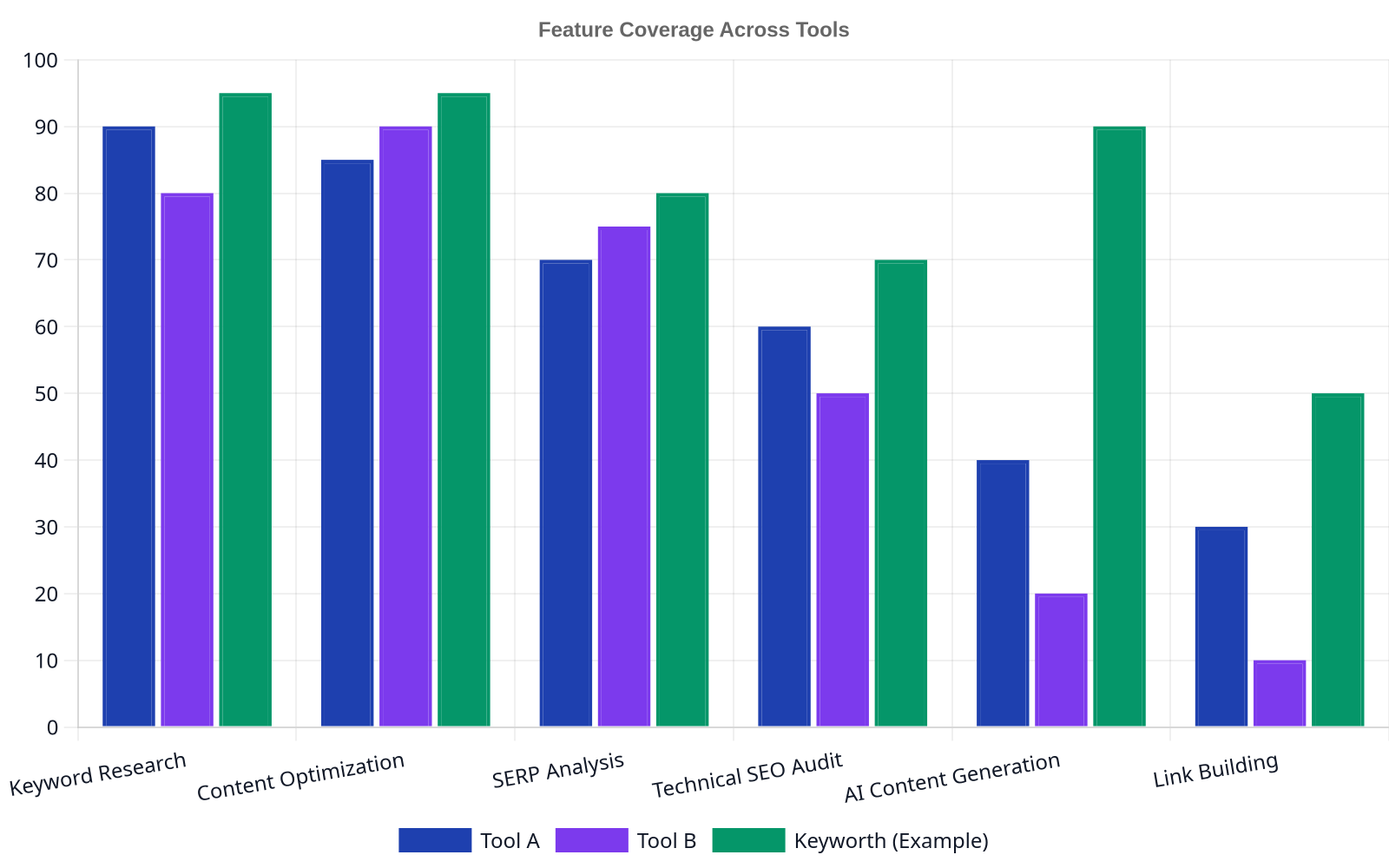
Choosing a tool means balancing your budget, team size, and primary use case. Are you a solo blogger, an agency, or an in-house team? Here’s how the top contenders stack up.
| Use Case | AIOSEO | Semrush | Clearscope | Rank Math |
|---|---|---|---|---|
| Best For | All-in-one WordPress SEO | Deep competitive analysis | Content brief generation | Feature-rich free alternative |
| Pricing | Starts at $49.60/year | Starts at $129.95/month | Starts at $199/month | Free core plugin; Pro at $59/year |
| Best Feature | TruSEO on-page analysis | Topic research & keyword gap | Term map & content grading | Advanced schema generator |
| Watch Out For | Can feel bloated with features | Steep learning curve; high cost | Lacks broader SEO toolset | “Content AI” credits are limited |
AIOSEO (All in One SEO)
AIOSEO is one of the original WordPress SEO plugins, and its modern iteration is a powerhouse. It aims to be the single dashboard for everything from technical checks to content optimization, right inside your WordPress admin.
Strengths
Its biggest advantage is integration. The TruSEO on-page analysis provides a checklist within the post editor, giving real-time feedback on focus keyphrase usage, title readability, internal links, and meta descriptions. This is invaluable for teams where writers are also responsible for basic optimization. The setup wizard is another strong point, correctly configuring sitewide defaults for title formats, knowledge graph information, and XML sitemaps without needing a developer.
For more advanced users, the schema generator is a standout, supporting 15+ schema types like FAQ, product, and recipe. This structured data helps Google understand your content contextually, which can lead to rich snippets in search results. A documented way to improve click-through rates.
Weaknesses
Because it does so much, the interface can feel crowded. A new user might be overwhelmed by the sheer number of menus and settings. While the core on-page analysis is excellent, its keyword research suggestions aren’t as robust as dedicated platforms like Semrush. It tells you how to optimize for a keyword you already have; it’s less effective at helping you find new ones.
Semrush
Semrush is less a single tool and more of a complete SEO and digital marketing toolkit. Its on-page features are just one part of a massive platform that includes competitor analysis, backlink tracking, and advertising research.
Strengths
Semrush shines before you write a single word. Its Topic Research tool can take a seed keyword and generate a mind map of related subtopics, common questions, and top-ranking headlines. This is how you build pillar pages and topic clusters that signal authority to Google. The SEO Content Template and SEO Writing Assistant are its direct on-page components. They analyze the top 10 results for your target keyword and generate a brief with recommendations for semantic keywords, word count, and readability.
Don’t confuse a high content score with a high-ranking article. A tool can tell you if you used the right terms, but it can’t tell you if you assembled them into a compelling argument that serves user intent. The score is the starting line, not the finish line.
Its greatest strength is competitive intelligence. You can see exactly which keywords a competitor ranks for and find “keyword gaps”terms they rank for that you don’t. This is a direct, data-driven path to creating content that steals their traffic. According to a G2 user, the ability to “see what keywords my competitors are ranking for and how difficult they are to rank for is priceless.”
Weaknesses
Complexity and cost are the two biggest hurdles. Semrush is a professional-grade suite, and its pricing reflects that, putting it out of reach for many small businesses and solopreneurs. The interface is packed with data, which can be difficult to navigate and interpret without some foundational SEO knowledge. It’s a tool for specialists, not casual users.
Clearscope
Unlike the all-in-one platforms, Clearscope does one thing and does it exceptionally well: content optimization. It uses natural language processing (NLP) to analyze top-ranking content and builds a “term map” of important entities and topics you need to cover.
Strengths
Clearscope’s reports are the gold standard for creating topically comprehensive content. It gives your writer a simple, graded interface showing which terms are missing and how important they are. It effectively turns SEO from a guessing game into a paint-by-numbers exercise for topical relevance. This focus makes it incredibly effective for refreshing old content that has decayed in the rankings or for creating new articles designed to outrank established competitors on depth alone.
Its focus is on quality over quantity. Instead of just a list of keywords, it provides a “Content Grade” based on term usage, which directly correlates with the comprehensiveness that Google’s systems are designed to reward. It’s not about stuffing keywords; it’s about covering a topic better than anyone else. This is the kind of work that automated platforms like ours focus on, using AI to ensure every article is topically complete.
Weaknesses
Clearscope is a premium, specialized tool with a premium price tag. Starting at $199/month for a single user seat and a limited number of reports, it’s a significant investment. Furthermore, it has no keyword research capabilities, no technical SEO audits, and no backlink analysis. It is purely a content editor. You must bring your own keyword research from another tool like Ahrefs or Semrush, making it an additive cost in your SEO tool stack.
Rank Math
Rank Math burst onto the scene as a fast and feature-rich alternative to Yoast and has quickly gained a loyal following. It offers a surprising number of features in its free version, making it a powerful choice for those on a tight budget.
Strengths
For a free tool, Rank Math’s feature set is remarkable. It includes a 40-point on-page analysis, an advanced schema generator (supporting more types out-of-the-box than most competitors), and even basic WooCommerce SEO. The user interface is clean and integrated directly into the WordPress block editor, making it feel more modern than some older plugins. Its modular design allows you to disable features you don’t need, which helps keep your site’s backend lean.
Perhaps its most-praised feature is the built-in redirection manager, something often sold as a separate premium plugin. If you change a URL, you can set up a 301 redirect right from the post editor, which is critical for preserving link equity and avoiding 404 errors. As one user on the WordPress plugin repository notes, “It combines the features of many different plugins in one.”
Weaknesses
While the core plugin is free, Rank Math pushes its “Content AI” feature, which operates on a credit system. These credits are used to generate AI-driven suggestions for keywords, questions, and links, and they get used up quickly. Many users find the credit system confusing and a bit of a bait-and-switch from the “free” offering. While the AI suggestions can be helpful, they aren’t as sophisticated as the analysis from a dedicated tool like Clearscope.

The Verdict: Which Tool Is Right for You?
Making a decision comes down to three factors: your workflow, your budget, and your primary goal. Don’t pay for an entire suite if you only need a content editor.
Choose AIOSEO if…
You work primarily within WordPress and want a single, integrated tool to handle both technical setup and on-page content checks. It’s perfect for small business owners, bloggers, and agencies managing multiple client sites who value convenience and a comprehensive feature set in one place.
Choose Semrush if…
Your strategy is driven by deep competitive and market analysis. You have the budget for a professional-grade toolkit and the expertise to interpret its vast datasets. It’s the best choice for in-house SEO teams, marketing agencies, and anyone for whom keyword research and competitor intelligence are the top priority.
Choose Clearscope if…
You are laser-focused on creating the most comprehensive, highest-quality content possible and have a separate workflow for keyword research. It’s the ideal tool for dedicated content teams and SEOs who need to win on content depth and are willing to pay for a best-in-class editor.
Choose Rank Math if…
You are starting out, on a tight budget, or need a powerful free tool for a new WordPress site. Its free version provides more than enough on-page guidance and technical features for most users, making it the undisputed value leader.
The best tool is the one you actually use. A complex, expensive platform that gathers digital dust is less valuable than a simple, free plugin that is part of your daily publishing process.
Ultimately, tools are just one piece of the puzzle. At Keyworth, we integrate these functions by automating the entire content lifecycle. We handle the keyword research, generate daily articles, and build the internal linking structure for you, creating a system that grows your organic traffic without the manual overhead. This is especially helpful for businesses like Wolverine Assemblies that need to focus on their core operations, not on managing a complex marketing stack.
FAQ
What is the difference between on-page and off-page SEO tools?
On-page SEO tools focus on elements within your own website. This includes content analysis (keyword usage, topical depth), technical elements (site speed, mobile-friendliness, schema), and site structure (internal linking). Off-page SEO tools, by contrast, focus on signals from outside your website, with the primary one being backlinks from other authoritative sites.
Are free on-page SEO tools good enough?
For many beginners and small websites, free tools like the core Rank Math plugin or Google Search Console are absolutely sufficient. They provide the essential feedback needed to optimize your pages. Paid tools become necessary when you need deeper competitive data (Semrush), advanced content intelligence (Clearscope), or workflow automation features for larger teams.
How do I measure the ROI of an on-page SEO tool?
Measure the impact on organic traffic and keyword rankings. Before using a tool, benchmark the current monthly organic traffic and rankings for a set of target pages. After implementing the tool’s suggestions for 2-3 months, measure the change. A positive ROI is evident if the increase in traffic (and associated leads or sales) exceeds the cost of the tool. Many platforms, like Google Analytics, can help you track these specific metrics.
Which tool is best for an e-commerce store?
For e-commerce, AIOSEO or Rank Math Pro are excellent choices because they have dedicated features for WooCommerce. This includes generating the correct product schema, optimizing category pages, and creating dynamic XML sitemaps for your product listings, which are critical for getting products to appear correctly in search results.
Can these tools write content for me?
Most of these tools do not write the content itself, but they guide you on how to write it. They provide templates, keyword suggestions, and quality scores. However, the industry is moving toward more integrated solutions. A platform like Keyworth is designed to automate the actual content creation process, using AI to generate SEO-optimized articles from scratch, bridging the gap between analysis and execution.
Leave a Reply