
Most digital agencies aren’t failing because their strategy is wrong; they’re leaking profitability through a thousand tiny SaaS subscriptions. The best affordable SaaS for digital agencies provides tools for core functions like project management, reporting, and client communication without the enterprise price tag. It prioritizes a clear ROI, seamless integration with other vital tools, and a pricing model that scales predictably as the agency grows. Forget bloated platforms with features you’ll never use. The goal is a lean, powerful, and cost-effective tech stack.
This list was compiled by analyzing over 50 SaaS tools popular with digital marketing agencies, ranking them based on a weighted score. The score considers three main factors: affordability for a typical 5-person agency (40% weighting), user review scores from G2 and Capterra published within the last 18 months (40% weighting), and the quality and breadth of their integration capabilities via public APIs or native connectors (20% weighting). Only tools with transparent, publicly available pricing were considered.
Understanding Agency SaaS Spending Habits
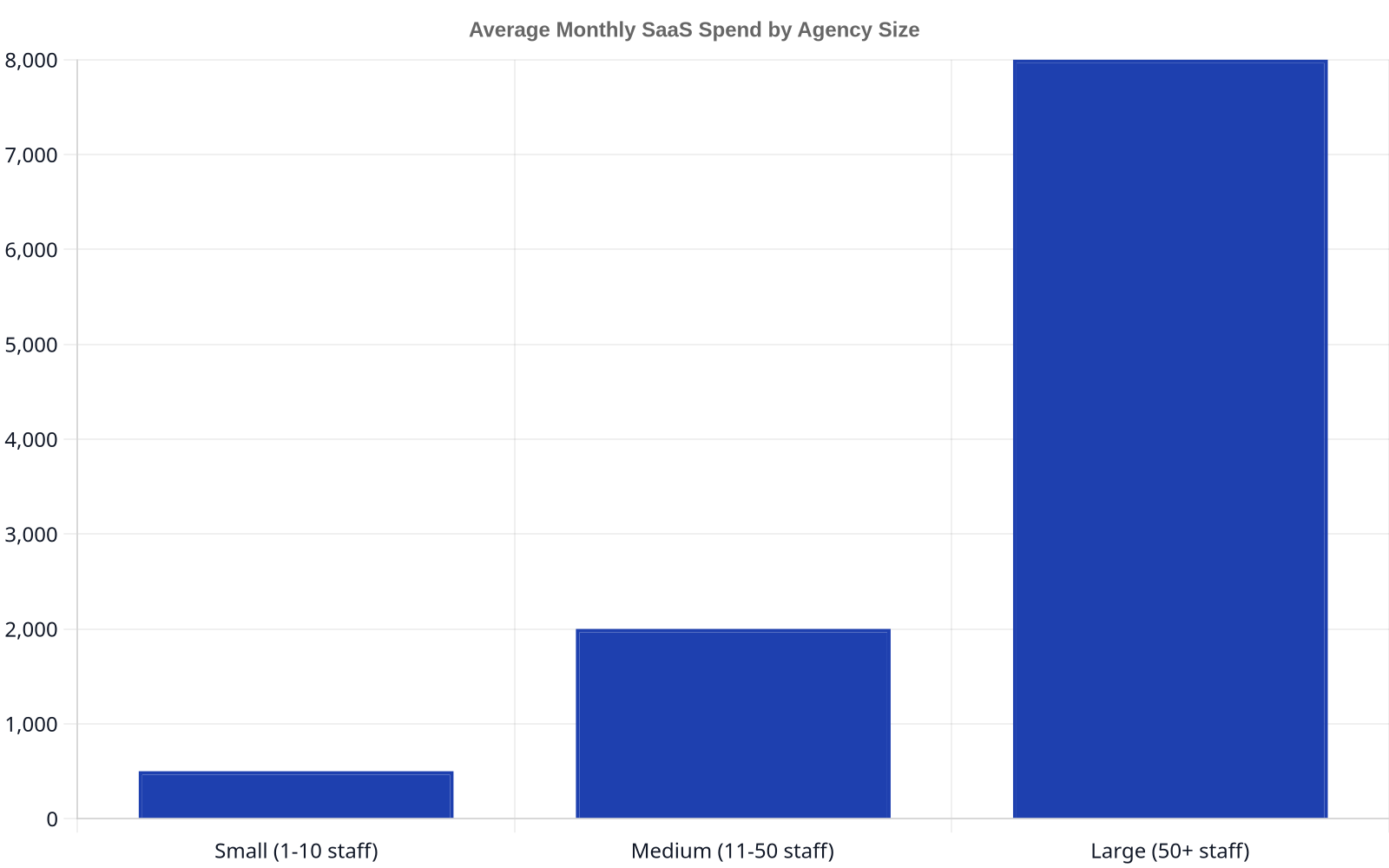
Before diving into specific tools, it’s critical to understand where the money goes. An agency’s SaaS stack is its assembly line. Inefficiency here doesn’t just add cost; it slows down client work and burns out your team. While our platform at Keyworth focuses on automating the heavy lifting of SEO content, from initial keyword research to publishing daily articles and building internal linking structures. We see firsthand how agencies wrestle with a patchwork of other tools. Many are paying for redundant features or using enterprise-grade software for startup-sized tasks.
The Cost of Inefficiency: Why Affordable SaaS Matters
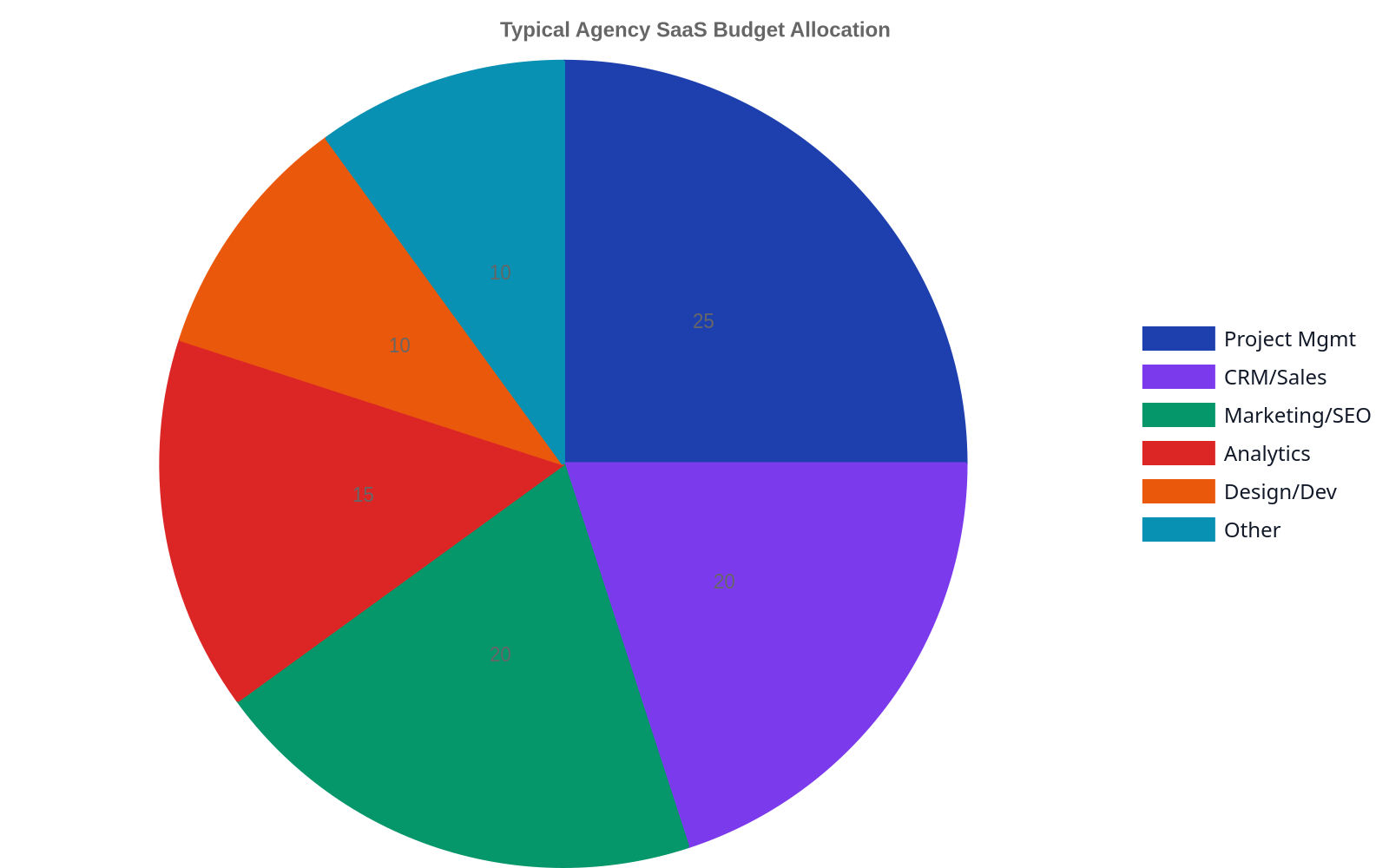
The pressure to deliver results for clients often pushes operational efficiency to the back burner. Agencies will onboard a new tool to solve an immediate problem without considering its place in the broader ecosystem. The result? A mess of overlapping subscriptions, data silos, and a monthly software bill that eats directly into profit margins. According to a 2024 report from Vertice, the average company wastes 21% of its SaaS spend on unused licenses and redundant tools. For a small agency, that can be the difference between reinvesting in growth and struggling to make payroll.
Key Features to Look For in Affordable SaaS
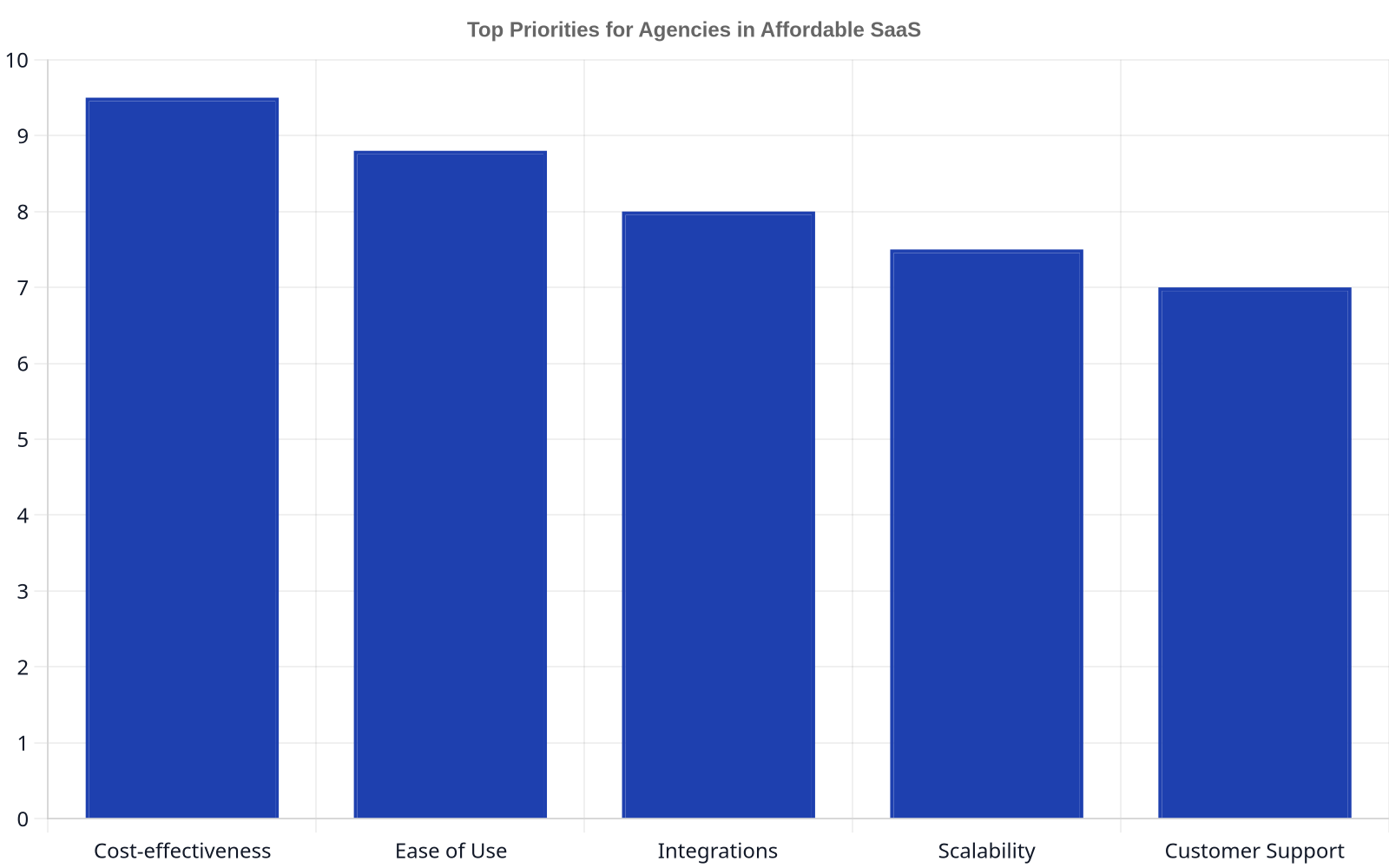
When evaluating affordable SaaS, look beyond the price. The cheapest option is rarely the best. Focus on tools that offer a free tier or a long trial period that is actually useful for testing on real client work. Prioritize solutions with usage-based pricing over rigid per-seat models, as agency teams often fluctuate. Finally, ensure the tool has a robust API or integrates with Zapier, as this provides a release valve for future-proofing your workflows. An open ecosystem is a hallmark of a tool built for modern agencies.
1. ClickUp: All-in-One Project Management
ClickUp has aggressively positioned itself as the “one app to replace them all,” and for many small to mid-sized agencies, it comes impressively close. It combines tasks, documents, chat, goals, and whiteboards into a single, customizable environment. For digital agencies juggling multiple clients, each with unique project boards, timelines, and communication needs, ClickUp’s hierarchical structure (Spaces > Folders > Lists > Tasks) is a godsend. You can create a dedicated Space for each client, ensuring total separation of assets and conversations.
Unlike more rigid tools like Asana or Monday.com at their lower tiers, ClickUp’s free and low-cost plans are remarkably generous with features. The ability to create custom fields, multiple task views (List, Board, Calendar, Gantt), and basic automations on the affordable tiers means you can build surprisingly sophisticated workflows without a hefty price tag. Its extensibility allows it to serve as the central nervous system for agency operations, tracking everything from content production pipelines to client onboarding checklists.
- Best for: Agencies that want a single source of truth for all client projects and internal tasks.
- Watch out for: The sheer number of features can be overwhelming for new users, leading to a steep initial learning curve. Proper setup and team training are essential.
- A Forrester analysis found that organizations using ClickUp saw a 377% return on investment over three years, with payback in under six months, driven by increased productivity and reduced tool sprawl.
2. Slack: Real-Time Client & Team Communication
Email is where client communication goes to die. Slack transformed internal team communication, but its real power for agencies is in creating shared channels with clients. This practice, when managed with clear guidelines, radically improves transparency and response times. Instead of waiting for a formal email response, a client can ask a quick question about a campaign report, and the right team member can answer it in minutes. This fosters a more collaborative, partnership-style relationship, which is a key differentiator.
For affordability, Slack’s free plan is often sufficient for small agencies to get started. It offers 90 days of message history, which is a limitation but forces disciplined archiving. The key is creating a dedicated channel for each client (e.g., #client-wolverine-assemblies) and inviting their primary points of contact as single-channel guests. This prevents clients from seeing your internal conversations while giving them a direct line to your team. Upgrading to a paid plan unlocks unlimited history and more integrations, but you can run a surprisingly large book of business on the free or low-cost tiers.
- Best for: Agencies prioritizing responsive client communication and building transparent, collaborative partnerships.
- Watch out for: Without strict channel discipline and “office hours” guidelines, Slack can create an expectation of 24/7 availability. It can become a major source of distraction if not managed.
- Which owns Slack, companies that use Slack Connect with partners see an 18% faster sales cycle and a 12% reduction in customer support cases.
3. Zoho Analytics: BI & Reporting Without the BI Price Tag
Every digital agency needs to prove its worth with data. This is where Zoho Analytics Shines. It’s a self-service business intelligence (BI) and analytics platform that offers powerful data blending and visualization capabilities at a fraction of the cost of tools like Tableau or Power BI.
An agency can connect directly to over 250 data sources, including Facebook Ads, Google Ads, LinkedIn, and various SQL databases. You can pull this data into a unified dashboard and build automated client reports that refresh on a schedule. Imagine sending every client a link to a live dashboard showing their core KPIs, updated daily, without a single team member having to manually update a spreadsheet. This level of professional reporting was once the exclusive domain of large, well-funded agencies. Zoho makes it accessible.
Don’t just show your clients a spreadsheet of numbers. Build them a live dashboard that tells a story. That’s how you move from being a vendor to an indispensable partner.
- Best for: Data-driven agencies that need to automate client reporting and blend data from multiple marketing platforms.
- Watch out for: While more user-friendly than enterprise BI tools, it still requires a data-literate user to get the most out of its advanced features like SQL queries and predictive analytics.
4. Keyworth: Automated SEO Content & Link Building
Content is the engine of any serious SEO strategy, but it’s also the most time-consuming and expensive part. For agencies, scaling content creation across multiple clients is a major operational bottleneck. Keyworth is designed to solve this exact problem. It’s an AI-powered platform that completely automates the SEO content lifecycle, from keyword research and article generation to on-page optimization, internal linking, and even securing backlinks.
Instead of hiring a stable of freelance writers or burning out your in-house team, an agency can use our platform to generate and publish dozens of SEO-optimized articles per month for each client. This drastically lowers the cost per article while ensuring consistent quality and adherence to SEO best practices. For agencies looking to add a profitable, scalable SEO service line or make their existing one vastly more efficient, automation isn’t just a nice-to-have; it’s a competitive necessity. This is how you deliver results for clients like Wolverine Assemblies without needing a massive team.
- Best for: Agencies that want to scale their SEO content services profitably and automate the most labor-intensive parts of digital marketing.
- Watch out for: While the platform handles the A-to-Z of content, a human strategist is still needed to guide the overall client strategy and interpret the results.
- We offer services to a wide range of clients, demonstrating the versatility of our platform in handling diverse content needs across various industries.
Comparison of Affordable SaaS for Agencies
| Tool | Primary Function | Starting Price (Monthly) | Key Benefit for Agencies |
|---|---|---|---|
| ClickUp | Project Management | Free Tier, then $7/user | Unifies tasks, docs, and goals in one customizable space. |
| Slack | Communication | Free Tier, then $7.25/user | Enables real-time, transparent client communication channels. |
| Zoho Analytics | BI & Reporting | $24/2 users | Automates data blending and creation of live client dashboards. |
| Keyworth | SEO Content Automation | Custom | Dramatically lowers the cost and effort of scaling content production. |
FAQ
What is the average SaaS spend for a digital agency?
This cost can escalate quickly as the agency adds clients and team members, making a focus on affordable and scalable solutions critical for maintaining profitability.
How can an agency reduce its current SaaS costs?
Start by conducting a full audit of all current subscriptions. Identify overlapping features (e.g., paying for two separate social media schedulers) and unused licenses. Report, this alone can cut 21% of your spend. Finally, consolidate tools where possible using an all-in-one platform like ClickUp to cover multiple functions.
Are free SaaS tools good enough to run an agency?
Yes, but with limitations. An agency can start with a combination of powerful free tools like Slack, the free tier of ClickUp, Google Looker Studio, and Google Analytics. However, you will eventually hit limitations on features, usage, or data history. Free tools are excellent for your first 1-3 clients but plan to invest in paid tiers of affordable SaaS as you scale to avoid operational bottlenecks.
What’s the difference between per-seat and usage-based pricing?
Per-seat pricing (or per-user pricing) charges you a fixed amount for every user you add to the platform, regardless of how much they use it. This is common for tools like Slack or Microsoft 365. Usage-based pricing charges you based on consumption, such as the number of reports you run, API calls you make, or contacts in your database. For agencies with fluctuating team sizes or project needs, usage-based pricing can be far more cost-effective.
How do I choose a SaaS tool that will scale with my agency?
Look for three things: a tiered pricing structure, a public API, and strong integration partners. Tiered pricing allows you to start cheap and add features as your needs become more complex. A public API (Application Programming Interface) ensures you can build custom connections to other tools in the future. Strong integrations with platforms like Zapier or Make mean the tool already plays well with the broader SaaS ecosystem, protecting you from getting locked into a closed system.
Leave a Reply